Authentication
The OPC Router offers two authentication methods for Microsoft SQL Server: SQL Server authentication and Windows authentication. Both methods support access to the same database but differ in terms of administration, security model, and operating environment.
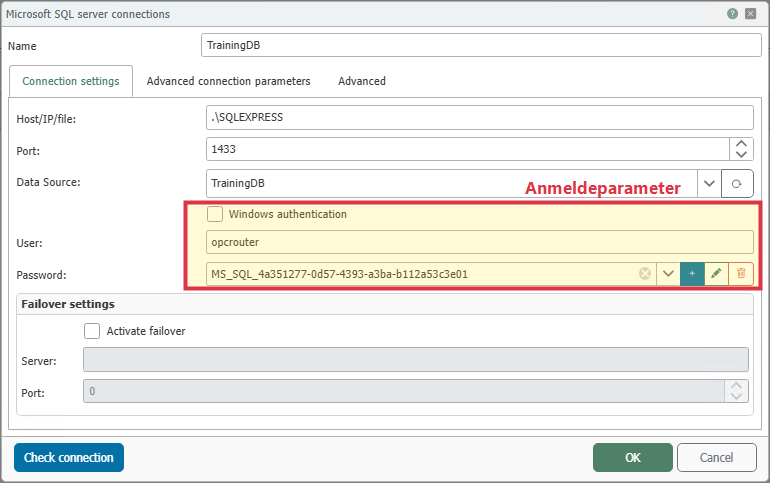
SQL Server Authentication
SQL Server authentication is an alternative authentication mode used when Windows authentication is unavailable or undesirable. With this method, you authenticate using an SQL Server login and password. The account used must have the permissions required for the desired actions in Microsoft SQL Server.
From a security perspective, SQL Server authentication is particularly useful when a Windows account cannot be used, such as in non-Windows-based environments or when database access is strictly separated. However, it requires proper management of usernames and passwords, regular password changes, and secure storage of login credentials.
Windows Authentication
With Windows authentication, identity is verified via the Windows user account. A separate SQL Server account is then not required. This authentication method is only suitable for Windows systems and is not supported under Docker or Linux.
From a security perspective, Windows authentication offers advantages in typical Windows or domain environments because password policies, account locks, and user management can be centrally controlled via Windows or Active Directory. Additionally, permissions can be specifically assigned to the OPC Router service user without having to maintain separate SQL logins.
Comparison of Authentication Methods and Best Practices
For production Windows environments, Windows authentication is generally the best practice. It reduces administrative overhead, avoids the need for additional SQL credentials, and integrates better with existing security policies. Whenever possible, use a dedicated service account with the minimum necessary privileges at the database and system levels.
SQL Server authentication is best practice if the OPC Router is not running on Windows, if there is no trust relationship with the Windows environment, or if the organization intentionally uses separate SQL accesses. In this case as well, you should use a separate account for the OPC Router and strictly limit permissions to the database actions that are actually required.
Since OPC Router version 5.0, the service user of the OPC Router runtime service has been used for Windows authentication. This account must have the necessary permissions for authentication and database access.
Notes on configuring Windows user accounts for the OPC Router.
Required Roles and Permissions for Database Transfer Objects
The following overview shows which database roles and permissions are required for the individual transfer objects and their options in Microsoft SQL Server.
| Action in Transfer Object | Description | Roles | Permissions |
|---|---|---|---|
| Update | - | db_datawriter | UPDATE |
| Select | without modifying records | db_datareader | SELECT |
| Select | with the option “Mark records after transfer” | db_datareader, db_datawriter | SELECT, UPDATE |
| Select | with the option “Delete records after successful transfer” | db_datareader, db_datawriter | SELECT, DELETE |
| Stored Procedures | - | Role or user with EXECUTE permission | EXECUTE |
| Delete | - | db_datawriter | DELETE |
| Insert | - | db_datawriter | INSERT |
These rights apply in addition to the requirements of the selected authentication method. Therefore, it is not only decisive how the OPC Router logs in, but also which actions the account used is actually permitted to perform in the database.