SAP IDoc Status Transfer Object
You can use the SAP IDoc Status Transfer Object to query the processing status of an IDoc in the SAP® system. Based on the IDoc number, the transfer object returns the current status and associated message texts. For example, after sending an IDoc, you can use this to check whether it was successfully processed in the SAP® system.
Dialog Overview
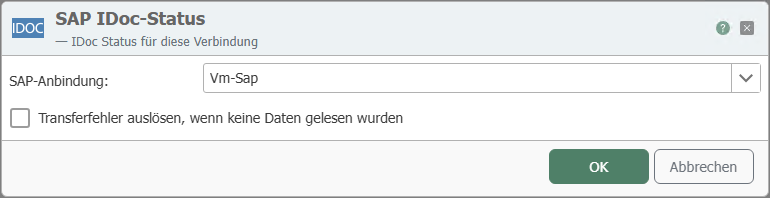
In the dialog, select the SAP® connection through which the IDoc status will be queried.
Settings
| Property | Description |
|---|---|
| SAP Connection | All SAP® connections created in the Plug-ins section are available for selection here. If the desired connection does not yet exist, you can make it available in the Plug-ins section as an SAP® connection. |
| Trigger transfer error if no data was read | If enabled, the transfer object triggers a transfer error if no status could be read for the specified IDoc number. |
Inputs and Outputs
After selecting the SAP® connection, the transfer object provides the following inputs and outputs:
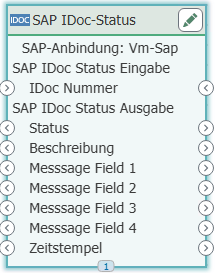
Input
| Input | Description |
|---|---|
| IDoc Number | Number of the IDoc whose status is to be queried. |
Outgoing
| Outgoing | Description |
|---|---|
| Status | Status code of the IDoc in the SAP® system. |
| Description | Plain-text description of the status. |
| Message Fields 1–4 | Additional message fields containing detailed information about the status. |
| Timestamp | Time at which the status was set in the SAP® system. |