Importing XML data
XML documents as a source
As a transfer source, the XML object extracts content from XML code using the configured XPath queries.
- The XML code is either defined statically at design time or passed to the "XML" element at runtime.
- The results are read from the XPath query elements
For example, the following code is delivered from a file:
<?xml version="1.0"?>

<catalog>
   <book id="bk101">
      <author>Heinrich Mann</author>
      <title>The Subject</title>

   </book>
   <book id="bk102">
      <author>Thomas Mann</author>
      <title>Buddenbrooks: Decline of a Family</title>
   </book>
 </catalog>
Then two X-Path expressions would deliver the author and title of the books:
- Name: "Author," X-Path expression "/catalog/book/author"
- Name: "Title," X-Path expression "/catalog/book/title"
You can find extensive documentation on the Internet about the possibilities of X-Path; these are only the simplest examples (e.g., at http://www.w3schools.com/xml/xpath_syntax.asp; Restriction: Any nodes must be preceded by "//".
For this example, the project planning looks as follows:
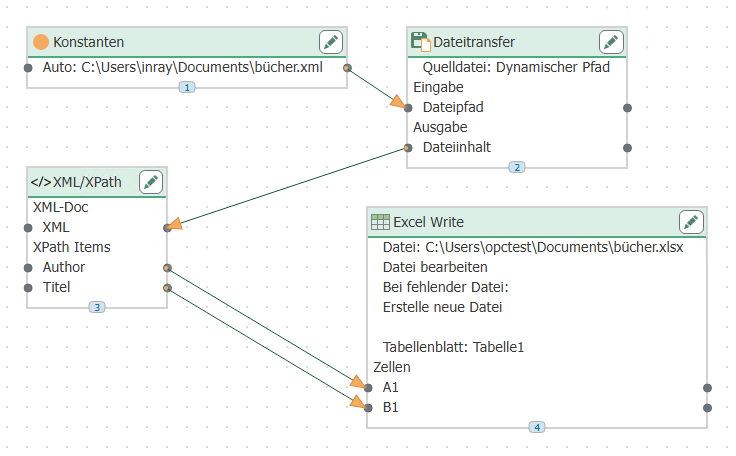
- The path and name of the file are transferred from a constant object to the file transfer object. The name could also be determined dynamically from a database.
- The file transfer object transfers the content of the XML file to the XML element in the XML object. At design time, no code was stored here, only the two X-Path expressions described.
- The query results are written to an Excel file. Any other destination (e.g., database INSERTS) is also possible. Since multiple lines are expected, the write mode in the Excel object is set to "Append lines."