Variable transfer object
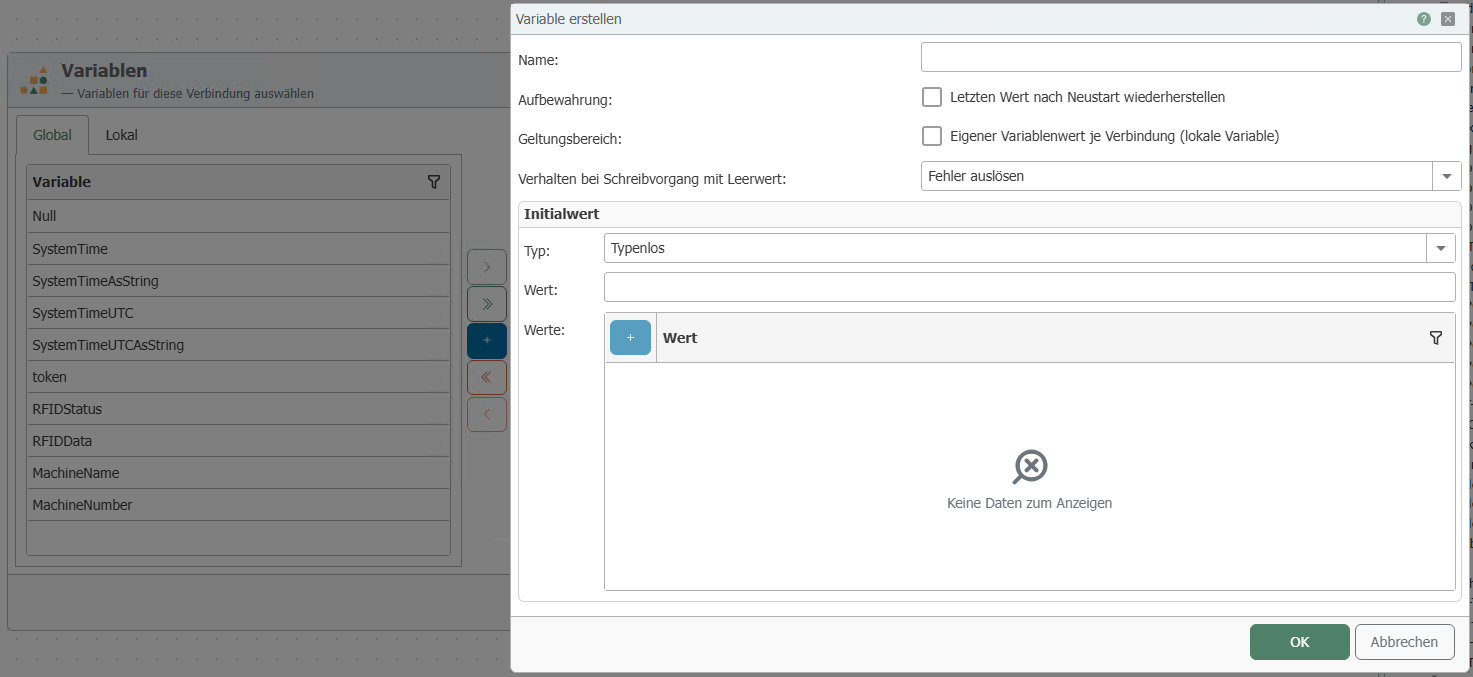
Self-defined variables are available as both sources and targets, while system variables are available as sources. The required variables must be configured as plug-in instances. You can create new variables directly in the transfer object. To do this, click on the "plus" icon. A new window will open, as shown in the screenshot. The variable can either be untyped, or you can assign a fixed data type. All common data types, including arrays, can be selected. The newly created variables are then immediately moved to the "Used variables" area. The variable can be moved by double-clicking on it or using the < and > buttons. To do this, the respective variable must be selected. << and >> move all variables.
Create a variable transfer object within the connection as described.
After double-clicking on the transfer object, set the following properties:
| Property | Description |
|---|---|
| Available variables | Existing variables that have not yet been used. Global variables: The value of the variable is available in every connection. Local variables: The value of the variable is only available in the respective connection. |
| Used variables | Variables that are displayed as elements (items) of the transfer object and are therefore available for transfers. |
Create variable:
| Property | Description |
|---|---|
| Name | Name of the variable |
| Type | Selection of the data type or type-less |
| Value | Value of the variable |