REST Server
The REST Server plug-in can be used to provide APIs that are accessible from outside the OPC Router.
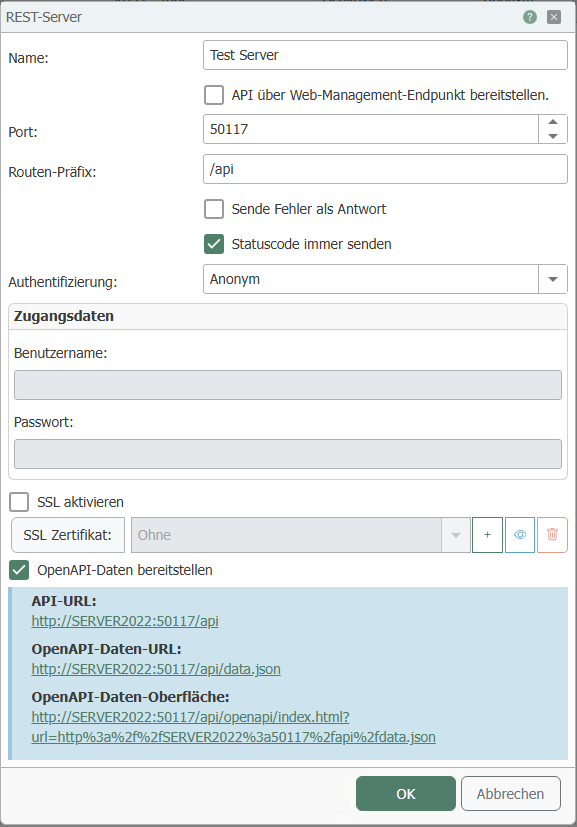
The following properties can be configured for the REST server:
| Name | Any name under which the REST server appears in the connection project. Choose a name that is unique for you during connection project planning. |
|---|---|
| Provide API via web management endpoint | If this option is active, the port of the OPC Router Web Management is used to provide the API in addition to the selected port. |
| Port | The port on which the API should be accessible. Note:
|
| Route prefix | The prefix that must be specified after the IP address and port to reach the API. |
| Send errors as a response | If this option is enabled, the status code is sent as a response when an error occurs. |
| Always send status code | The status code is always sent, e.g., in the case of a successful transfer. |
| Authentication | Specify how to authenticate externally:
|
| Username (available with Basic authentication method) | Username for login. |
| Password (available with Basic authentication method) | Password for login. |
| SSL | If this option is active, SSL is used for the connection. |
| SSL certificate (available when SSL is activated) | Certificate to be used for connections. The plus sign is used to add a certificate, the trash can to remove a certificate. The eye icon can be used to view the properties of the selected certificate. |
| Provide OpenAPI data | Enable this option if the OpenAPI data is to be provided. This is done in the form of a JSON file. |