File Trigger
The File Trigger initiates a transfer as soon as a file is added to a directory.
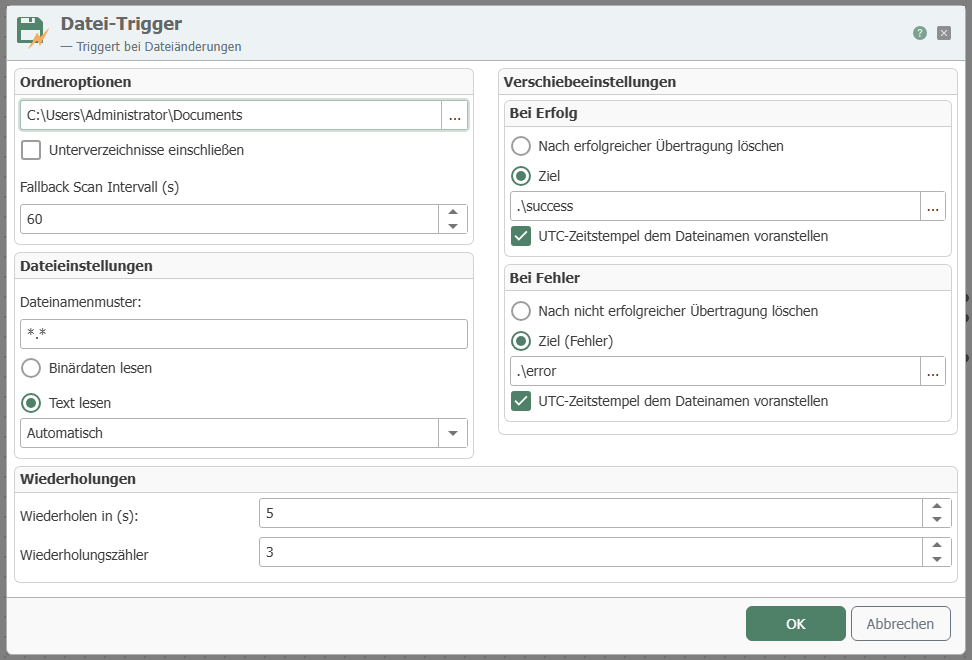 The individual properties are:
| Property | Description | | :---------------------- | :-------------------------------------------------------------------------------------------------------------------------------------------------------------------------------------------------------------------------------------------------------------------| Path | Specify a directory to be monitored. If you check the Include subdirectories box, all directories below the root directory will also be monitored. | | Fallback Scan Interval | The OPC router subscribes to file system events (file modification and creation). A transfer is performed for each file that triggers such an event. If an event is not reported, the folder is additionally checked for changes at the interval set here. | | File name pattern | Specify how a file name must be structured in order for the trigger to be activated. | | Read binary data | Select this option if you want to read a binary file. (E.g. *.doc, *.jpg, * .xlsx). | | Read text | Read simple text file. |
Target options
| Property | Description |
|---|---|
| Delete after successful transfer | Deletes the source file after a transfer has been successfully completed. |
| Destination path | Moves the source file to any directory after a transfer has been successfully completed. |
| Prefix UTC timestamp to file name | If the source file is to be moved, this option can be used to add the current timestamp (UTC) to the source name. For example, the file "test.txt" becomes "20191204_095646_test.txt". |
| Delete after failed transfer | Deletes the source file after a transfer has not been completed successfully. |
| Target path (error) | Moves the source file to any directory after a transfer has not been completed successfully. |
| Prefix UTC timestamp to file name | If the source file is to be moved, this option can be used to add the current timestamp (UTC) to the source name. For example, the file test.txt becomes 20191204_095646_test.txt. |
| Number of retries | If a file cannot be accessed, the transfer can be retried. |
| Time between retries | Time waited between retries in seconds. |