MQTT Transfer Object
The MQTT Transfer Object allows you to publish messages to an MQTT topic. This requires that the desired broker connection has already been configured in the MQTT Plug-in.
The following figure shows the General tab of the MQTT transfer object.
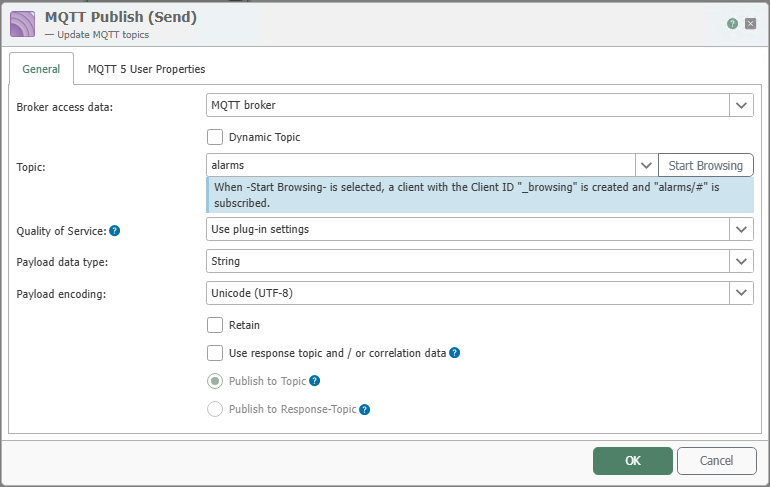
After double-clicking the transfer object, configure the following properties:
| Property | Description |
|---|---|
| Broker Connection | Select the configured MQTT broker connection through which the message is to be published. |
| Dynamic Topic | Enable this option if the destination topic is not predefined but is to be set at runtime via an input value. |
| Topic | Name of the destination topic on which the message will be published. Clicking Start Browsing allows you to initiate a topic selection based on the current broker connection. |
| Quality of Service | Sets the Quality of Service value for publication. 0 sends without acknowledgment, 1 with simple acknowledgment, and 2 with full delivery assurance. Clicking Apply Plug-in Setting uses the default value stored in the MQTT plug-in. |
| Payload Data Type | Specifies whether the message content is sent to the broker as a byte array or as a string. |
| Payload Encoding | Specifies the character encoding for string payloads. This setting is relevant when the payload data type String is used. |
| Retain | Causes the broker to store the published message as the last known message for this topic. New subscribers receive this retained message immediately after subscribing. |
Not all properties are always available in the General tab. Which additional options are displayed depends on the selected MQTT profile for the chosen broker connection.
| Use response topic and/or correlation data | Enables additional MQTT-5 settings for the response topic and correlation data. These options are relevant when messages are to be processed according to the request-response pattern. | | Publish to topic | Publishes the message to the destination topic specified under Topic. | | Send to response topic | Instead, publishes the message to a defined response topic. This option is intended for response messages in MQTT 5 scenarios. |
Confirm your entries by clicking “OK”.
MQTT 5 User Properties
The MQTT 5 User Properties tab is used to transmit additional metadata with the published message.
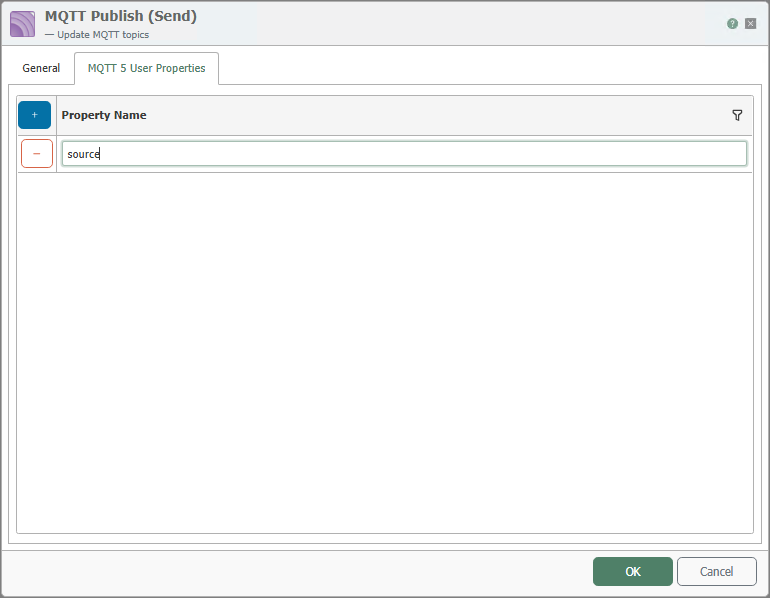
MQTT 5 user properties are freely definable pieces of information that are sent with a message as additional key-value pairs. They are not part of the actual payload but supplement it with descriptive metadata.
Typical use cases include:
- Identifying the origin of a message, for example
Source=OPC Router - Adding technical metadata, for example
Plant=Line 3orMessageType=Alarm - Providing version or format information, for example
SchemaVersion=1.0 - Additional evaluations in receiving applications, bridges, or integration services
Use the Plus button to add new user properties. Use this feature only if the receiving system actually evaluates MQTT-5 user properties. If the recipient does not require this metadata, you can leave the tab blank.
MQTT-5 user properties are not intended to replace the actual message content. Business data that must always be processed still belongs in the payload or in a clear topic structure.