OPC Data Transfer via Multi-Data-Change Trigger
In our performance benchmark, we were able to simultaneously transfer approximately 28,500 OPC data points per second to MQTT and InfluxDB. The transfer rate was limited by the processing capacity of the OPC server, which became the limiting factor under higher load.
Systems
OS: Windows Server 2019 Standard 1809
RAM: 16 GB
Processor: 64-bit 2.6 GHz (4 cores)
OPC Router: 5.3.5008.157
OS: Windows Server 2019 Standard 1809
RAM: 12GB
Processor: 64-bit 2.6GHz (4 cores)
KEPServer: V6.16.203.0
OS: Windows 10 Pro N 22H2
RAM: 12GB
Processor: 64-bit 2.6 GHz (4 cores)
KEPServer: V6.16.203.0
Projects
2 KEPServerEx projects
- each with one channel (simulator)
- each with one device (16-bit device)
- each with two tag groups
- each with 40 sub-tag groups
- each with 200 tags (Random 1000)
Total: 32,000 tags
OPC Router Project
- Four OPC UA client connections (2 plug-ins per KEPServerEx)
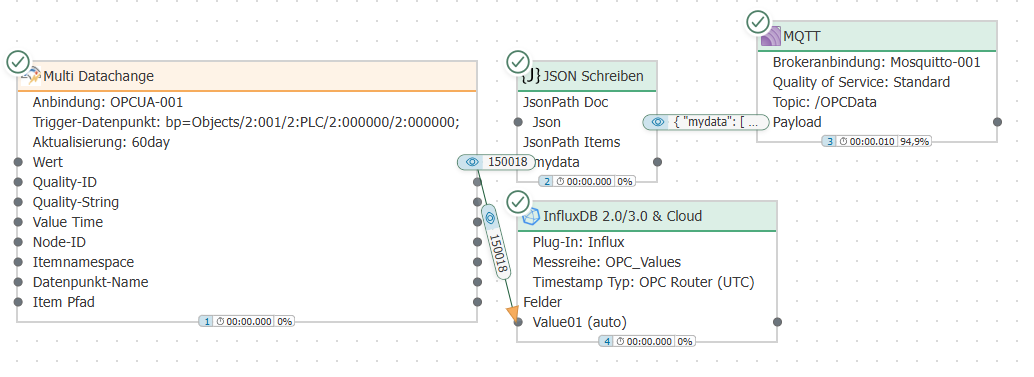
- Each plug-in is used in 40 template instances in the Multi-Datachange trigger
- Each Multi-Datachange trigger monitors one tag group (each with 200 tags)
- The values read when the triggers are fired are written to Influx and via MQTT
In summary: Monitoring and reading of 32,000 tags
OPC UA Client Connection
Deviations from the default:
- Subscription – Register OPC tags on startup: true
- Advanced – Sample Rate (ms): 1000
Multi-Data-Change Trigger
Deviations from the default:
- Update items: false
Evaluation
The average time interval between executions of the respective Multi-Data-Change triggers was examined.
The columns Flows, data points, Plug-ins, and OPC Server describe the overall structure and are therefore identical in all four rows: 4 connections, each with 40 template instances, result in 160 flows; with 200 tags each, this amounts to 32,000 data points. Only the trigger interval is measured for each connection.
| Flows | Data Points | Plug-ins | OPC Server | Average Trigger Interval | Plug-in |
|---|---|---|---|---|---|
| 160 | 32000 | 4 | 2 | 1100 ms | KEPServerEx 1 Connection #1 |
| 160 | 32,000 | 4 | 2 | 1,027 ms | KEPServerEx 1 Connection #2 |
| 160 | 32,000 | 4 | 2 | 1,204 ms | KEPServerEx 2 Connection #1 |
| 160 | 32000 | 4 | 2 | 1101 ms | KEPServerEx 2 Connection #2 |
Conclusion
All four connections delivered their values at the same rate: The average trigger interval ranged from 1027 ms to 1204 ms, which is approximately one second—the sample interval set in the OPC UA client connection. The system thus handled the load evenly; none of the four connections fell behind.
The interval is the key metric that allows the setup to be transferred to a specific project: If it rises significantly above the set sample interval, the chain consisting of the OPC server, the connection, and the target system can no longer keep up.
As the number of data points to be transferred continued to increase, the OPC server emerged as the limiting factor. The performance analysis revealed that the server’s processing capacity was insufficient to efficiently handle higher loads, thereby limiting the overall transfer rate.
Project Files
Download Benchmark_Multidatachange.rpe
:::note[[ [Extract before importing]]
The KEPServer project files are provided as a ZIP archive. Extract the archive before importing the included .opf file into KEPServer Ex.
:::