OPC Batch Read
OPC Batch Read is only available for OPC UA connections.
The OPC Batch Read transfer object makes it easy to read many OPC values that have a uniform structure without having to specify each value individually. Variables are used to specify which values are to be read. The use of this transfer object is explained in detail below.
Configuration
The following properties can be configured in the OPC Batch Read transfer object:
| Property | Description |
|---|---|
| OPC connection | OPC connection used to access the OPC data point group. |
Variables
The following properties can be defined for variables:
| Property | Description |
|---|---|
| Name | Name of the variable. A unique name should be used here that clearly describes the purpose of the variable. |
| Type | Array: |
| Value | If the type String is selected, the value is transferred as entered. |
When specifying a range of numbers, the smaller number must always be on the left side.
Templates
Templates offer an easy way to configure the reading of many values.
The  button can be used to open the tag browser to select a path. This function is used to insert a path into the template. This means that the path into which the variables are to be inserted does not have to be typed in manually.
At runtime and during the data point preview, the variables in the template are replaced with the values of the variables. Paths are created with all possible combinations of values from the variables.
The following properties can be defined for templates:
| Property | Description |
|---|---|
| Item name | The name under which all values are output at runtime |
| Item template binding | Here you can select whether the items should be read via browse path or NodeId. |
| Item template name | The path in which the items to be read can be configured using variables. |
| Export metadata | If this option is active, metadata is output in addition to the value. E.g., the Quality ID. |
Example
A company has two halls, each of which operates three machines. The values "speed" and "temperature" are to be read from each of these machines.
The path for reading each of these values would be structured according to the following pattern:
As a browse path: bp=Objects/2:Hall{Hall number}/2:Machine{machine number}/2:{value name};
With NodeId: ns=2;s=Hall{hall number}.Machine{machine number}.{value name}
The path is static except for three variable values. Variables can be created for these variable values.
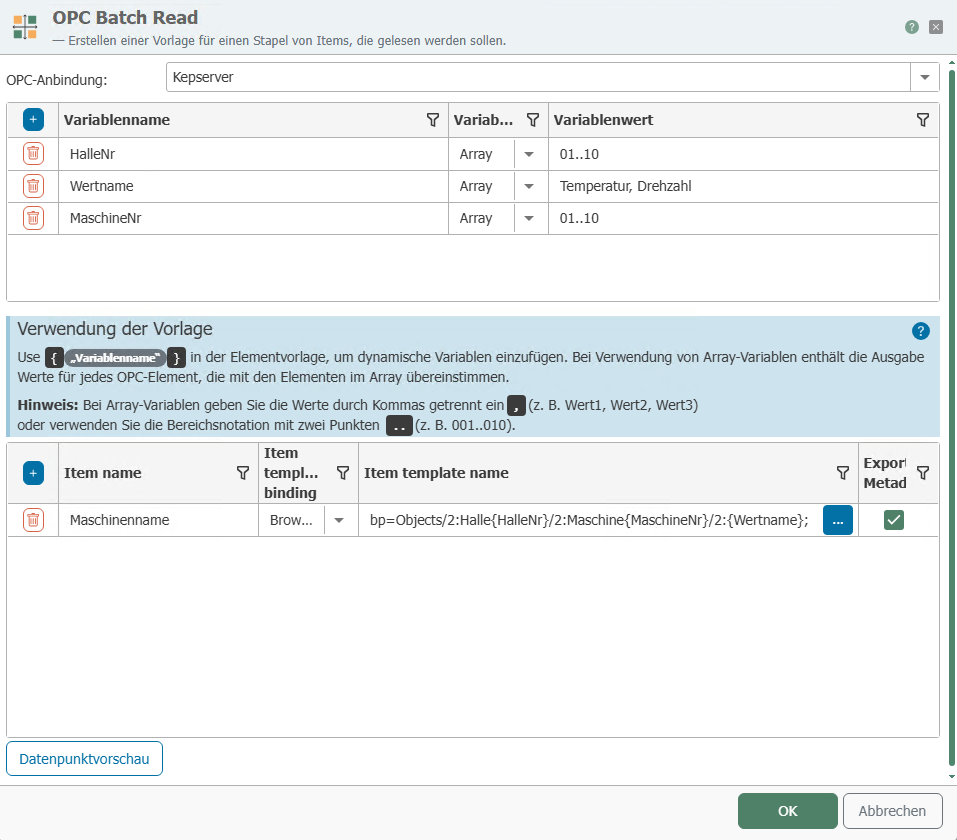
For the example, this could look like this:

Using the tag browser, you can select a path that matches the pattern to which variables are to be assigned.
For the example, this path would be suitable:

To avoid having to add each hall and each machine individually, the variables just created can be used here.
The finished path with variables could then look like this:

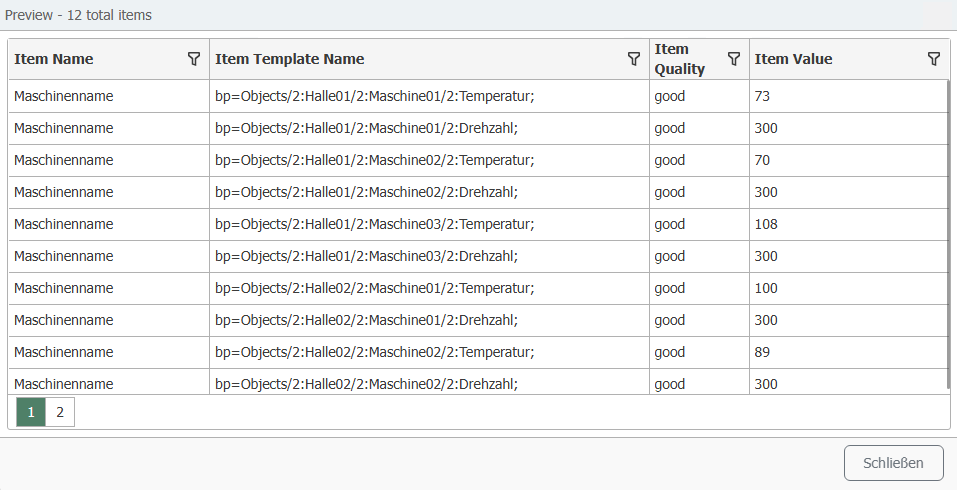
By using variables, it was possible to configure the reading of 12 data points with a template without having to configure each individual path.
It is possible to map many more data points using a template. The example has been deliberately kept small for illustrative purposes.
The "Data Point Preview" button can be used to display a preview of the values that would be read out with the current configuration.