FTP plug-in
You can set the following properties in the FTP plug-in configuration:
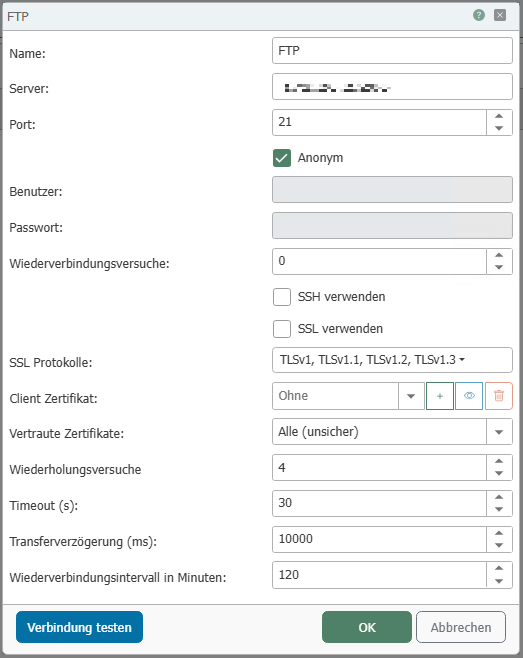
| Property | Description |
|---|---|
| Name | Any name under which this FTP file server appears in the connection project. Choose a name that is unique to you during connection projecting. |
| Server | Host name or IP address of the server |
| Port | Ports under which the server's FTP service can be accessed |
| Anonymous | This option can be used if no authentication is required |
| User | The user name for the FTP server |
| Password | Password for the FTP server. |
| Reconnection attempts | Number of reconnection attempts before an error is returned. |
| Use SSH | If this option is enabled, SSH is used. |
| Use SSL | If this option is enabled, SSL is used. |
| SSL protocols | SSL protocols that may be used for a connection. (Some servers refuse the connection if weak algorithms are selected). |
| Client Certificate | Certificate used by the OPC Router to log in to the FTP server. |
| Trusted Certificates |
|
| Retry attempts | If connection problems occur, the transfer is repeated the specified number of times before an error is returned. |
| Timeout | Connection timeout for the FTP server |
| Transfer delay | Delay between finding the file and starting the download. |
| Reconnection interval | Time in minutes that a connection remains active before it is reestablished. |
You can use the "Check connection" button to check whether a connection can be successfully established with the current configuration.