Filters and Filter Groups
Several Snowflake objects use the same Filter tab to specify which records are processed. It has the same structure everywhere and is used by the following objects:
- Snowflake Select Transfer Object
- Snowflake Update Transfer Object
- Snowflake Delete Transfer Object
- Snowflake Transfer Status Trigger
- Snowflake Data Change Trigger
Dialog Overview
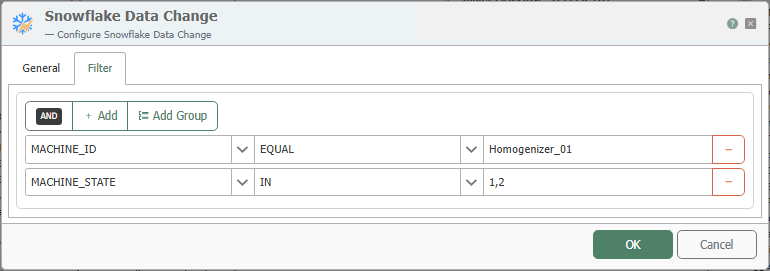
Filters and filter groups are created graphically. At runtime, the OPC Router generates the appropriate filter condition from the tree. Use the Add button to add a single filter criterion and Add Group to add a filter group. The button with the minus sign deletes the respective criterion or group.
Structure of a Filter
A filter consists of three elements:
- Column: The column to which the filter applies.
- Filter operator: Determines how the filter value is used to filter the records.
- Filter value: The value used for filtering.
An explanation of the various filter operators can be found under Database Filter Operators.
Combining with AND and OR
Clicking on the text AND or OR switches the group type to the other.
AND: All conditions in the group must be met for the group as a whole to be true.OR: At least one condition in the group must be met for the group as a whole to be true.
Fixed and Dynamic Filter Values
- In transfer objects (Select, Update, Delete), filter values can be filled dynamically at runtime via connection arrows or specified at design time.
- In triggers, filter values are entered statically.