Snowflake Select
The Snowflake Select transfer object retrieves one or more records from a table or database view in the Snowflake AI Data Cloud. The transfer object thus serves as a data source.
Dialog Overview
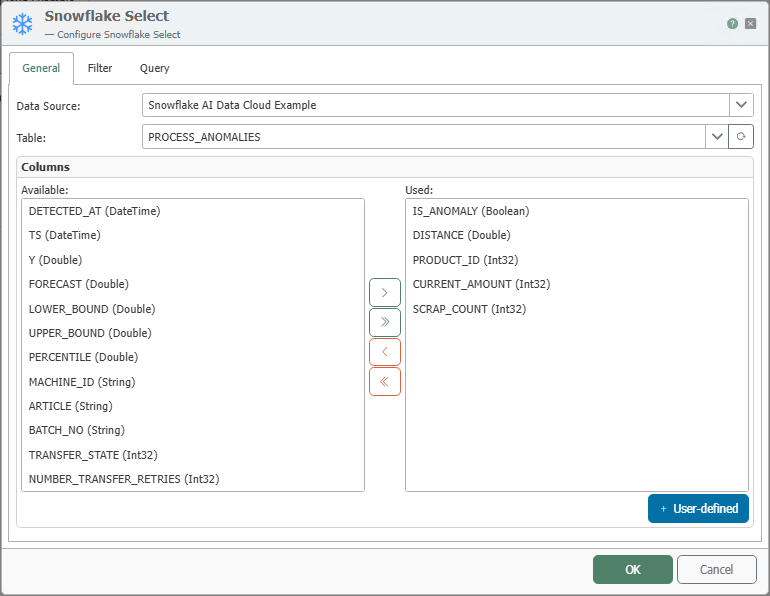
General Properties
| Property | Description |
|---|---|
| Data Source | All Snowflake connections created in the Plug-ins section are available for selection here. If the desired connection does not yet exist, you can make it available in the Plug-ins section as the “Snowflake AI Data Cloud” plug-in. |
| Table | Table or database view from which data is read. |
| Available Columns | Columns in the table that have not yet been used. |
| Used Columns | Columns that are displayed as elements of the transfer object and are therefore available for the query. |
Move columns by double-clicking the column name or using the <, >, <<, and >> buttons. Use the Up and Down buttons to sort the used columns.
Filter
The filter restricts which data records are read. The structure and operation of the Filter tab are described in detail under Filters and Filter Groups.
Query
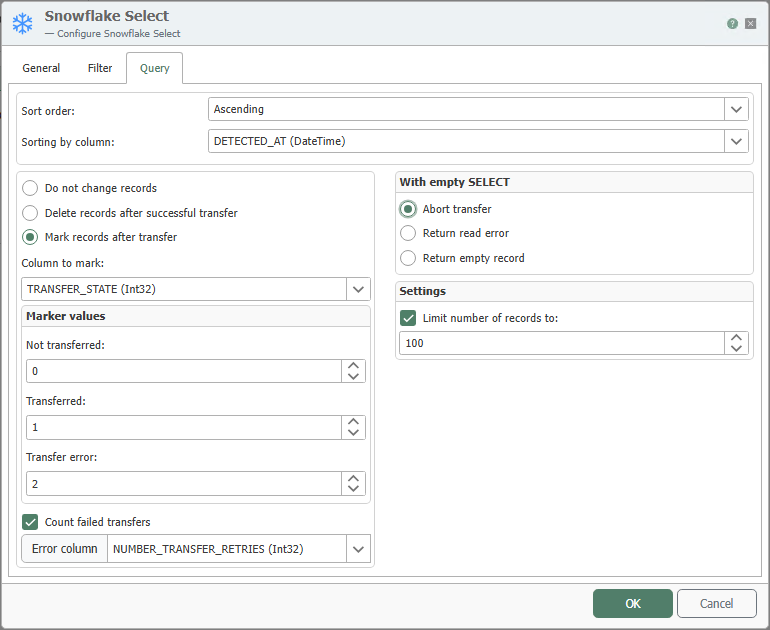
| Property | Description |
|---|---|
| Sort Order | Ascending or descending. |
| Sort by Column | Column by which the query result is sorted. |
| Do Not Modify Records | Only available for queries from tables. The transferred records are not modified. |
| Mark Records After Transfer | Available only for queries from tables. In a corresponding column of the source table, 1 is entered for each successfully transferred record and 2 for a failed transfer. |
| Column for Marking | Only available for queries from tables. Column in which the marker for a successful or failed data transfer is entered. |
| Marking Values | Values entered into the marking column. The marking values must be unique. |
| Count Failed Transfers | Counts the number of failed transfers. |
| Delete Records After Successful Transfer | Available only for queries from tables. Transferred records can also be deleted from the table. |
| Abort transfer (if query result is empty) | Aborts the data transfer if the query result is empty. |
| Trigger read error (if query result is empty) | Aborts the data transfer if the query result is empty and triggers an error log entry (in the router status and in the log file). |
| Return an empty record | Returns an empty record if the query result is empty. |
| Limit number of records to | Transfers only the number of records specified here. Sorting must be configured accordingly. |
For Mark records after transfer, a simple primary key on the numeric ID column is required in the relevant table.
If you use Count Failed Transfers, select the column in Error Column where the number of failed transfers should be incremented.
If you enable Delete records after a successful transfer, the records in the source table will be permanently deleted.
Notes
Whenever possible, use Snowflake Select with filters so that the entire table is not loaded. For example, when using transfer flags, filter by Transfer Flag <> 1.
To mark transferred records, provide a separate “Transfer Flag” column (not transferred, transferred, transfer error). The column should have a default value of 0 and must not allow NULL values. Sort the results in ascending order by the transfer flag so that records that have not yet been transferred are processed first.
Example
The OPC Router reads the anomalies detected by the Snowflake AI Data Cloud from PROCESS_ANOMALIES in order to respond to them at the machine. The filter restricts the query to records identified as anomalies; the “Query” tab marks the read records so that each is processed only once. The transfer object shown above is configured for this example.
| Setting | Value |
|---|---|
| Table | PROCESS_ANOMALIES |
| Columns Used | IS_ANOMALY, DISTANCE, PRODUCT_ID, CURRENT_AMOUNT, SCRAP_COUNT |
| Filter | IS_ANOMALY = TRUE |
| Query | “Mark records after transfer” using the TRANSFER_STATE column |
The OPC Router generates the following query based on this:
SELECT IS_ANOMALY, DISTANCE, PRODUCT_ID, CURRENT_AMOUNT, SCRAP_COUNT FROM PROCESS_ANOMALIES WHERE IS_ANOMALY = TRUE