Email Plug-in
In the plug-in configuration, you set up the mail server for outgoing emails. Incoming emails are not processed here, but via the Email Trigger.
The configuration is organized into tabs. The available tabs depend on the selected provider template.
"General" Tab
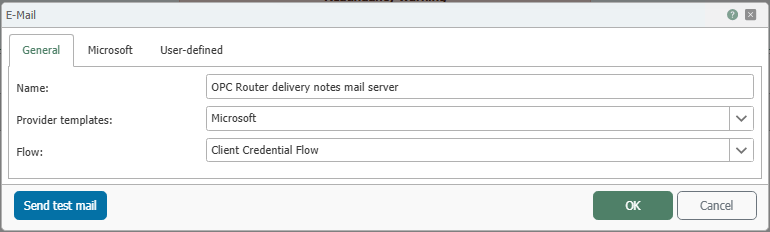
| Property | Description |
|---|---|
| Name | Display name of the mail server configuration in the connection configuration. Choose a name that clearly identifies its purpose. |
| Provider Templates | Specifies which configuration template is used. You can choose between Microsoft and User-defined. Use Microsoft for Microsoft 365 or Entra ID environments. Use User-defined for other SMTP or OAuth providers with their own configuration. |
| Flow | Specifies the authentication method for the mail server. With Client Credential Flow, the OPC Router authenticates itself as a registered application without interactive user login. Basic Authentication, on the other hand, uses the email account’s username and password directly. |
“Microsoft” Tab
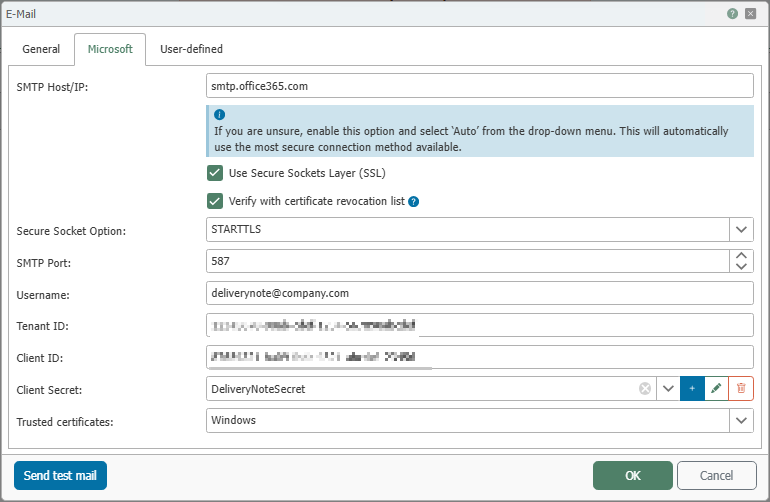
| Property | Description |
|---|---|
| SMTP Host/IP | Hostname or IP address of the SMTP server. |
| Use Secure Sockets Layer (SSL) | Enables an encrypted connection to the SMTP server. |
| Check against certificate revocation lists | Checks whether the server certificate has been revoked via revocation lists. Disable this option if network restrictions prevent this. |
| Secure Socket Option | Specifies how transport encryption is used. Available options are Automatic, SSL/TLS, STARTTLS, STARTTLS (Optional), and None. |
| SMTP Port | The SMTP server’s network port for sending mail. Typical values are 25 or 587, depending on the server and encryption. |
| Username | The username for logging in to the mail server. |
| Tenant ID | Unique identifier of the Microsoft tenant for authentication. You can find the Tenant ID in the Microsoft Entra Admin Center under Microsoft Entra ID. You will typically receive this information from your Microsoft 365 or Azure administrator. |
| Client ID | Unique application ID (Application ID) of the app registered in Microsoft Entra ID or Azure AD. It identifies the application to the OAuth service and can be found in the app registration in the Microsoft Entra Admin Center. |
| Client Secret | Secret for the registered application in Microsoft Entra ID. It is generated in the app registration under Certificates & Secrets and, once created, is stored in the OPC Router as a secret. Typically, this information is provided by the administrator of the app registration. |
| Trusted Certificates | Specifies which certificates are trusted for the TLS connection. Router: Accepts certificates that are stored as trusted in the OPC Router. Windows: uses the trusted certificates from the Windows certificate store. All (untrusted): also accepts certificates that have not been explicitly marked as trusted. |
note
If you are unsure, select Automatic for Secure Socket Option initially. The plug-in will then automatically select the most secure connection method.
"User-defined" Tab
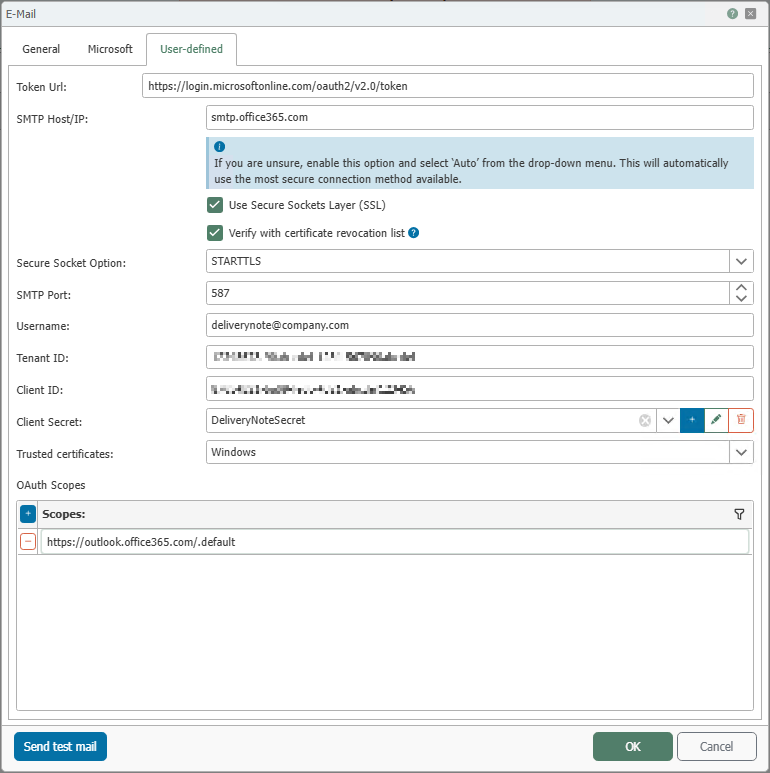
| Property | Description |
|---|---|
| Token URL | OAuth token endpoint of the identity provider being used. The OPC Router uses this address to request the access token for logging in to the mail server. |
| SMTP Host/IP | Hostname or IP address of the SMTP server. |
| Use Secure Sockets Layer (SSL) | Enables an encrypted connection to the SMTP server. |
| Verify with certificate revocation list | Checks whether the server certificate has been revoked via revocation lists. |
| Secure Socket Option | Specifies how transport encryption is used. Available options are Automatic, SSL/TLS, STARTTLS, STARTTLS (Optional), and None. |
| SMTP Port | Network port of the SMTP server for sending mail. |
| Username | Username for logging in to the mail server or for OAuth-based access, depending on the selected flow. |
| Tenant ID | Unique identifier of the tenant or directory at the identity provider being used, provided that the provider uses a tenant structure. It maps the authentication request to the correct tenant and is provided by the respective provider or its administration interface. |
| Client ID | Unique application identifier of the OAuth client registered with the identity provider. It identifies the client to the token endpoint and is assigned during client registration with the provider in use. |
| Client Secret | Secret of the registered OAuth client for client authentication at the token endpoint. The secret is generated during client registration or subsequently within the identity provider and stored as a secret in the OPC Router. |
| Trusted certificates | Specifies which certificates are trusted for the TLS connection. Router: Accepts certificates that are stored as trusted in the OPC Router. Windows: uses the trusted certificates from the Windows certificate store. All (untrusted): also accepts certificates that have not been explicitly marked as trusted. |
| OAuth Scopes | List of permissions requested when retrieving an access token. The entries must match the email service being used and the app registration; otherwise, a valid token for accessing the mail server will not be issued. |
Use Send Test Email to verify the configuration directly from the dialog.