Email Transfer Object
The email transfer object allows you to send emails from within a connection. This requires that the necessary mail server has already been configured as a plug-in instance. Create the transfer object within the connection as described.
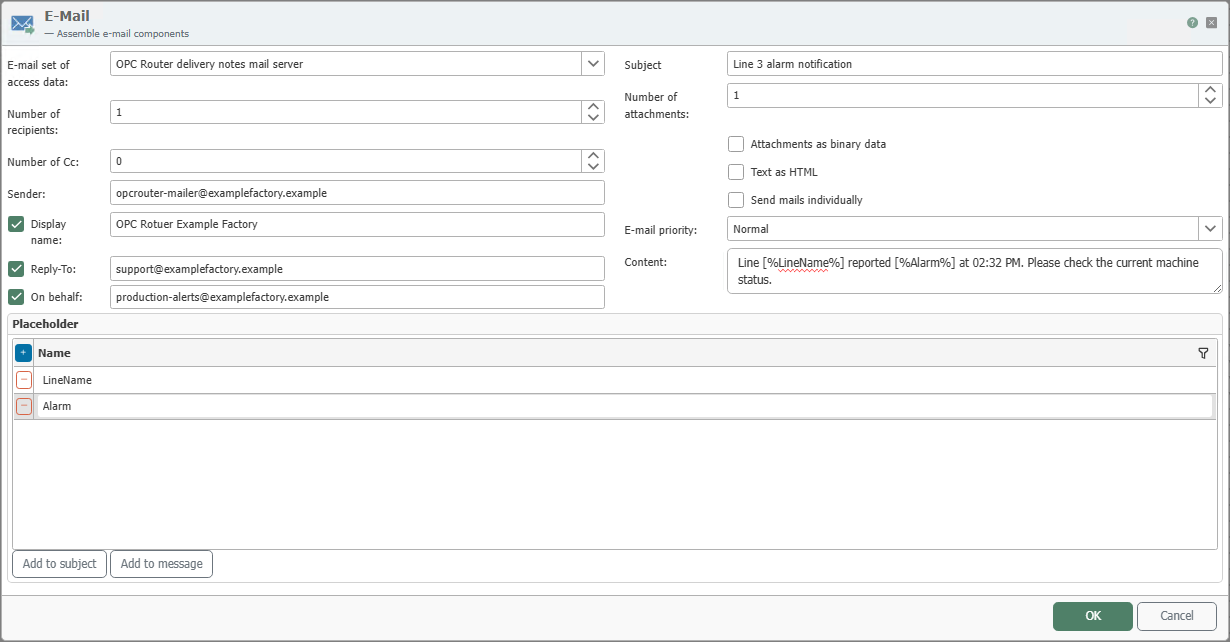
You can configure the following properties in the Email Transfer Object:
note
You can use placeholders with the syntax [%placeholder_name%] in all text fields.
| Property | Description |
|---|---|
| Email Connection | Selection of a configured mail server from the Email Plug-in. The email is sent via this instance. The setup of the mail server is described in the Plug-in Configuration. |
| Number of Recipients | Specifies how many recipient fields are provided in the transfer object. You can populate the addresses statically or dynamically at runtime. Multiple recipients can also be passed as a string within a single field, with the individual email addresses separated by semicolons. |
| Number of Cc | Determines how many CC fields are provided. These recipients receive a copy of the email. |
| Sender | Sender address of the email in the format name@example.com. |
| Display Name | Name displayed to the recipient in addition to the sender address. |
| Reply-To Address | Alternative reply address for recipient feedback. |
| On behalf of | Email address on whose behalf the message is sent. |
| Subject | Subject line of the email. |
| Number of file attachments | Specifies how many attachments are provided in the transfer object. You can populate the file paths or file names statically or dynamically. Multiple file paths can be passed either as a string separated by semicolons in a field or as an array of paths in the property value. All passed paths are used, and the corresponding files are attached to the email. |
| Attachments as binary data | Enables the transfer of attachments as a filename plus binary content instead of a file path. |
| Text as HTML | Sends the text content as an HTML message. |
| Send emails individually | Sends a separate email for each recipient. This keeps recipient lists hidden, and incorrect individual addresses do not necessarily block delivery to other recipients. |
| Email Priority | Sets the priority of the message, for example Normal, so that downstream mail systems can classify the message accordingly. |
| Text content | Text of the email. |
| Placeholders | Define variables that you populate at runtime with values such as process data, messages, or text modules. Use the insertion functions to insert placeholders directly into the subject line or message body. |