ERP Web Services Transfer Object
Web services are available as data destinations (input parameters) and as data sources (output parameters). Create an ERP transfer object within the flow as described.
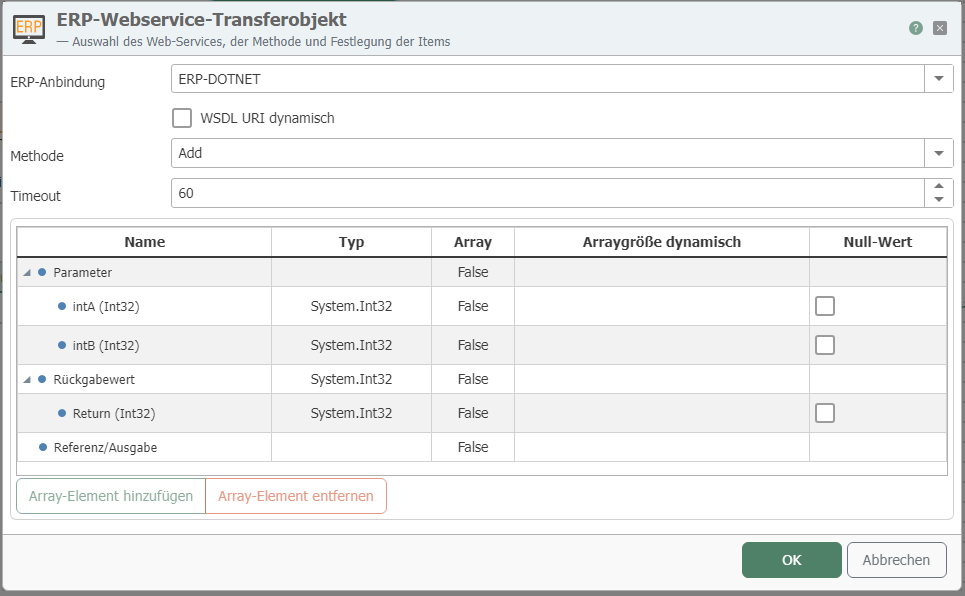
After double-clicking the transfer object, configure the following properties:
| Property | Description |
|---|---|
| ERP Connection | The web services are available here as configured instances of the ERP plug-in. |
| Method | Select the method to be called |
| Dynamic WSDL URL | Enable to pass the URL dynamically at runtime. However, the method and parameters must be identical in each case. |
| Timeout | Time (in ms) that the connection establishment may take before a connection error is returned. |
In general, all input and output parameters of the web service are available to you.
Parameters of Type “Array”
For parameters of type “Array”,” you have two options:
- Enable the "Dynamic Array Size" property to read all entries in the array.
- Limit the number of returned entries by specifying a number of nodes. This number corresponds to the number of array entries returned. Note: The web service determines which entries are returned, not the OPC Router. 1. Leave the “Array Size” property set to “Dynamic.” 2. Select the array (labeled “input” in the figure). 3. Click “Add node”.” These nodes appear within the array, here as “input[ 0],” “input[ 1],” and so on. 4. Add as many nodes as you need: “ ,” “ ,” “ .” To remove a node, select it and click the “Delete node” button.
Nested classes with array parameters do not support dynamic parameters. If you still wish to use nested classes, you must first define how many elements the array contains, since all nodes must be created manually.
“Integer” Data Type
According to the XSD standard, the “Integer” type represents an infinitely large number that can only be stored as a string. If an integer needs to be passed, the web service must use the “INT” data type, which is read correctly.