... read a new, current data record?
In the previous example, the current data record was transferred cyclically from the table or the filter result. The following shows how the current data record is only transferred if it is new, i.e., if it has not been transferred before. In addition to the timestamp column, you need a column in which a successful data transfer is logged. This example includes an additional filter (ConfigID as the ID of the measurement series) and a filter on the Transfer column to filter only non-transferred data records. Just like the previous example, this connection could also be implemented as a template/instance. However, the simple variant is shown here.
Required fields/columns:
| Name | Description |
|---|---|
| <zeitstempel> | Timestamp of type date/time, which is used for sorting |
| <transfer> | Column in which a successful transfer is displayed (type: Int, default value: 0) |
| ConfigID | ID of the measured value series |
| <werte> | Column(s) with the relevant values |
Configure a DB transfer object with the following properties:
| Name | Configuration |
|---|---|
| DB connection | <ihre db-anbindung="" aus="" der="" plug-in-konfiguration=""> |
| Type | Select |
Tab: General
| Name | Configuration |
|---|---|
| Table | <tabelle, die="" ihre="" daten="" enthält=""> |
| Available columns/Used columns | <alle werte-spalten=""> |
Tab: Filter
| Name | Configuration |
|---|---|
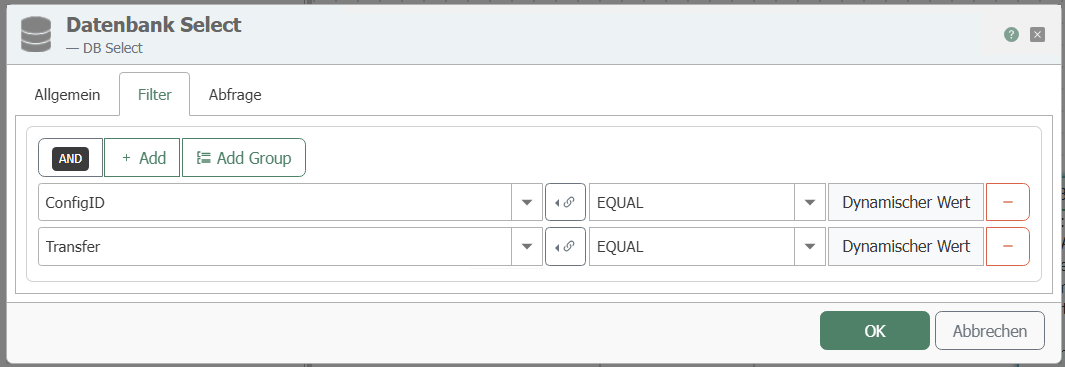
| Filter | "Add filter" creates a new filter. You need 2 filters. The AND link is the default setting. |
| Edit filter/filter group | Column: ConfigID Comparison operator: EQUAL Column: Transfer Comparison operator: EQUAL |
| Preview | This should now read: WHERE (ConfigID = ? AND Transfer = ?) |
Tab: Query
| Name | Configuration |
|---|---|
| Sort by column | <zeitstempel-spalte> |
| Sort order | Descending (newest value at the top) |
| Limit number of records to | 1 (only the first record = the newest should be transferred) |
| Error if query result is empty | Disabled. If there is no new, current record, this should not be considered an error. |
| Cancel transfer if query result is empty | Enabled. Nothing is transferred if no new data record is available. |
This transfer object filters the data according to the ConfigID to be entered and the transfer code. "0" must be entered for the transfer code. Create a constant object with:
Required constants
| Name | Description |
|---|---|
| <configid> | ID of the measured value series |
| 0 | for non-transferred data records |
Connect the ConfigID value to the ConfigID filter element and the 0 to the Transfer filter element:
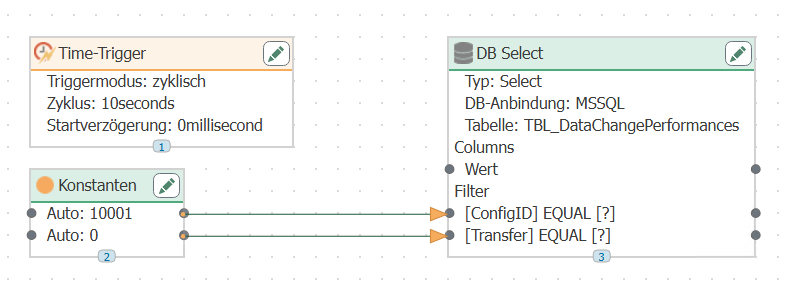
Configure a time trigger that polls the database cyclically.
After the transfer, the OPC Router writes "1" to the Transfer column and "2" if there is a transfer error. With this configuration, the latest data record of the measured value series with Transfer = 0 is transferred.
Note: If the data in the source table arrives faster than the time trigger polls, it may happen that the transferred data record is no longer current or that data records are skipped. Weigh up the required accuracy against the resource consumption on the database server. For database servers that offer a notification service, you could program a script trigger that triggers the transfer as soon as it is notified by the database server. However, due to the cycle time of the OPC router, there would be another delay (max. 50 ms in the default setting). If you want to ensure that no data records are lost, you should read all non-transferred data records.