... read all non-transferred data records?
To read all non-transferred data records from a table, you need a column in which the OPC Router can mark a completed transfer. You execute a query with a filter on this transfer column.
Required fields/columns:
| Name | Description |
|---|---|
| <transfer> | Column in which a successful transfer is displayed (type: Int, default value: 0) |
| <werte> | Column(s) with the relevant values |
Configure a DB transfer object with the following properties:
| Name | Configuration |
|---|---|
| DB connection | <ihre db-anbindung="" aus="" der="" plug-in-konfiguration=""> |
| Type | Select |
Tab: General
| Name | Configuration |
|---|---|
| Table | <tabelle, die="" ihre="" daten="" enthält=""> |
| Available columns/Used columns | <alle werte-spalten=""> |
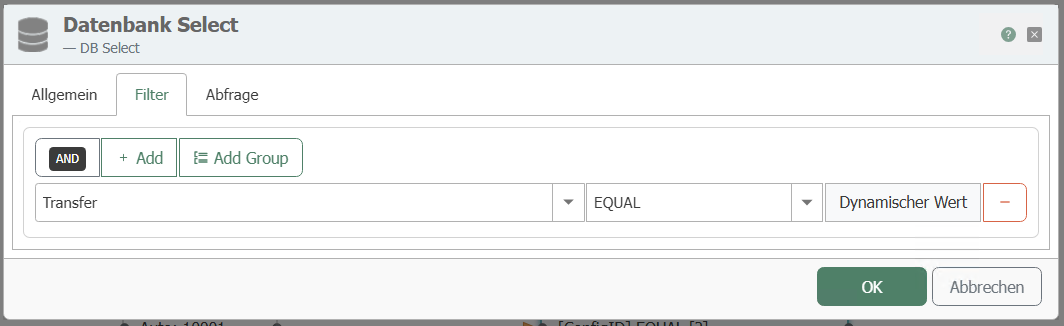
Tab: Filter
| Name | Configuration |
|---|---|
| Filter | "Add filter" creates a new filter. |
| Edit filter/filter group | Column:<Transfer> Comparison operator: EQUAL |
| Preview | This should now read: WHERE (Transfer = ?) |
Tab: Query
| Name | Configuration |
|---|---|
| Sort by column | as required |
| Sort order | as required |
| Limit number of records to | deactivated. All records with <transfer> = 0 should be transferred. |
| Error if query result is empty | deactivated. If no new, current record is available, this should not be considered an error |
| Cancel transfer if query result is empty | Enabled. Nothing is transferred if no new data record is available. |
This transfer object filters the data according to the transfer code. "0" must be entered for the transfer code. Create a constant object with:
Required constants
| Name | Description |
|---|---|
| 0 | for non-transferred data records |
Connect the 0 to the Transfer filter element:
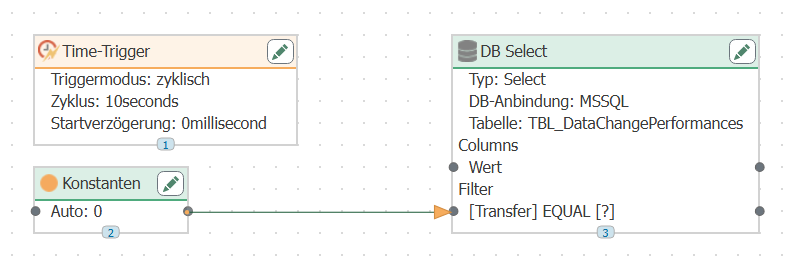
Configure a time trigger that queries the database cyclically.
After the transfer, the OPC Router writes "1" to the Transfer column and "2" if there is a transfer error. With this configuration, the new data records with Transfer = 0 are transferred. Of course, you can configure additional filters, e.g., the ID of the measurement series from the previous example.