OPC-DA connections
We are currently not aware of any sources of error that restrict access to local OPC servers. However, accessing distributed OPC servers can present some pitfalls.
Connection cannot be established – remote only
The "OPC Server" property returns <error browsing="" opc-servers="">.
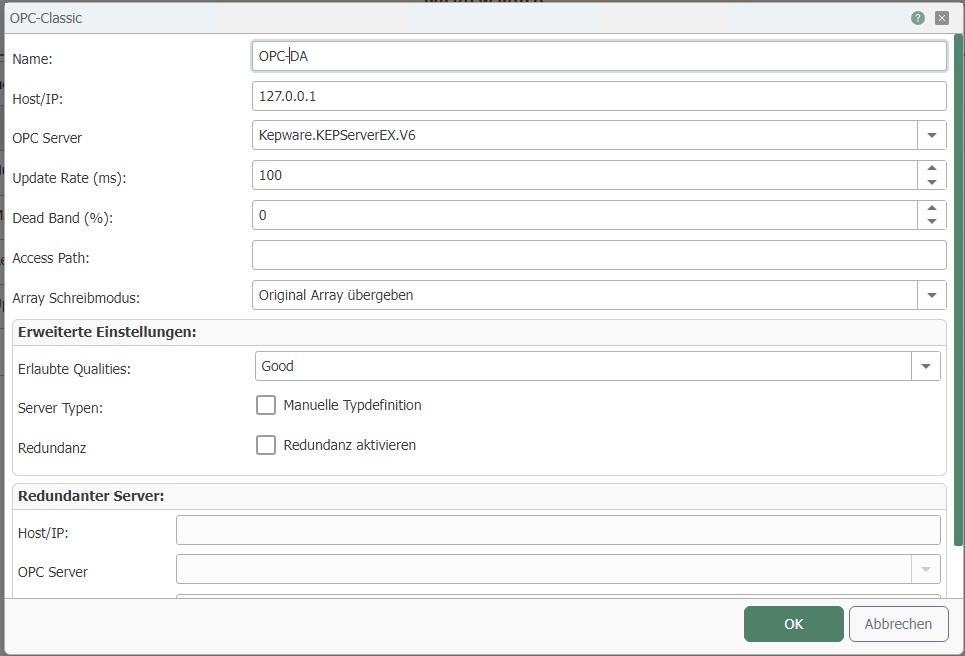
Check whether the DCOM configuration is correct:
- Is the configuration environment running under the same user who has DCOM access to the OPC server?
- Are both the OPC Enum and OPC Server components enabled for the user on the target computer?
- Is DCOM enabled on the target computer in general?
- Are the local firewalls on the computers involved disabled?
- Of course, the target computer is turned on and accessible!
Connection is established, but the OPC connection does not appear in the OPC transfer object.
The OPC server could be connected in the configuration, but the OPC connection does not appear in the connection project planning in the OPC transfer object, or an error is returned.
- You must save the OPC connection using the "OK" button before it is available.
Tag browser cannot connect to the OPC server.
If the OPC connection could be configured without any problems, check whether the OPC server has just been manually shut down or is being reinitialized.
- Is the computer with the OPC server switched on and accessible?
No data transfer takes place at runtime
The connection could be established without any problems at design time. No transfer takes place at runtime. Open the log file via the tray icon. Look for the error message at the end of the file. Does the error message look like this?
2026-08-30 14:49:06.194 +02:00 [WRN] [<Connection>] Das Item <Item> konnte nicht angemeldet werden (E_INVALID_ITEM_NAME)
Each line begins with the timestamp, including the time zone offset, and the severity level—[WRN] for a warning, [ERR] for an error. The name under which you configured the OPC connection is listed in the square brackets that follow; this is followed by the message text.
The router displays this message in German, regardless of the installation language. Therefore, even on an English installation, search for “konnte nicht angemeldet werden” or the error code “E_INVALID_ITEM_NAME.”
- You have probably spelled the item name incorrectly, or your OPC server is not evaluating the Access Path property stored in the OPC connection correctly. Select the item using the tag browser and/or configure a connection without Access Path for testing purposes. Check whether your OPC server is running correctly.
Error message in log file:
2026-08-30 15:19:34.886 +02:00 [ERR] [<Connection>] Timeout connect OPC Server!
- In distributed systems: Is the computer with the OPC server turned on and accessible?
Error message in log file:
2026-08-30 15:16:24.694 +02:00 [ERR] [<Connection>] Connection to OPC-server (<ProgID> on <Host>) could not be established. (Message: CoCreateInstanceEx: ...)
The router displays this message in English regardless of the installation language. Windows appends its own error text after “CoCreateInstanceEx:”; this text appears in the operating system’s language and, in the case of missing DCOM permissions on a German Windows system, reads “Zugriff verweigert.”
- If the connection works during design time, the router configuration is probably running under the correct user, but the router service is not. Check whether the router service running under the user has DCOM permission on the OPC computer.