CSV Transfer Object
CSV transfer objects can read, evaluate, and output CSV strings. They can write data to defined cells or read data from them. No plug-in configuration is necessary; you can directly project the transfer object within the connection as described.
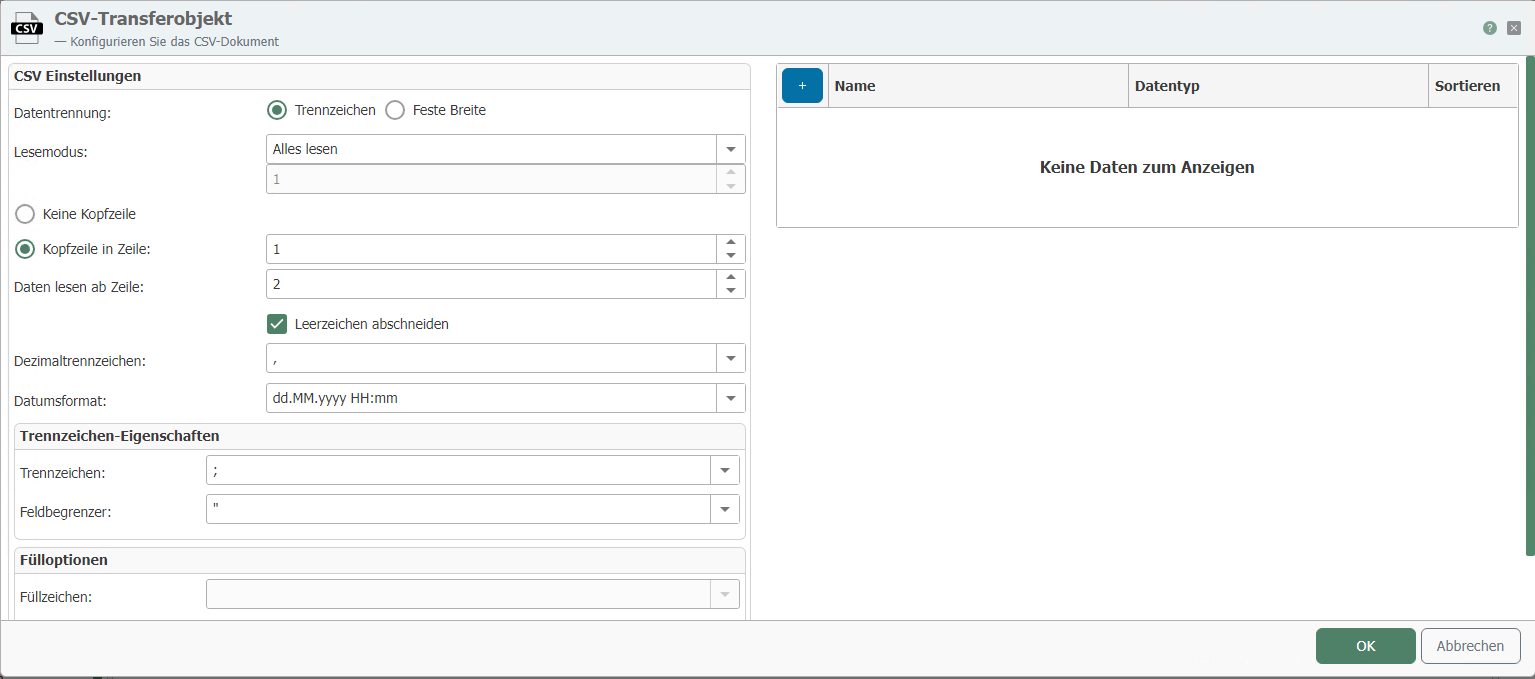
After double-clicking on the transfer object, set the following properties:
Caution: The CSV transfer object only works with CSV strings, not with CSV files. If you want to read and write corresponding CSV files, you must also use the File Read and File Write transfer objects.
| Property | Description |
|---|---|
| Data separation | Separator separated if the data in the CSV document is separated by separators (e.g., semicolons). Fixed width if the field length is defined. If this option is selected, the field lengths can be defined in the table on the right. |
| Read mode | Specify which part of the CSV string you want to read. Read all: The entire CSV document is read. Read first: Specify the rows to be read. Selects the first rows of the document. Read last: Specify the rows to be read. Selects the last rows of the document. |
| Header | Select whether the file has a header. If there is a header, select the row in which it is located. The names used in the header must also be used as column names. |
| Read data from row | Specify the row from which the actual data should be read. Normally, the row number of the header + 1 should be entered here. |
| Decimal separator | Specify which decimal separator is used in the CSV string. |
| Date format | Specify the date format used in the CSV string. |
| Separator | Specify which separator separates the fields in the CSV string. (Only for separator-delimited documents) |
| Field delimiter | Specify which character is used as the field delimiter. Text within two field delimiters is always combined, even if a separator appears within it. (Only for delimiter-separated documents) |
| Filler character | Fields that do not reach the specified length are filled with this character. (Only for fixed-width documents) |
| Fill method | Define whether the fill characters should be written to the left or right of the actual content. (Only for fixed-width documents) |
On the right half of the CSV transfer object, you can define the data fields contained in the CSV string.
The names of the data fields must match the names in the header. Not all columns in the header have to be used. For CSV strings that work with a fixed width, the correct field lengths must be entered. At runtime, you can use the arrows here to read or write the individual values. Using the Data Type option, you can define the format in which the individual data is to be output.