Editor
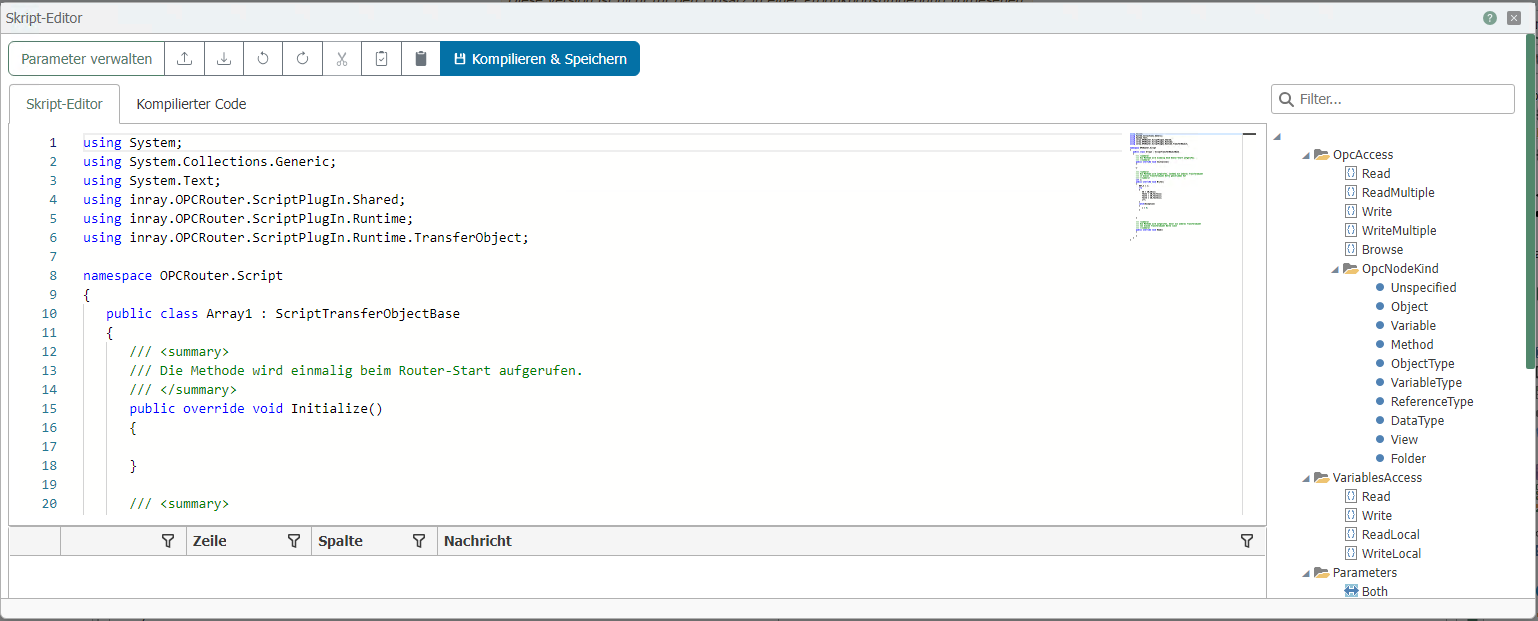
In addition to standard functions (Copy, Paste, Cut, Undo, Save), the editor offers several special features:
- "File – Save Externally" menu: Saves the script as an XML file containing header data, code, and parameter definitions. You can also open such XML files to import scripts.
- "Settings – Manage Parameters" menu: Here you can create the necessary parameters and variables (see Transfer Object Scripts and Trigger Scripts).
- "Settings – Edit Comment" menu: The comment is displayed in the plugin’s script list.
- "F6" key: Compiles and tests the program for errors.
In the right pane, you will find a graphical programming aid for OPC accesses, variables from the OPC router configuration, log messages, and parameters.
- Double-click an entry, and the corresponding prepared line of code is inserted. Entries can be written as a string (in quotation marks) or as a predefined variable.
Notes on OPC Null Values
If you have checked the "Transfer OPC null values" box in the OPC UA plug-in, the corresponding values of the data points are always transferred when they are zero.
If the box is not checked and the "Quality" of the data point is not "Good," then the value is not transferred and the connection fails.
If the checkbox is not selected, the data point’s “Quality” is “Good,” and the value is zero, then zero is transferred
OpcAccess.Read
Reads the value of an OPC item.
Object <myValue> = OpcAccess.Read("<ItemPath>", "<OPCServerName>")
- Return value: Object
- ItemPath: Access path and name of the item
- OPCServerName: Name of the OPC connection in the router project
OpcAccess.ReadMultiple
Reads the values of multiple OPC items.
List<string> <lItemNames> = new List<string> ();

<lItemNames>.Add ("<ItemPath.ItemName1>");
<lItemNames>.Add ("<ItemPath.ItemName2>");
...

Dictionary<string,object> <MyValues> = OpcAccess.ReadMultiple(<lItemNames>, "<OPCServerName>");
- Return: Dictionary <string>
- lItemNames: Access paths and names of the items as a list
- OPCServerName: Name of the OPC connection in the router project
OpcAccess.Write
Writes a value to an OPC item.
OpcAccess.Write ("<ItemPath>", <objValue>, "<OPCServerName>")
- Return: none
- ItemPath: Access path and name of the item
- objValue: Value to be written
- OPCServerName: Name of the OPC connection in the router project
OpcAccess.WriteMultiple
Writes multiple values to multiple OPC items.
Dictionary<string,object> <dicItemsToWrite> = new Dictionary<string,object> ();
<dicItemsToWrite>.Add("<ItemPath.ItemName1>", <Value1>);
<dicItemsToWrite>.Add("<ItemPath.ItemName2>", <Value2>);
...
OpcAccess.WriteMultiple(<dicItemsToWrite>, "<OPCServerName>")
- Return value: None
- dicItemsToWrite: Dictionary containing items and values
- OPCServerName: Name of the OPC connection in the router project
OpcAccess.Browse
Provides the ability to perform a browse (object search) for OPC DA and UA connections.
ItemPath: Access path and name of the item
ServerName: Name of the OPC connection in the router project
Various queries are available:
OpcAccess.Browse(ItemPath, ServerName).Select(e => e.DisplayName).ToArray()
- Return value: Returns the names of the tags from this OPC path.
OpcAccess.Browse(ItemPath, ServerName).Select(e => e.NodeKind.ToString()).ToArray()
- Return value: Returns the types of the tags from this OPC path.
OpcAccess.Browse(ItemPath, ServerName).Select(e => e.Identifier).ToArray()
- Return: Returns the names of the tags with their full paths.
OpcAccess.Browse(ItemPath, ServerName).Select(e => e.HasChildren).ToArray()
- Return: Returns whether the tags still have child objects.
Important: To search for OPC objects, the "Using System.Linq;" directive and the assembly reference "System.Core.dll" must be specified.
OpcAccess.Reset
Resets OPCAccess so that it is reinitialized on the next call.
OpcAccess.Reset()
- Return value: none
- Input parameters: none
OpcAccess.Decode
Decodes a value from an OPC UA server and returns a .NET object that can contain all possible variable types.
object <myValue> = OpcAccess.Decode("<OPCServerName>", <objValue>)
- Return value: Object
- OPCServerName: Name of the OPC server from which the value is to be decoded.
- objValue: The value to be decoded.
The return value can contain all native data types. In addition, the following properties may be contained in the .NET object.
IUaStructureTypeDescription <myValue> = TypeDescription
- Return: The type description of type IUaStructureTypeDescription.
- This function is a property. Therefore, it has no parameters and no parentheses.
CopyTo(<dest>)
- Return: none
- dest: Destination of type IEncodeable
CopyValuesFrom(<objValue>)
- Return: none
- objValue: Source of the values to be copied.
T <myValue> = GetValue<T>("<property>")
- Return value: A value of a generic type.
- property: The property to be read.
bool <myResult> = TryGetValue("<field>", out <objVallue>)
- Return value: Whether the corresponding value was found.
- field: The name of the variable to be read.
- objValue: The actual value returned to the user via the out parameter.
WriteField<T>("<property>", <genericValue>);
- Return value: None
- property: The variable name to be written to.
- genericValue: A value of a generic type to be written to the variable.
bool <myResult> = TryGetFieldInfo("<field>", out <fieldInfo>)
- Return value: Indicates whether the corresponding variable information was found.
- field: The name of the variable to be read.
- fieldInfo: The variable information of type IFieldType, which is returned to the user via the out parameter.
IEnumerable<KeyValuePair<string, object>> <myValues> = GetValues()
- Return value: All values, stored in an IEnumerable of type KeyValuePair, which contains the types String and object.
- Input parameters: None.
ExpandedNodeId <myTypeId> = TypeId
- Return value: The node ID of the type to be encoded.
- This function is a property. Therefore, it has no input parameters and no parentheses.
ExpandedNodeId <myBinaryEncodingId> = BinaryEncodingId
- Return value: The node ID of the binary type to be encoded.
- This function is a property. Therefore, it has no input parameters and no parentheses.
ExpandedNodeId <myXmlEncodingId> = XmlEncodingId
- Return value: The node ID of the XML data type to be encoded.
- This function is a property. Therefore, it has no input parameters and no parentheses.
VariablesAccess.Read
Reads the value of a global variable in the OPC router project. This refers only to variables created via the Variables plug-in, i.e., not placeholders in templates, mail objects, or similar. If the variable does not exist, NULL is returned.
Object <myValue> = VariablesAccess.Read("<VariableName>")
- Return value: Object
- VariableName: Variable name in the OPC Router project
VariablesAccess.ReadLocal
Reads the value of a local variable in the OPC Router project. This refers only to variables created via the Variables plugin, i.e., not placeholders in templates, mail objects, etc. If the variable does not exist, NULL is returned.
Object <myValue> = VariablesAccess.ReadLocal("<VariableName>", "<connectionId>")
- Return: Object
- VariableName: Variable name in the OPC Router project
- connectionId: ID of the connection from which the variable is to be read.
VariablesAccess.Write
Assigns a value to a global variable in the OPC Router project. This refers only to variables created via the Variables plug-in, i.e., not placeholders in templates, mail objects, or similar. If the variable does not exist, it is created, but not saved in the configuration.
VariablesAccess.Write("<VariableName>", Value)
- Return value: none
- VariableName: Variable name in the OPC Router project
- Value: Value to be assigned, Object
VariablesAccess.WriteLocal
Assigns a value to a local variable in the OPC Router project. This refers only to variables created via the Variables plug-in, i.e., not placeholders in templates, mail objects, or similar. If the variable does not exist, it is created.
VariablesAccess.WriteLocal("<VariableName>", Value, "<connectionId>")
- Return value: None
- VariableName: Variable name in the OPC Router project
- Value: Value to be assigned, Object
- connectionId: ID of the connection from which the variable is to be read.
ConnectionParameters.GetConnectionName
Returns the name of the current connection.
string "<myConnectionName>" = ConnectionParameters.GetConnectionName()
- Return value: The name of the current connection.
- Input parameters: None
ConnectionParameters.GetConnectionId
Returns the connection ID of the current connection.
string "<myConnectionId>" = ConnectionParameters.GetConnectionId()
- Return value: The ID of the current connection.
- Input parameters: None
PlugInAccess.GetStatus
Returns the current status of a plug-in. The plug-in can be identified by an ID or a name, and optionally by a type.
PlugInStatus <myStatus> = PlugInAccess.GetStatus("<plugInId>")
PlugInStatus <myStatus> = PlugInAccess.GetStatus("<plugInName>", "<plugInType>")
- Return value: The current status of the selected plug-in of type PlugInStatus.
- plugInId: ID of the desired plug-in for identification.
- plugInName: Name of the desired plug-in for identification.
- plugInType: Type of the desired plug-in for identification.
The possible statuses of the PlugInStatus type are as follows:
- Unknown = 0
- Stopped = 1
- Starting = 2
- Running = 3
- Stopping = 4
- Faulted = 5
- NoLicense = 6
PlugInAccess.RequestRestart
Requests that a plug-in be restarted. The plug-in can be identified by an ID or a name, and optionally by a type.
PlugInAccess.RequestRestart("<plugInId>")
PlugInAccess.RequestRestart("<plugInName>", "<plugInType>")
- Return value: none
- plugInId: ID of the desired plug-in for identification.
- plugInName: Name of the desired plug-in for identification.
- plugInType: Type of the desired plug-in for identification.
Log
Writes a message to the log file
Log("<strMessage>", MessageType.<LogLevel>)
- Return value: none
- strMessage: Message to be written
- LogLevel: Log level to be written. If the corresponding log level is disabled, nothing is logged.
MessageType.Alllogs in all cases, regardless of the router configuration.
AbortTransfer
Aborts a data transfer with a passed message.
AbortTransfer(<myMessage>)
- Return value: none
- myMessage: Abort message for the interrupted data transfer.