Creating XML data
XML documents as target
As the transfer target, the XML object creates XML code based on the configured X-Path queries.
- The XML code can be transferred further, e.g., to a database. A script would be required to generate an XML file.
For example, the following is delivered from a table:
| Author | Title |
|---|---|
| Heinrich Mann | The Subject |
| Thomas Mann | Buddenbrooks: Decline of a Family |
This is used to generate an XML file with the known structure.
- Name: "Author," X-Path expression "/catalog/book/author"
- Name: "Title," X-Path expression "/catalog/book/title"
For this example, you need two staggered XML objects. The first will convert the result sets into individual XML elements, and the second will combine the elements into a document:
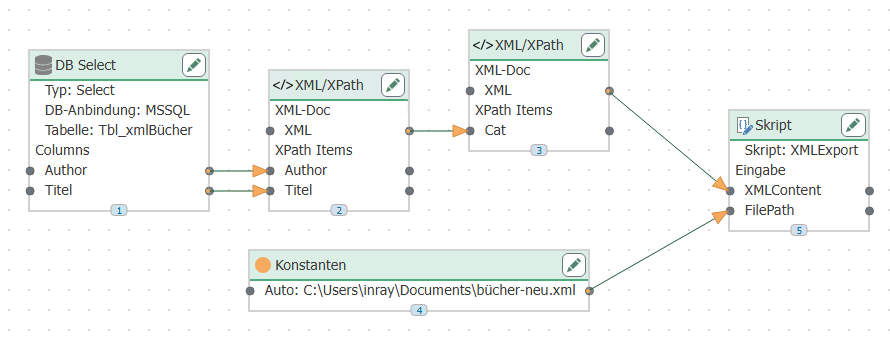 1. The data records to be written are queried from a database and transferred to the X-Path elements of the first XML transfer object.
2. The XML object generates the XML code. The XML object contains the familiar X-Path expressions
1. The data records to be written are queried from a database and transferred to the X-Path elements of the first XML transfer object.
2. The XML object generates the XML code. The XML object contains the familiar X-Path expressions
- Name: "Author", X-Path expression "book/author"
- Name: "Title", X-Path expression "book/title"
as well as the basic structure
       <book>
          <author></author>
          <title></title>
       </book>
The XML output = "Output multiple XML documents" property is important so that each data record from the database becomes a separate element.
The structure could also be transferred dynamically at runtime, e.g., from a text file or a database. 3. The code is transferred from the XML element to the X-Path element of the second XML transfer object. This object only contains the XML declaration and the root element:
<?xml version="1.0"?>
With the X-Path query /catalog and the XML output property "Combine in one document" 4. The code can be transferred further. Here, a script transfer object is used to create a file. The file path (type: string) and XML content (type: array, string) are transferred as input parameters:
public override void Write()
{
StringBuilder stb = new StringBuilder();
stb.AppendLine("<?xml version=\"1.0\"?>
");
foreach(string xml in XMLContent)
{
stb.AppendLine(xml.Substring(xml.IndexOf("?>")+2));
}
System.IO.File.WriteAllText(FilePath, stb.ToString());
}