Create XML Data
XML Documents as the Target
As a transfer destination, the XML object generates XML code based on the configured XPath queries.
- The XML code can be transferred further, e.g., to a database. A script would be required to generate an XML file.
For example, the following is generated from a table:
| Author | Title |
|---|---|
| Heinrich Mann | The Subject |
| Thomas Mann | Buddenbrooks: The Decline of a Family |
An XML file with the familiar structure should be generated from this.
- Name: "Author," X-Path expression "/catalog/book/author"
- Name: "Title," X-Path expression "/catalog/book/title"
For this example, you’ll need two nested XML objects. The first will convert the result sets into individual XML elements, and the second will combine the elements into a single document:
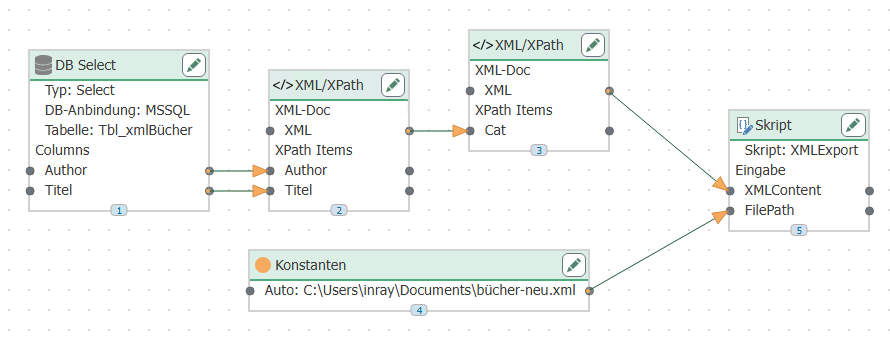
-
The records to be written are queried from a database here and passed to the XPath elements of the first XML transfer object.
-
The XML object generates the XML code. To do this, the XML object contains the following familiar XPath expressions:
-
Name: “Author,” XPath expression “book/author”
-
Name: “Title,” XPath expression “book/title”
as well as the basic structure
   <book>
      <author></author>
      <title></title>
   </book>
The XML-Output property = “Multiple XML documents” is important so that each record from the database becomes its own element.
The structure could also be passed dynamically at runtime, e.g., from a text file or a database.
-
-
The code is passed from the XML element to the XPath element of the second XML transfer object. This object contains only the XML declaration and the root element:
<?xml version="1.0"?>
<catalog>
</catalog>
Using the XPath query /catalog and the XML output property “Combine into a single document”
-
The code can be transferred further. Here, a ScriptTransferObject is used to create a file. File path (type: String) and XML content (type: Array, String) are passed as input parameters:
   public override void Write()
      {
         StringBuilder stb = new StringBuilder();
         stb.AppendLine("<?xml version=\"1.0\"?>");
         foreach(string xml in XMLContent)
         {
           stb.AppendLine(xml.Substring(xml.IndexOf("?>")+2));
         }
         System.IO.File.WriteAllText(FilePath, stb.ToString());
      }