Domino Printer Plug-in
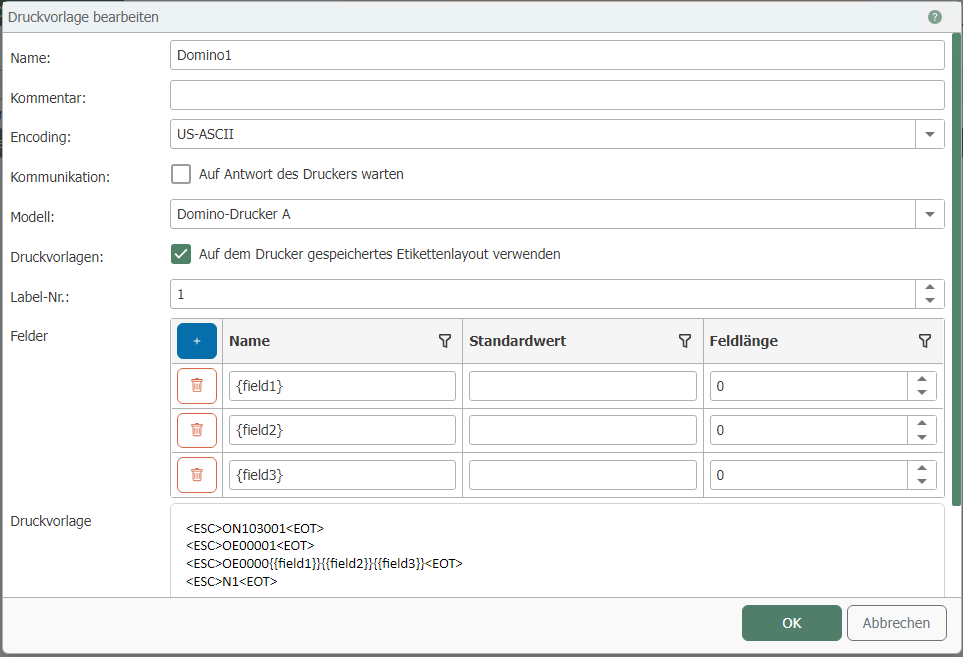
| Property | Description |
|---|---|
| Name | Name of the print template |
| Comment | Enter a comment here. |
| Encoding | Select from the various encodings here. Note: The encoding of the OPC router should match that of the printer. Contact the manufacturer if you have any questions about printer encoding. |
| Wait for printer response | Do not check this box if you have a Domino printer model that does not send a response indicating that the print was successful. |
| Model | Choose between the following models:
The difference lies in the communication protocols used. If you have any questions about the protocols, please contact the manufacturer. |
| Use label layout stored on the printer. | Check this box if you have already created a layout for the printer. |
| Label No. | If you have already designed a layout, enter the label number of the layout here. |
Fields
| Property | Description |
|---|---|
| Name | Name for the field |
| Default value | Enter the default value for the field here. |
| Field length | Enter the length of the field here. |
Label
Uncheck "Use label layout stored on the printer" if you do not yet have a layout. Enter the corresponding commands for the desired layout here if you have not yet created one. Use the "Control characters" button to add new control characters to the label. The commands in the <> will be converted to special characters.