Providing Production Data via MCP
This example explains how production data from databases can be made available to artificial intelligence systems using the OPC Router via MCP. An artificial intelligence system with access to this MCP tool could, for example, answer the following questions:
- Which machine is the most productive?
- Which machines are due for maintenance soon?
- At what times are the machines least productive?
This example uses a specific data structure. However, the basic concepts from this example can be applied to a wide range of use cases.
Initial Situation
Production data for individual machines is recorded in a database table. This data is to be made available via MCP using the OPC Router to enable artificial intelligence systems to query and process it.
Data Structure
The table containing the machine data is structured as follows:
| id | machine_id | ts | quantity | scrap | oee |
|---|---|---|---|---|---|
| 1 | PRESS-01 | 2026-02-01 06:00:00 | 500 | 10 | 0.82 |
| 2 | PRESS-01 | 2026-02-01 07:00:00 | 520 | 12 | 0.80 |
| 3 | PRESS-01 | 2026-02-01 08:00:00 | 515 | 11 | 0.81 |
Setup in the OPC Router
MCP Tool Configuration
A REST trigger is required to configure an MCP tool in OPC Router. When defining an MCP tool, you must provide, among other things, a name and a description. These help an artificial intelligence system determine when it makes sense to use this MCP tool.
To configure an MCP tool in the REST trigger, MCP must be enabled in the REST plug-in.
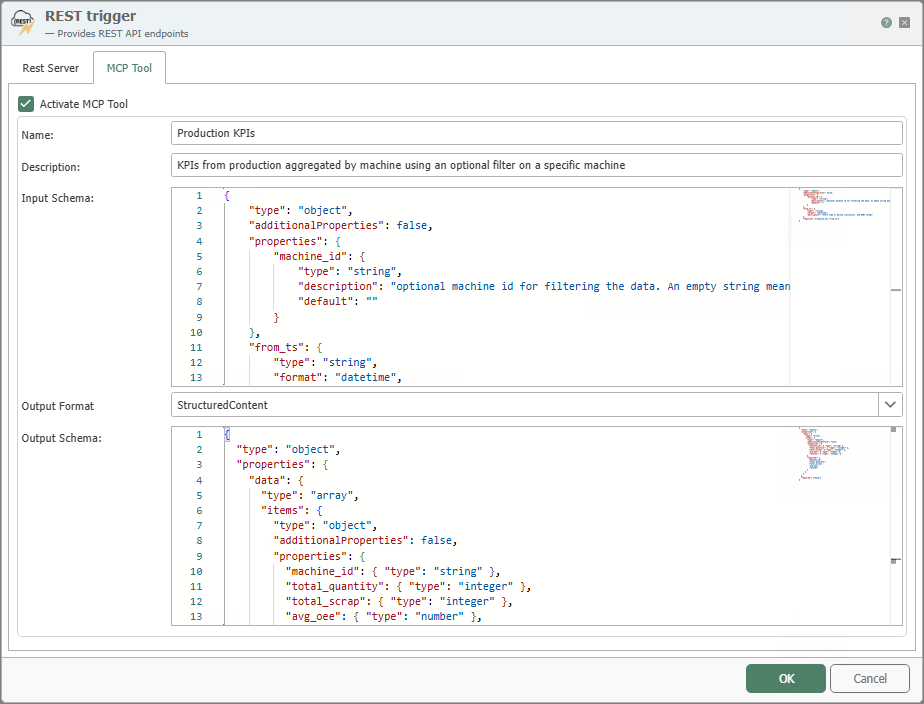
To create the schemas for input and output, you must specify which parameters can be included in the request and which of them are optional. You must also decide on the structure in which the MCP tool should return the data.
Input Schema
For this example, it was specified that a time range for the data must be provided in the request. This is specified using two timestamps. Optionally, a filter for a specific machine should be allowed. This results in the following input schema.
{
  "type": "object",
  "additionalProperties": false,
  "properties": {
    "machine_id": {
      "type": "string",
      "description": "Optional machine ID for filtering the data. An empty string means: all machines.",
      "default": ""
    },
    "from_ts": {
      "type": "string",
      "format": "date-time",
      "description": "Start time of the time period (inclusive). ISO-8601 format."
    },
    "to_ts": {
      "type": "string",
      "format": "date-time",
      "description": "End time of the time period (inclusive). ISO-8601 format."
    }
  },
  "required": ["from_ts", "to_ts"]
}
Output Schema
The aggregated data for the machines should be returned as an array. Each element of the array contains data for one machine.
{
  "type": "object",
  "properties": {
    "data": {
      "type": "array",
      "items": {
        "type": "object",
        "additionalProperties": false,
        "properties": {
          "machine_id": { "type": "string" },
          "total_quantity": { "type": "integer" },
          "total_scrap": { "type": "integer" },
          "avg_oee": { "type": "number" },
          "records": { "type": "integer" }
        },
        "required": [
          "machine_id",
          "total_quantity",
          "total_scrap",
          "avg_oee",
          "records"
        ]
      }
    }
  },
  "required": ["data"]
}
These schemas show the artificial intelligence how queries for this MCP tool must be structured and how the results are organized.
Preparing the Data for the MCP Tool
The data from the table is aggregated for the specified time period using a stored procedure. This stored procedure is executed in the OPC Router using the Stored Procedure transfer object. The output values of the Stored Procedure Transfer Object are then mapped to the data structure defined as the output schema using two JSON Transfer Objects. Finally, the generated JSON document is passed to the REST trigger as the response body.
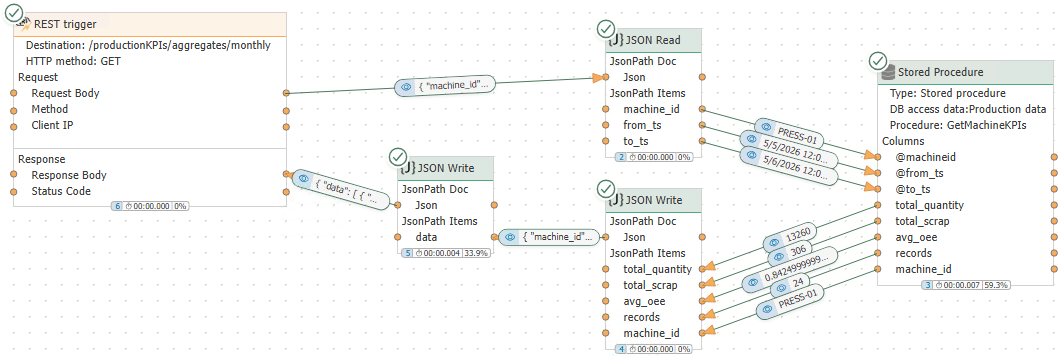
A detailed description of the configuration for data preparation has been intentionally omitted, as real-world scenarios can vary greatly. Furthermore, providing data in JSON format is not specific to MCP. There may already be existing REST endpoints in the OPC Router for which MCP would simply need to be configured to make them usable for artificial intelligence.