REST Client: Authentication Options
This page describes the available authentication options for the REST Client plug-in. The option you should use depends on the requirements of the target system.
The general configuration of the plug-in is described on the REST Client page.
Overview
| Authentication | Description | Typical Use |
|---|---|---|
| None | The plug-in does not perform any authentication. | For publicly accessible endpoints or when authentication information is passed dynamically in the actual REST call. |
| HttpBasic | The plugin sends the username and password via HTTP Basic Authentication. | For RESTful web services with classic username/password authentication via the Authorization HTTP header. |
| Jwt | The plugin sends a JSON Web Token for authentication. | When the target system directly expects a JWT. |
| OAuth1 | The plugin uses OAuth 1 for authentication. | For RESTful web services that still require OAuth 1. |
| OAuth2-RequestHeader | The plugin sends the OAuth 2 token in the HTTP header. | When the target system expects a bearer token in the header. |
| OAuth2-UriQueryParameter | The plug-in passes the OAuth 2 token as a query parameter in the URL. | When the target system explicitly expects the token in the URL. |
| Negotiate (process identity) | The plug-in uses the identity of the running process for authentication. | For integrated Windows authentication, if the RESTful web service supports it. |
| Digest | The plug-in uses HTTP Digest Authentication. | For RESTful web services that require Digest Authentication. |
Notes on the Variants
None
Use None if no authentication is required or if the authentication information should not be hard-coded in the plug-in.
This is particularly relevant for dynamically generated tokens.
HttpBasic
This variant is suitable for target systems that expect fixed login credentials consisting of a username and password.

Additional properties:
| Property | Description |
|---|---|
| Username | Username for logging in to the RESTful web service. |
| Password | Password or password reference for the specified user. |
Jwt
This option is suitable for target systems that expect a predefined JSON Web Token.

Additional Properties:
| Property | Description |
|---|---|
| Access-Token | JSON Web Token hard-coded in the plug-in. This option is only suitable if the token can be stored statically. |
Note: If the token must first be retrieved or regularly renewed, use the None option instead of Jwt and pass the current value dynamically in the REST call.
OAuth1
This option is only required if the target system still uses OAuth 1.
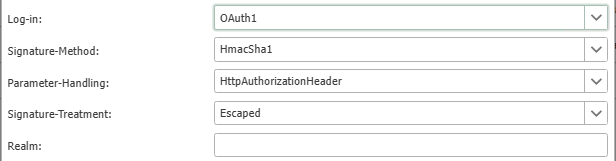
Additional properties:
| Property | Description |
|---|---|
| Signature Method | Signature method for OAuth 1. In the example shown, HmacSha1 is used. The required value depends on the target system and directly affects how the OAuth signature is calculated. A different value may result in the login being rejected even if the credentials are correct. |
| Parameter Handling | Specifies how the OAuth parameters are transmitted. In the example shown, they are sent via the HTTP Authorization header. Which option is allowed depends on the target system’s implementation. |
| Signature Treatment | Determines how the signature characters are handled. In the example shown, Escaped is used. This setting is relevant when special characters or URL-encoded characters are included in the signature calculation. |
| Realm | In OAuth 1, this refers to the scope or realm of the authentication. If the RESTful web service specifies a realm, this value must be set accordingly. If no specific realm is required, the field can remain empty. |
Note: If the OAuth credentials are not to be hard-coded but must first be determined at runtime, use the None option instead of OAuth1 and pass the required values dynamically in the REST call.
OAuth2 Request Header
This variant is suitable for target systems that expect the OAuth 2 token in the HTTP header.

Additional Properties:
| Property | Description |
|---|---|
| Access-Token | OAuth 2.0 access token sent in the header. |
| Token-Type | Type identifier set before the access token in the header. This is typically Bearer, resulting in a header such as Authorization: Bearer<access-token>. The value is not the token itself, but describes how it is transmitted in the header. |
Note: If the access token must be retrieved first or renewed periodically, use the None option instead of OAuth2-RequestHeader and pass the current token dynamically in the REST call. An example of this approach is described on the Connecting with a Bearer Token.
OAuth2-UriQueryParameter
This variant is suitable for target systems that expect the OAuth 2 token as a query parameter.

Additional properties:
| Property | Description |
|---|---|
| Access-Token | OAuth 2.0 access token appended to the URL as a query parameter. |
Note: If the access token must be retrieved first or renewed periodically, use the None option instead of OAuth2-UriQueryParameter and pass the current value dynamically in the REST call.
Negotiate (process identity)
With this variant, the plug-in authenticates using the identity of the process under which the OPC Router is running. This variant does not display any additional properties. Login occurs using the process identity under which the OPC Router is running. Which identity is actually used therefore depends directly on the user account or service account under which the OPC Router is running.
Digest
This variant is suitable for target systems that require HTTP Digest Authentication.

Additional properties:
| Property | Description |
|---|---|
| Username | Username for Digest authentication with the RESTful web service. |
| Password | Password or password reference for the specified user. |
Dynamic OAuth Credentials
Instructions for dynamic passing of parameters are provided directly in the relevant variant sections.
As a general rule: If OAuth credentials or tokens must first be retrieved or regularly renewed, use the None option in the REST Client plug-in and pass the current values dynamically in the REST call.
A complete example of this approach is described on the Connection with Bearer Token page.
This applies in particular to the following variants:
OAuth1OAuth2-RequestHeaderOAuth2-UriQueryParameter