DB Delete
The DB Delete transfer object deletes one or more records from a table or database view during data transfer. The transfer object thus acts as a transfer destination.
Dialog Overview
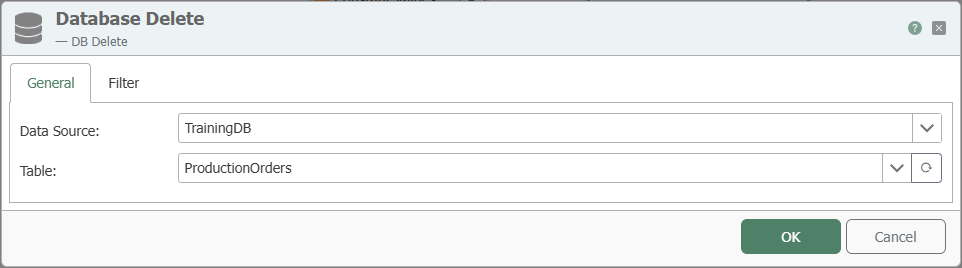
General Properties
| Property | Description |
|---|---|
| DB Connection | All relational database connections created in the Plug-ins area are available for selection here. If your desired database connection is not listed, you can create it in the Plug-ins area as Microsoft SQL Server, Oracle, SAP HANA, ODBC, OLE DB, MySQL, or PostgreSQL. |
| Table | Table or database view on which the delete operation is performed. |
Filter
The delete operation requires a filter to clearly define which records are to be removed.
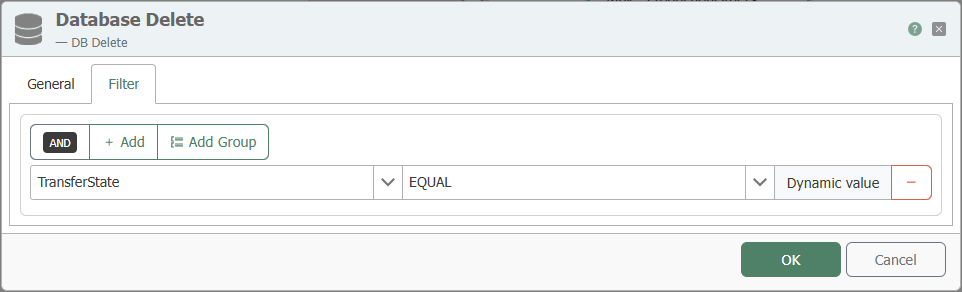
| Property | Description |
|---|---|
| Filter | Graphically displays filters and filter groups. The OPC Router uses this to generate the appropriate database statement at runtime. |
| Link | Defines the AND and OR operators between filters and filter groups. |
| Column | Column used for filtering. |
| Comparison Operator | Operator for comparing values. |
| Preview | Displays the resulting filter condition, for example WHERE (TIMESTAMP > ?) AND (VALUE = ?). |
An explanation of the various filter operators can be found here.
Impact on the Data Set
DB Delete removes the affected records from the data set. The operation should therefore only be used if the business implications have been clearly defined.
Notes
warning
Delete operations are particularly critical from a business perspective. Use DB Delete only with a clear filter and check the impact on downstream processes and histories.
note
The transfer object can also be selected for database views.