DB Insert
The DB Insert transfer object inserts new records into a table or database view during data transfer. The transfer object thus acts as a transfer destination.
Dialog Overview
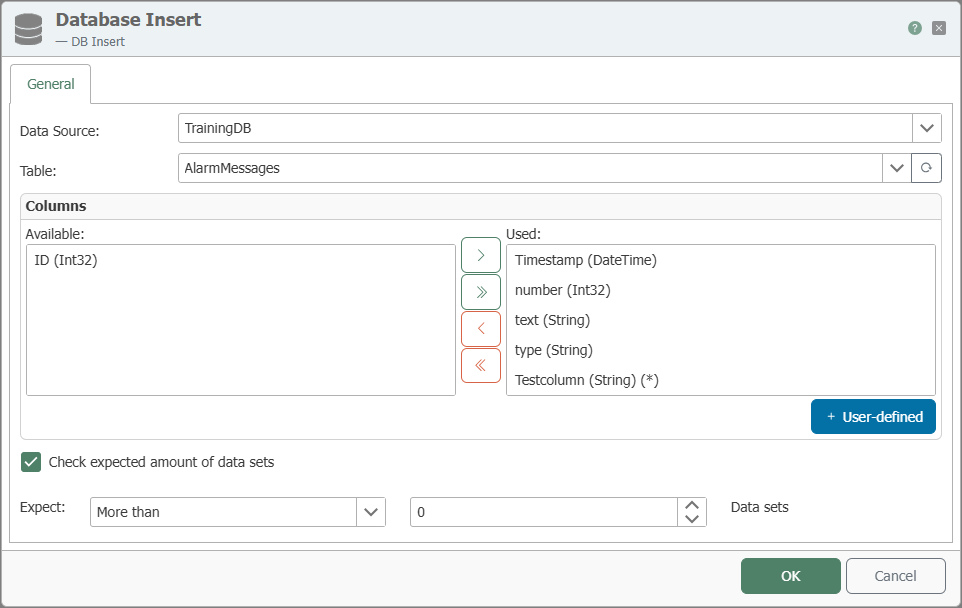
General Properties
| Property | Description |
|---|---|
| DB Connection | All relational database connections created in the Plug-ins area are available for selection here. If your desired database connection is not listed, you can create it in the Plug-ins area as Microsoft SQL Server, Oracle, SAP HANA, ODBC, OLE DB, MySQL, or PostgreSQL. |
| Table | Table or database view into which records are inserted. |
| Available Columns | Columns in the table that have not yet been used. |
| Used Columns | Columns that are displayed as elements of the transfer object and are therefore used for the insert. |
Manual columns can be added via +User-defined. They must exist in the database at runtime. This is particularly helpful for templates when the columns are not yet available during design.
The distinction between available and used columns serves to provide clarity in the configuration area. Move columns by double-clicking the column name or using the <, >, <<, and >> buttons.
Behavior When Adding
During a database insert, incomplete arrays are filled in. For example, if a single timestamp is to be inserted into the database along with multiple array values, the timestamp is automatically used multiple times until all array elements have been inserted. Therefore, the highest InsertCount is always determined during an insert. Entries with a lower count are expanded accordingly so that the table is completely filled.
Check expected number of incoming records
Enable this option to check the number of incoming records before insertion. For example, if you receive an array, you can specify the minimum, maximum, or exact number of records that must be present for the insertion process to execute.
Notes
The transfer object can also be selected for database views.
For general information on relational database plug-ins, see Relational Database Plug-ins. For examples of best practices, see Examples and Concepts.