DB Update
The DB Update transfer object updates one or more existing records in a table or database view during data transfer. The transfer object thus acts as a transfer destination.
Dialog Overview
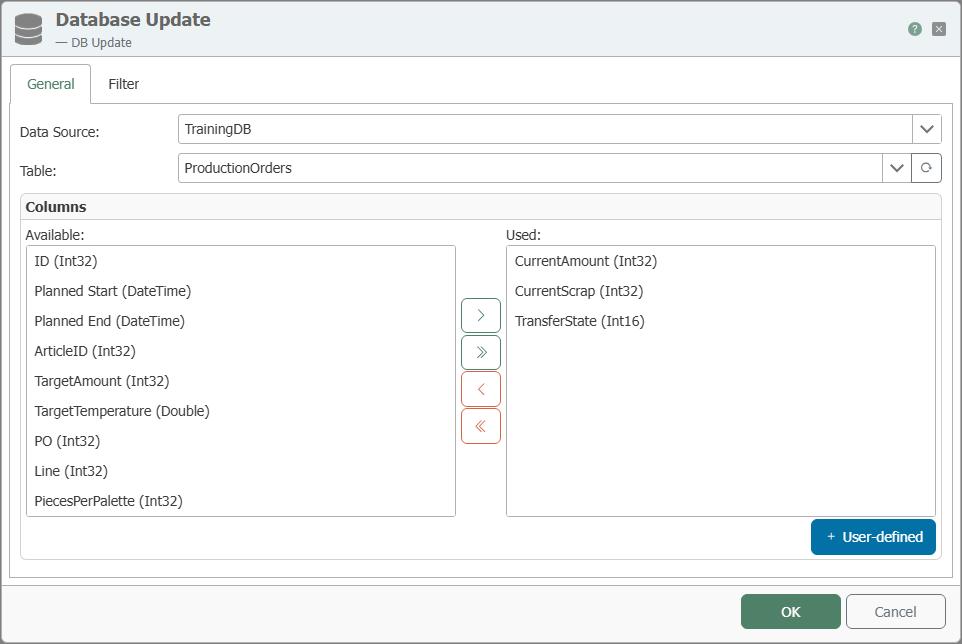
General Properties
| Property | Description |
|---|---|
| DB Connection | All relational database connections created in the Plug-ins area are available for selection here. If your desired database connection is not listed, you can create it in the Plug-ins area as Microsoft SQL Server, Oracle, SAP HANA, ODBC, OLE DB, MySQL, or PostgreSQL. |
| Table | Table or database view on which the update is performed. |
| Available Columns | Columns in the table that have not yet been used. |
| Used Columns | Columns whose values are updated during the update. |
The distinction between available and used columns serves to provide clarity in the design area. Move columns by double-clicking the column name or using the <, >, <<, and >> buttons.
Filter
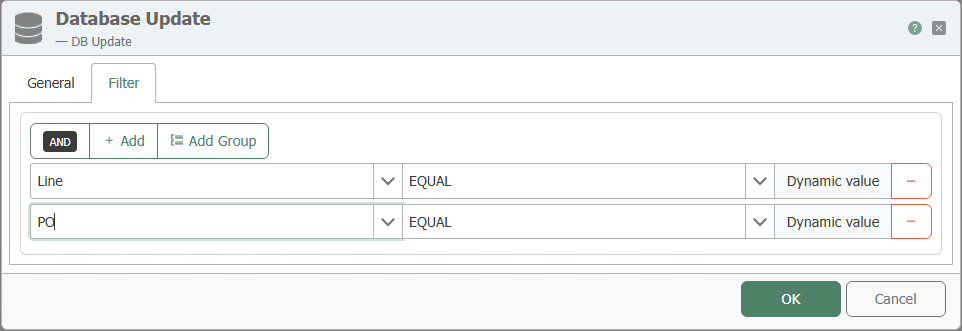
The update requires a filter to clearly define which records are updated.
| Property | Description |
|---|---|
| Filter | Graphically displays filters and filter groups. The OPC Router uses this to generate the appropriate database statement at runtime. |
| Link | Defines the AND and OR operators between filters and filter groups. |
| Column | Column used for filtering. |
| Comparison Operator | Operator for value comparison. |
| Preview | Displays the resulting filter condition, for example WHERE (TIMESTAMP > ?) AND (VALUE = ?). |
An explanation of the various filter operators can be found here.
Return Value
The transfer object provides the number of rows actually updated as a data source.
Notes
Use the update only with filters that are appropriate for the business context. A filter that is too broad or missing can unintentionally modify many records.
The transfer object can also be selected for database views.