RFC Trigger
Connected SAP® systems use the RFC trigger to initiate data transfers in the OPC Router. To do this, a corresponding entry must be created on the SAP® side in transaction SM59.
Dialog Overview
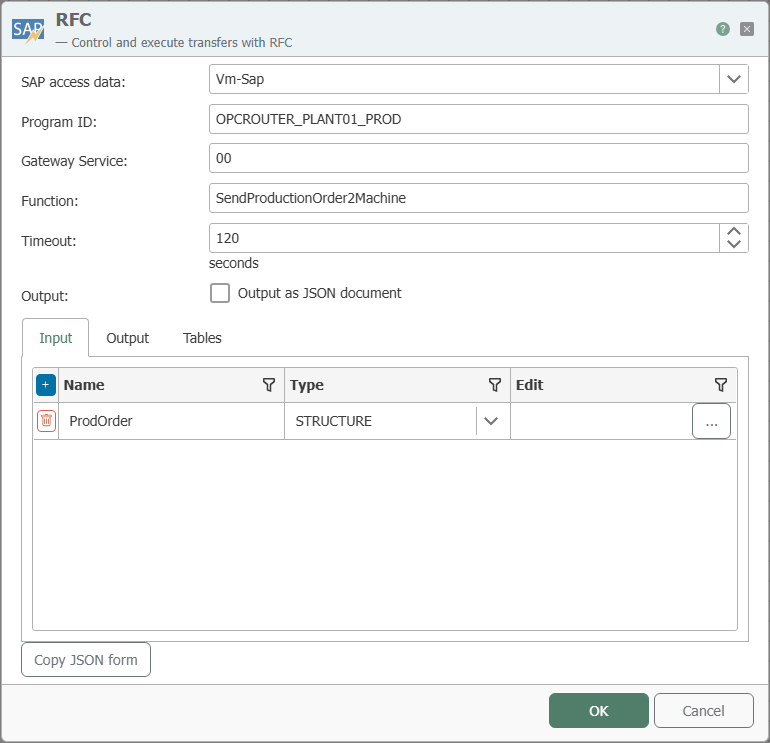
The screenshot shows the selection of the SAP® connection as well as the configuration of the program ID, gateway service, function, and parameters.
Configuration
| Property | Description |
|---|---|
| SAP Connection | All SAP® connections created in the Plug-ins section are available for selection here. If the desired connection does not yet exist, you can make it available as an SAP® connection in the Plug-ins section. |
| Program ID | Program ID used to call the destination on the SAP® system; identical to the program ID in transaction SM59. |
| Gateway Service | RFC Protocol: Enter the gateway, for example sapgw00 (SAP Gateway 0). NetWeaver RFC Protocol: Specification of the port (3300 + Id for Basic authentication, 4800 + Id for SNC authentication). |
| Function | Function defined in the SAP® system that triggers this trigger. |
| Timeout | The time interval after which the OPC Router sends a timeout message to the SAP® system if the task continues. |
| Output | Select this field if you want to receive the output as JSON. |
| Input (Input tab) | Parameters that the calling SAP® system passes to the OPC Router when triggering the function (import parameters of the function module). |
| Output (“Output” tab) | Parameters that the OPC Router returns to the calling SAP® system after executing the connection (export parameters of the function module). |
| Tables (“Tables” tab) | Table parameters used in both directions—they can pass data to the call and return (modified) data to SAP®. |
| Copy JSON Format | Copies a JSON document to the clipboard whose structure corresponds to the function call. |
Input, Output, and Tables
An RFC function module has a fixed interface consisting of parameters. With the RFC trigger, the OPC Router takes on the role of the called module—you therefore define its interface using three tabs:
- Input: Values that the SAP® system passes to the OPC Router when it is called. These values are then available in the connection.
- **Output: Values that the OPC Router returns to the SAP® system after the connection ends. These are populated in the connection.
- Tables: Tables (multi-row data structures) that can be used in both directions.
In each tab, create the required parameters by assigning a name and selecting the data type. In addition to simple types, “STRUCTURE” (a structure with multiple fields) and “ITAB” (an internal table) are also supported. Use “Edit” to define the individual fields for these types; nesting is not possible.
For CHAR and NUM fields, specify the expected length using “Edit.” The default length is 0; if it has not been changed, a corresponding message appears when you close the dialog.
Calling a nonexistent function module will inevitably result in the server being unregistered from the SAP® Gateway. The registration can no longer be used and must be performed again, which in ERP-Connect results in a server restart.
Once functions have been declared to the NetWeaver library, they cannot be deleted. This applies to the entire process, across all SAP® systems and RFC servers. Therefore, you cannot subsequently change the name or type of the import/export/tables parameters of a function module called via an RFC server, nor can you alter the existence of the module itself. Do not make any changes while the OPC Router service is running. If changes are made, the module must always be republished in its entirety.
Return Parameters
When the SAP® system calls the function module, the OPC Router executes the corresponding connection and then returns a result to the calling SAP® system. The SAP® system uses the return parameter TRANSFER_OK to determine whether the transfer was successful:
| Name | Description |
|---|---|
| TRANSFER_OK | 1 = OK: Successful transfer of the connection. 2 = Aborted: The transfer was canceled by a transfer object, for example, if a table for a database transfer object contained no data. 3 = Error: An error occurred during the execution of the transfer. The request must be resubmitted later and must not be marked as completed by the connected system. |
Register the function name in ALL CAPS (for example, Z_TRIGGER): SAP® passes function module names in uppercase, and the OPC Router matches them character-for-character—a lowercase registration will not be found. The program ID is also evaluated on a character-by-character basis (case-sensitive) and must match exactly the entry in the SAP® transaction SM59; uppercase letters are common and recommended, but not mandatory. The SAP®-side call is:
Call function '<FUNCTION_NAME>' destination '<SAP-DESTINATION>'.
The combination of host (SAP connection), gateway, and program ID must be unique. The program ID itself can be used multiple times—but only with different gateways/hosts.
Example
Settings for the RFC trigger:
| Property | Configuration |
|---|---|
| SAP Connection | <SAP-Anbindung>, through which the relevant function is accessed. |
| Program ID | INRAYTRIGGER |
| Gateway Service | Gateway service of the SAP® system, for example 3302 |
| Function | TRIGGERFUNKTION |
Corresponding SAP® Settings, SM59:
Program ID INRAYTRIGGER was created in the SAP® transaction SM59.
| Property | Configuration |
|---|---|
| Destination | OPCROUTER |
| Connection Type | T TCP/IP |
| Activation Type | Registered server program |
| Program ID | INRAYTRIGGER |
| Gateway Host | (no entry!) |
| Gateway Service | (no entry!) |
Data transfer is actively triggered by the SAP® system through a synchronous function call within a program, function module, or dialog in SAP®:
Call function 'TRIGGERFUNKTION' destination 'OPCROUTER'.