RFC Trigger
Connected SAP® systems use the RFC trigger to initiate data transfers in the OPC Router. To do this, a corresponding entry must be created on the SAP® side in transaction SM59.
Dialog Overview
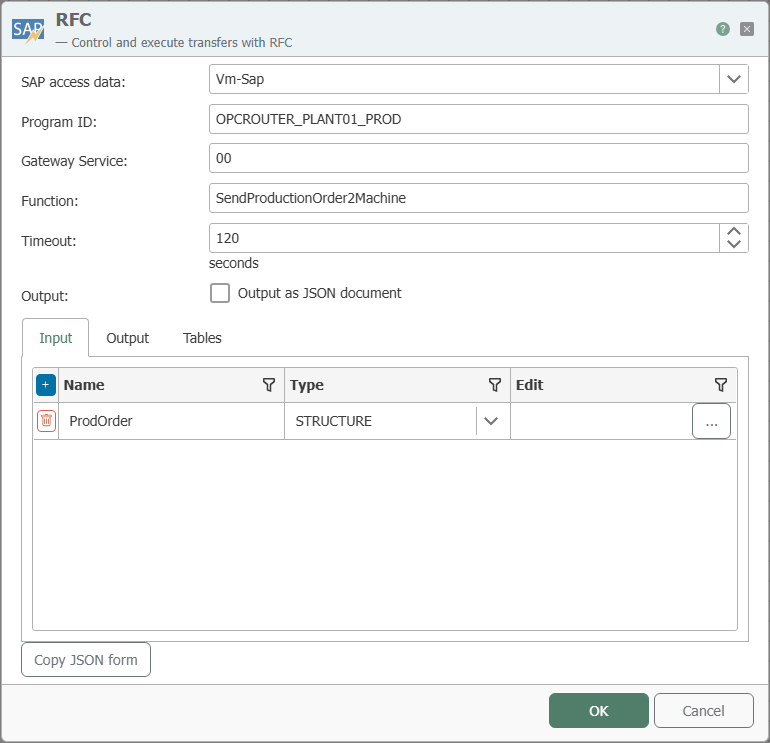
The screenshot shows the selection of the SAP® connection as well as the configuration of the program ID, gateway service, function, and parameters.
Configuration
| Property | Description |
|---|---|
| SAP Connection | All SAP® connections created in the Plug-ins section are available for selection here. If the desired connection does not yet exist, you can make it available in the Plug-ins section as a SAP® connection . |
| Program ID | Program ID used to call the destination on the SAP® system; identical to the program ID in transaction SM59. |
| Gateway Service | RFC Protocol: Enter the gateway, for example sapgw00 (SAP Gateway 0). NetWeaver RFC Protocol: Specify the port (3300 + Id for Basic authentication, 4800 + Id for SNC authentication). |
| Function | Function defined in the SAP® system that triggers this trigger. |
| Timeout | Time interval after which the OPC Router sends a timeout message to the SAP® system if the task is still in progress. |
| Output | Check this box if you want to receive the output as JSON. |
| Input (Input tab) | Parameters that the calling SAP® system passes to the OPC Router when triggering the flow (import parameters of the function module). |
| Output (“Output” tab) | Parameters that the OPC Router returns to the calling SAP® system after executing the flow (export parameters of the function module). |
| Tables (Tables tab) | Table parameters that are used in both directions—they can pass data to the call and return (modified) data to SAP®. |
| Copy JSON Format | Copies a JSON document to the clipboard whose structure corresponds to the function call. |
Input, Output, and Tables
An RFC function module has a fixed interface consisting of parameters. With the RFC trigger, the OPC Router assumes the role of the called module—you therefore define its interface using three tabs:
- Input: Values that the SAP® system passes to the OPC Router when it is called. These values are then available in the flow.
- **Output: Values that the OPC Router returns to the SAP® system after the flow has completed. These are populated within the flow.
- Tables: Tables (multi-row data structures) that can be used in both directions.
In each tab, create the required parameters by assigning a name and selecting the data type. In addition to simple types, “STRUCTURE” (a structure with multiple fields) and “ITAB” (an internal table) are also supported. For these types, you define the individual fields via “Edit”; nesting is not permitted.
For CHAR and NUM fields, specify the expected length using “Edit”. The default length is 0; if it has not been changed, a corresponding message appears when you close the dialog.
Calling a nonexistent function module will inevitably result in the server being deregistered from the SAP® Gateway. The registration can no longer be used and must be performed again, which in ERP-Connect results in a server restart.
Once functions have been registered with the NetWeaver Library, they cannot be deleted. This applies to the entire process, across all SAP® systems and RFC servers. Therefore, you cannot subsequently change the name or type of the import/export/tables parameters of a function module called via an RFC server, nor can you change the existence of the module itself. Do not make any changes while the OPC Router service is running. Any changes must always be published in full.
Return Parameters
When the SAP® system calls the function module, the OPC Router executes the associated flow and then returns a result to the calling SAP® system. The SAP® system uses the return parameter TRANSFER_OK to determine whether the transfer was successful:
| Name | Description |
|---|---|
| TRANSFER_OK | 1 = OK: Successful transfer of the flow.2 = Aborted: The transfer was aborted by a transfer object, for example, if a table for a database transfer object contained no data.3 = Error: An error occurred during the execution of the transfer. The request must be resubmitted later and must not be marked as completed by the connected system. |
Register the function name in ALL CAPS (for example, Z_TRIGGER): SAP® passes function module names in uppercase, and the OPC Router matches them character-for-character—a lowercase registration will not be found. The program ID is also evaluated on a character-by-character basis (case-sensitive) and must match exactly the entry in the SAP® transaction SM59; uppercase letters are common and recommended, but not mandatory. The SAP®-side call is:
Call function '<FUNCTION_NAME>' destination '<SAP-DESTINATION>'.
The combination of host (SAP connection), gateway, and program ID must be unique. The program ID itself can be used multiple times—but only with different gateways/hosts.
Interaction with SAP
The section on sequence diagrams explains how to read this diagram.
The RFC trigger is the receiving end of a server program registered with the SAP gateway: The SAP system initiates the transfer with CALL FUNCTION '<Funktion>' DESTINATION '<Destination>'. Whether the calling SAP process waits for the transfer to complete is determined solely by the “Asynchronous Call” checkbox on the trigger, which is visible only in expert mode. Note the inverse logic: If the box is unchecked—which is the default setting—SAP waits; if it is checked, SAP continues immediately. The following diagrams illustrate both cases, and the difference lies in the point at which the RFC call returns to SAP.
Asynchronous Call: Off (default) – the SAP call waits for the transfer
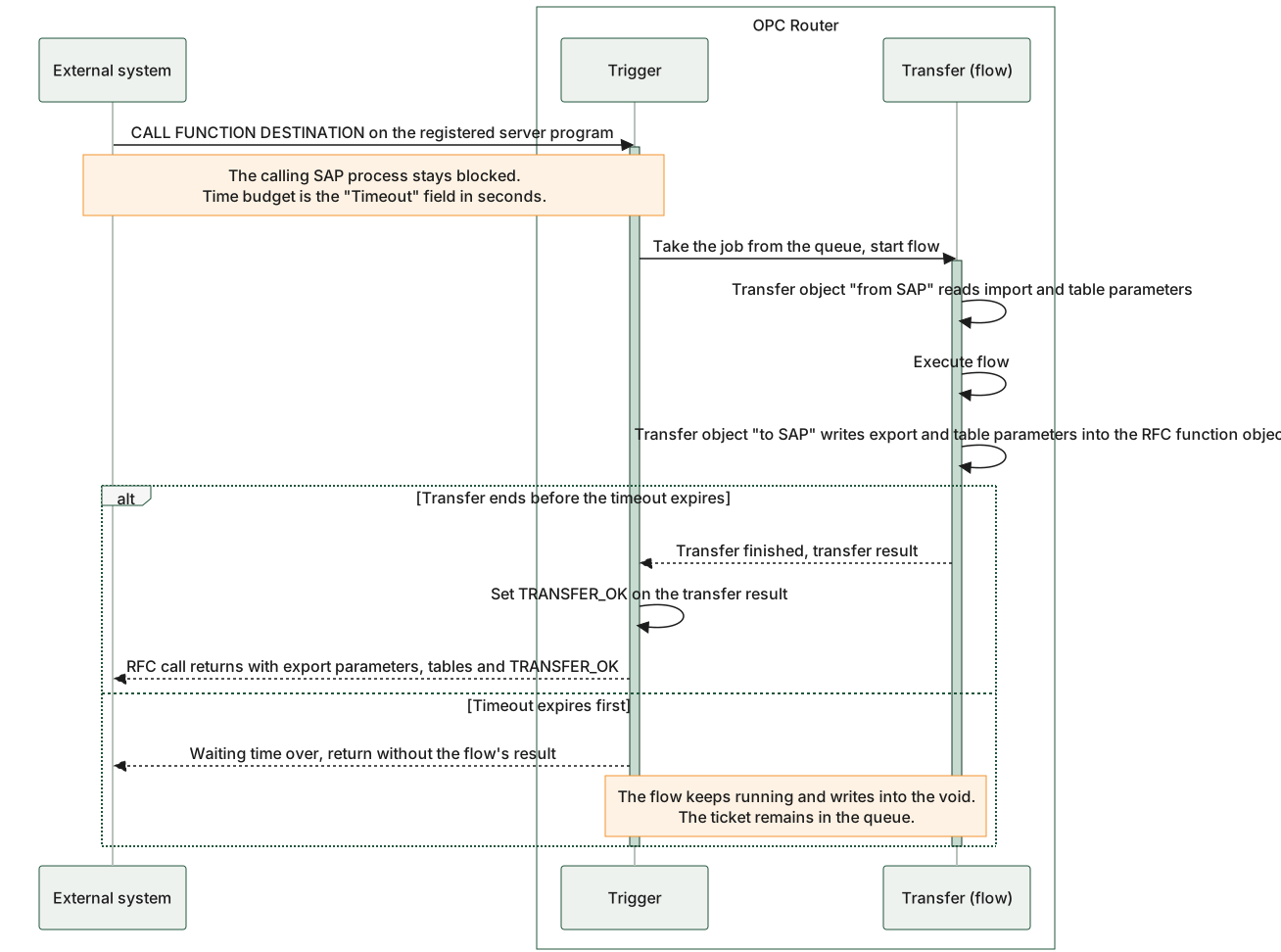
The typical scenario: SAP calls the function, the calling process pauses, and the transfer runs in the router. The transfer object writes the export and table parameters “to SAP” right in the middle of the flow into the same function object that SAP later receives; the return parameter TRANSFER_OK, on the other hand, is set only after the transfer ends, immediately before the call returns. If the “Timeout” field expires beforehand, a time discrepancy occurs: The SAP call ends, but the flow in the router continues and writes to nothing—it continues to write to the same function object whose RFC call has since ended, and whose contents SAP therefore never sees again. The ticket remains in the queue, so a delayed start of the flow is also possible. Exactly what SAP reports in this case depends on the RFC server’s operating mode (in the default hosting process, a fixed 60-second limit for the internal handoff applies; if the “Timeout” is shorter than that, SAP treats it as a normal return with unassigned export parameters)—the diagram deliberately does not show a separate arrow for this scenario.
Asynchronous call: one (expert mode only) – the SAP call returns immediately
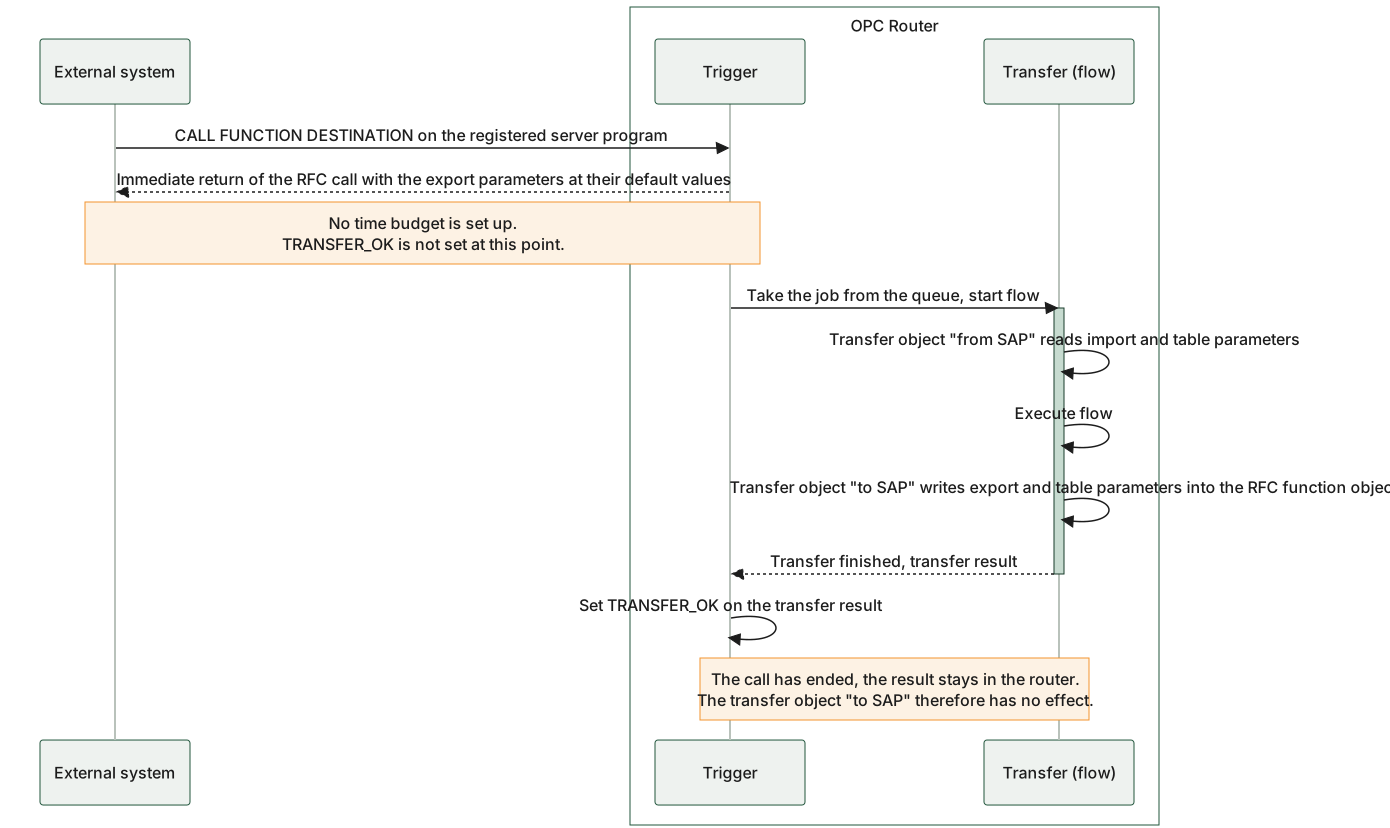
If “Asynchronous Call” is checked, the trigger does not set a wait signal: The RFC call returns as soon as the request is queued, and SAP receives the export parameters as they are predefined. The flow does not run until afterward; by that point, the call has long since ended. Both the transfer object “to SAP” and the return parameter TRANSFER_OK, which is set after the transfer, then write to an object that SAP no longer sees. A transfer object “to SAP” and the evaluation of TRANSFER_OK are therefore irrelevant in this operating mode.
The setting for “Asynchronous Call” determines when the RFC call returns to SAP: if unchecked, it returns only after the transfer and includes export parameters, tables, and TRANSFER_OK; if checked, it returns immediately and includes only the default values for the export parameters.
Example
Settings for the RFC trigger:
| Property | Configuration |
|---|---|
| SAP Connection | _<SAP-Anbindung> _, through which the relevant function is accessed. |
| Program ID | INRAYTRIGGER |
| Gateway Service | Gateway service of the SAP® system, for example 3302 |
| Function | TRIGGERFUNKTION |
Corresponding SAP® Settings, SM59:
Program ID INRAYTRIGGER was created in the SAP® transaction SM59.
| Property | Configuration |
|---|---|
| Destination | OPCROUTER |
| Connection Type | T TCP/IP |
| Activation Type | Registered Server Program |
| Program ID | INRAYTRIGGER |
| Gateway Host | (no entry!) |
| Gateway Service | (no entry!) |
Data transfer is actively triggered by the SAP® system through a synchronous function call within a program, function module, or dialog in SAP®:
Call function 'TRIGGERFUNKTION' destination 'OPCROUTER'.