RFC Trigger
Connected SAP systems can use the RFC trigger to initiate data transfers. On the SAP side, a corresponding entry must be made in transaction SM59.
The following properties can be configured:
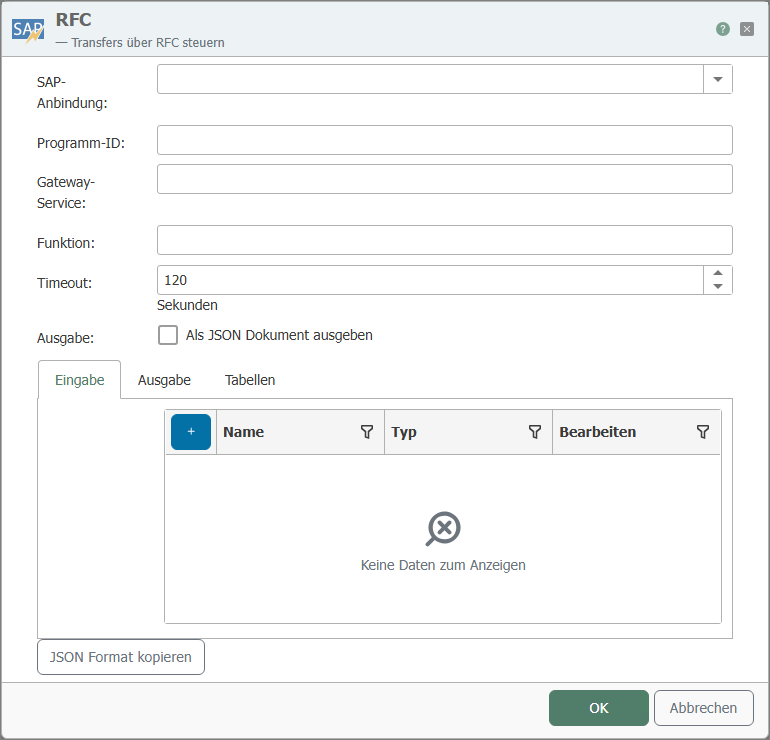
| Property | Description |
|---|---|
| SAP connection | SAP connection used to access the relevant function. |
| Program ID | The program ID used to call the destination in the SAP system corresponds to the program ID in transaction SM59. |
| Gateway Service |
|
| Function | Function defined in the SAP system that triggers this trigger. |
| Timeout | Time period after which the router sends a timeout message to the SAP system if the task continues. |
| Output | Set this field if you want to receive output as JSON. |
| Input (Grid) | The rows of this grid are trigger inputs. |
| Output (Grid) | The rows of this grid are trigger outputs. |
| Tables (Grid) | The rows of this grid are used as both outputs and inputs. |
| JSON Format Copy | Copies a JSON document to the clipboard whose structure corresponds to the function call. |
The expected length for sent and received CHAR and NUM fields must be configured using the Edit button. The default length is set to 0. If you have not changed the length for a parameter, you will receive a notification to that effect when you close the dialog.
Calling a nonexistent function module will force the server to be deregistered from the SAP Gateway. The registration can no longer be used and must be performed again, which in ERP-Connect results in a server restart.
Once functions have been registered with the NW Library, they cannot be deleted. This applies to the entire process, across all SAP systems and RFC servers. Therefore, you can no longer change the name and type of the import/export/tables parameters of a function module that is called via an RFC server and identified by its function module name, nor can you alter the existence of the function module itself. Do not make any changes while the OPC Router service is running. If you make any changes, you must always republish the entire configuration.
Return Parameters
| Name | Description |
|---|---|
| TRANSFER_OK |
|
Important: The program ID and function name must be written in UPPERCASE. The SAP-side call is:
Call function ’<FUNCTION_NAME>‘ destination ’<SAP-DESTINATION>‘.
The combination of host (SAP connection), gateway, and program ID must be unique. The program ID itself can be used multiple times—but only with different gateways/hosts.
With the RFC trigger, you also have the option to define ITAB or STRUCTURE as parameters. Create the inputs and outputs accordingly by selecting the respective types, assigning a name, and accessing the editor for the individual fields via Edit. Nesting is not possible.
Example
Settings for the RFC trigger:
| Property | Configuration |
|---|---|
| SAP Connection | <SAP-Anbindung>, through which the relevant function is accessed. |
| Program ID | INRAYTRIGGER |
| Gateway Service | Gateway service of the SAP system, e.g., 3302 |
| Function | TRIGGERFUNKTION |
Corresponding SAP settings, SM59:
The program ID INRAYTRIGGER was created in the SAP transaction SM59.
| Property | Configuration |
|---|---|
| Destination | OPCROUTER |
| Connection type | T TCP/IP |
| Activation Type | Registered Server Program |
| Program ID | INRAYTRIGGER |
| Gateway Host | (no entry!) |
| Gateway Service | (no entry!) |
Data transfer is actively triggered by the SAP system through a synchronous function call within a program, function module, dialog, etc., within SAP:
Call function ’TRIGGERFUNKTION‘ destination ’OPCROUTER‘.