REST Trigger
The REST trigger provides a REST endpoint within a flow. When an external client calls this endpoint, the associated transfer is triggered.
The mapping between the REST Server plug-in and the trigger is described in the chapter REST in OPC Router: Structure and Responsibilities.
Dialog Overview
The dialog is divided into the REST Server and MCP Server tabs. On the REST Server tab, you select the REST Server plug-in and configure the endpoint, HTTP method, response format, and request and response parameters.
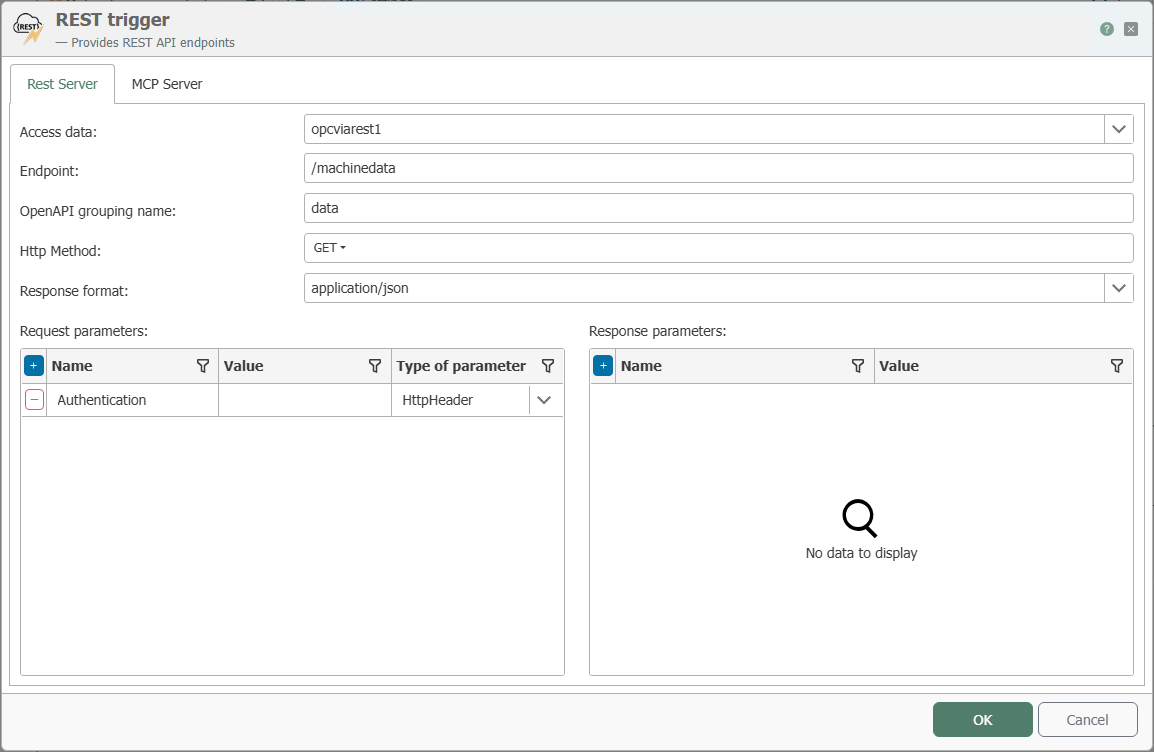
Configuration
| Property | Description |
|---|---|
| connection | All REST server plug-in instances created in the Plug-ins section are available for selection here. If the desired REST server plug-in is not listed, you can make it available in the Plug-ins section as a REST server . |
| endpoint | The path portion of the endpoint following the host address, port, and, if applicable, the route prefix of the selected REST server plug-in. |
| OpenAPI Group Name | The name of the group under which the endpoint is grouped in the OpenAPI description of the REST Server plug-in. |
| HTTP Method | HTTP methods that the endpoint should support. |
| Response Format | The format in which the response is sent, such as JSON. |
| Request Parameters | Parameters that an external client must pass when calling the endpoint. Use the “Parameter Type” column to specify how each parameter is passed. |
| Response Parameters | Parameters that are returned to the calling client as a response. |
Types of Request Parameters
For each request parameter, use the drop-down box in the “Parameter Type” column to specify where in the call the parameter is expected.
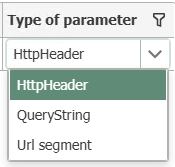
| Parameter Type | Description |
|---|---|
| HttpHeader | The parameter is passed as an HTTP header. |
| QueryString | The parameter is appended to the URL as a query string (?Name=Value). |
| URL segment | The parameter is part of the URL path. |
Endpoint Address
For example, if the address http://server:50117/api/ is configured in the REST Server plug-in and the endpoint GetData is specified in the trigger, the call can be accessed at http://server:50117/api/GetData.
If “Provide API via web management endpoint.” is also enabled in the REST Server plug-in, the path segment /services/{Plug-in-Name} is inserted between the host address with port and the route prefix. The call can then be, for example, http://server:8080/services/MyPlugin/api/GetData.
If the OPC Router is running as a Docker instance, the port configured in the corresponding REST Server plug-in must also be exposed to the outside world within the container so that the trigger endpoint is accessible externally. This can be bypassed if the “Provide API via web management endpoint.” option is enabled in the REST Server plug-in and the Web Management endpoint is accessible.
MCP Tool Configuration
On the MCP Server tab, you can additionally expose the REST trigger as an MCP tool. A complete, end-to-end example can be found at Providing Production Data via MCP.
The MCP Server tab can only be used once the MCP Server feature has been enabled in the selected REST Server plug-in instance. See MCP Server Configuration.
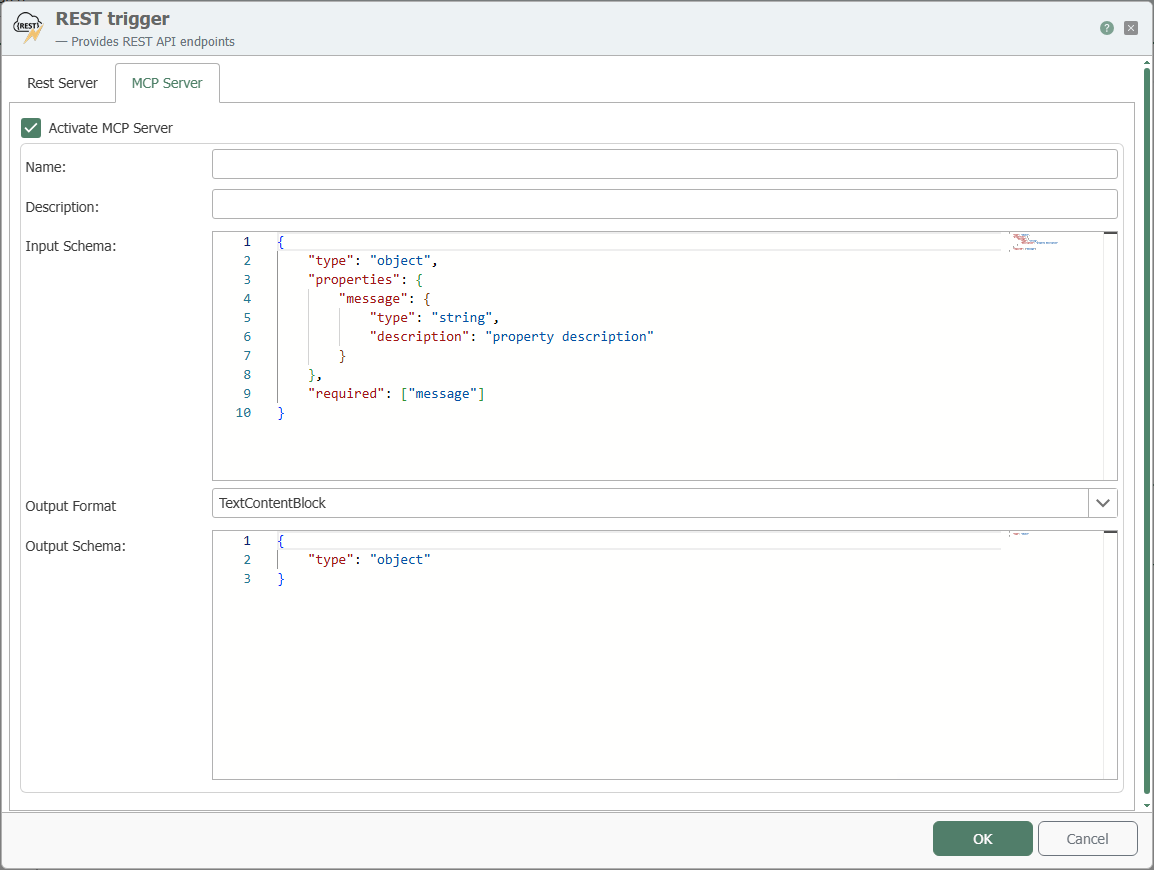
| Property | Description |
|---|---|
| Enable MCP Server | Makes the REST trigger available as an MCP tool. |
| Name | Name of the MCP tool. |
| Description | Description of the MCP tool. |
| Input Schema | Schema for the request to the MCP tool. |
| Output Format | Specifies the format in which data is returned. With TextContentBlock, unstructured text is returned. With StructuredContent, an output schema can be defined. |
| Output Schema | Return schema for the MCP tool. This property is only relevant when StructuredContent is used as the output format. |

You can find documentation for the schemas used in the schema reference at modelcontextprotocol.com.
Interaction with the calling client
The section on sequence diagrams explains how to interpret this diagram.
The REST trigger operates in a request-response synchronous manner: The calling HTTP client waits until the triggered transfer is complete. There is no “wait for transfer” switch here—the system always waits. Note that the response content is not generated within the trigger, but within the flow: The hidden response transfer object, which is unioned with the trigger, writes the response body (multiple links are concatenated), the status code, and the response parameters as HTTP headers during the transfer. The response is then sent exactly once by the trigger after the transfer is complete. Without a projected response-transfer object, the response body remains empty, and only the status code is returned.
REST trigger via HTTP: Response from the Flow
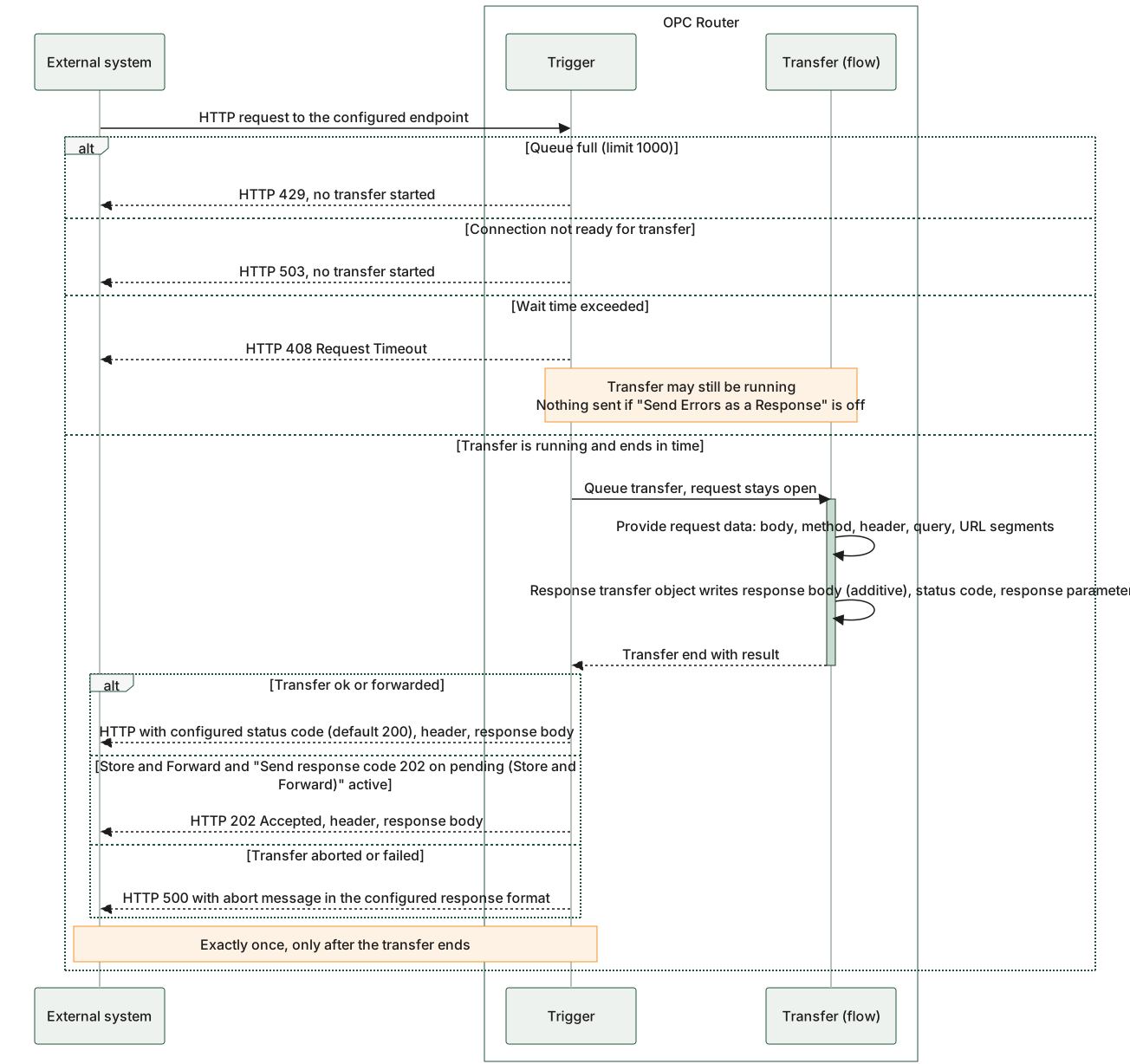
The main diagram shows that the HTTP client waits in a blocking manner and the response is not sent until the transfer is complete. The content of the response comes from the flow; it is sent by the trigger exactly once, after which the waiting request thread times out. The three immediate responses—429, 503, and 408—are separate from this: For 429 and 503, no transfer ever took place; for 408, the transfer was queued and may still be in progress. If the “Send error as response” option is disabled for 408, nothing is sent at this point, and the regular response is sent later with a delay.
Delta: the same trigger as the MCP tool
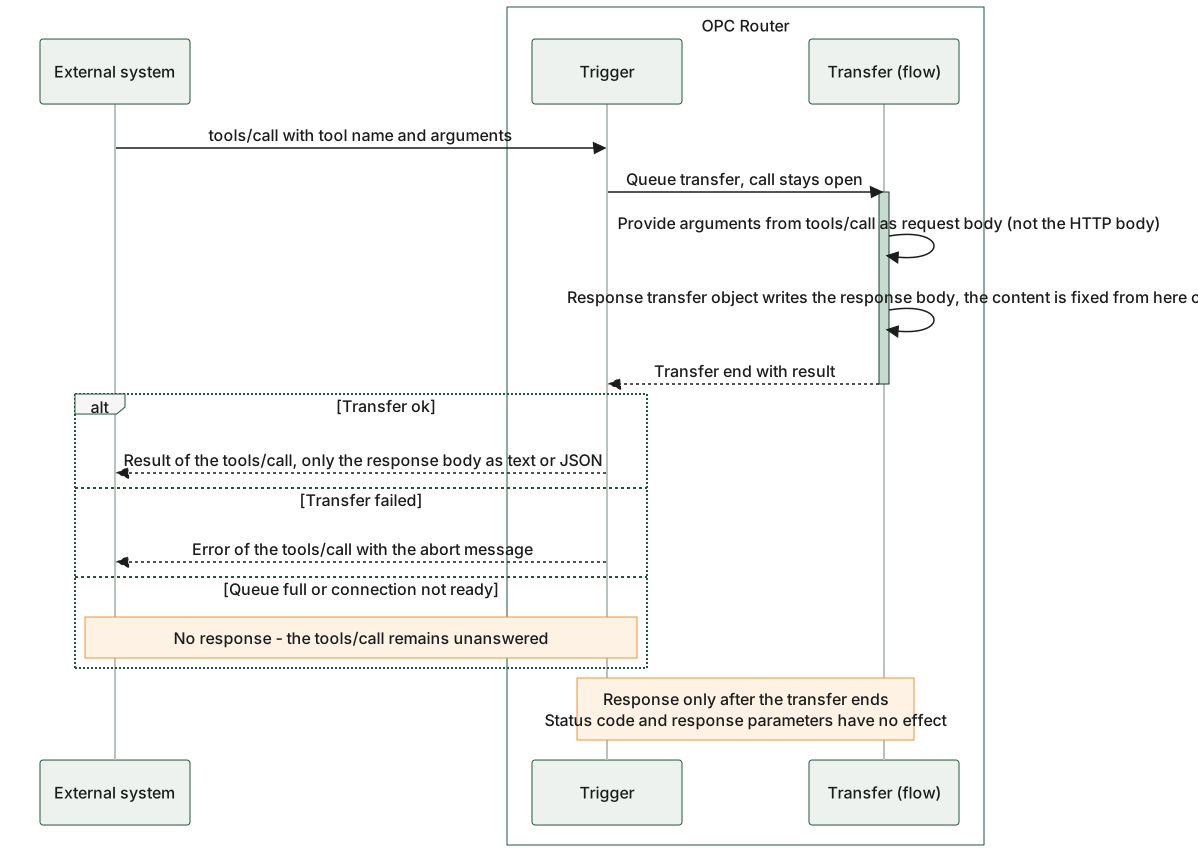
The delta diagram shows only the differences in the MCP path. The request body comes from the arguments of the tool call rather than from the HTTP body, and for the response transfer object, only the response body matters. The response is also sent only after the transfer is complete; only the content is determined earlier. If the transfer has not started (full queue, connection not ready), the caller receives nothing.
Flow of a REST call: The response content is generated during the flow and sent after the transfer ends; the lower half of the image shows the same trigger as an MCP tool.