Advanced Connection Settings
On this tab, you can customize additional connection parameters. All settings on this page are optional and part of the configuration of the “Snowflake AI Data Cloud” plug-in.
Dialog Overview
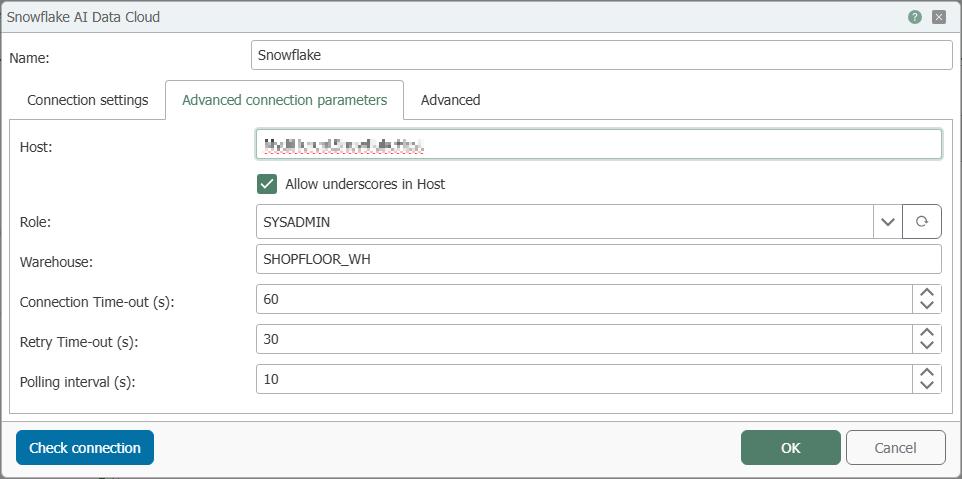
Configuration
| Input Field | Description |
|---|---|
| Host | Server address of the Snowflake AI Data Cloud. It is typically derived from the account identifier and only needs to be specified if a different address is required. |
| Allow underscores in host | Enable if the host address is allowed to contain underscores (required for some account names). |
| Role | Snowflake role used to execute operations; it determines access permissions. Select an existing role or enter a role that will be created in the future. |
| Warehouse | Snowflake warehouse through which queries and write operations are executed—the computing resource of the Snowflake AI Data Cloud. If not specified, the user’s default warehouse is used. |
| Connection Timeout (s) | Wait time in seconds after which a failed attempt to connect to the Snowflake AI Data Cloud is considered unsuccessful. |
| Retry Timeout (s) | Wait time in seconds after which further connection attempts are aborted. |
| Polling Interval (s) | Time interval in seconds between periodic status requests to the Snowflake AI Data Cloud. |