Sparkplug plug-in
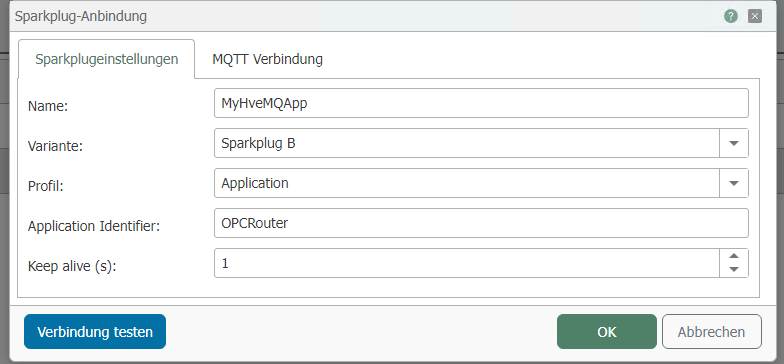
Sparkplug Settings
| Property | Description |
|---|---|
| Name | Assign a unique name to the Sparkplug connection. |
| Variant | Select the variant Sparkplug A or Sparkplug B |
| Profile | Specify the profile of the Sparkplug connection to be used for logging in to the Sparkplug broker |
| Group ID (Only for Profile: Node) | Assign a freely selectable, unique Group ID to be used as the default |
| Node ID (Only for Profile: Node) | Assign a freely selectable, unique Node ID to be used as the default |
| Application Identifier (Only for Profile: Application) | Assign a freely selectable, unique Application Identifier to be used as the default |
| Keep-alive (s) | Specify the keep-alive in seconds |
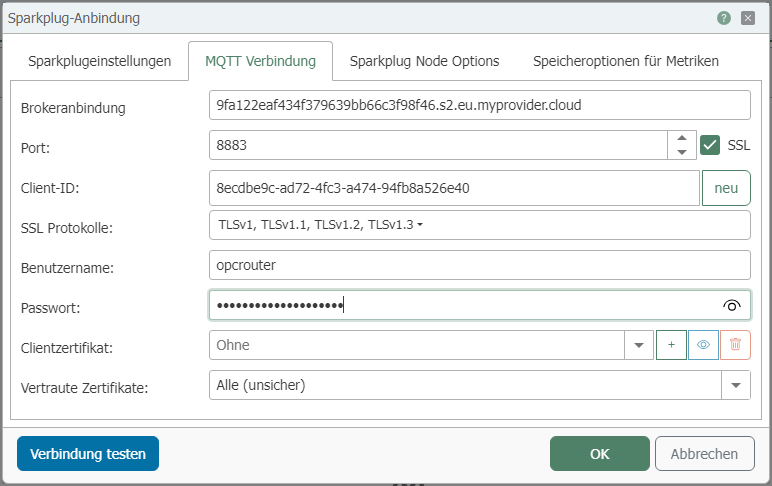
MQTT Connection
| Property | Description |
|---|---|
| Broker Connection | Enter the broker’s address. |
| Port | Port on the server used for the MQTT connection. |
| SSL | Uses SSL encryption. The server must support this, and the corresponding port must be configured. |
| Client ID | Enter a unique client ID. |
| Create a new client ID | Creates a new unique client ID, which is displayed in the Client ID field. |
| SSL Protocols | Select the algorithms that are allowed to be used. Note: Some MQTT brokers reject connections if outdated protocols might be used. |
| Username | Username for logging in to the server. |
| Password | Password for logging in to the server. |
| Certificate | Select a client certificate from the drop-down list that the OPC Router sends along with the connection. |
| Trusted Certificates | Select which certificates should be accepted. For example, all certificates, only Windows certificates, or only router certificates. |
Sparkplug Options
| Property | Description |
|---|---|
| Publish known device metrics on reconnect | Specifies whether metrics from known devices are published upon a new connection. |
| Add Session Number to Data Messages | Determines whether the current session number is added to data messages. |
| Add Session Number to Device Birth and Death | Adds the current session number to Device Birth and Death messages. |
Metric Storage Options
| Property | Description |
|---|---|
| Null Handling | This option is only active if the "Filter" option has been enabled under "Default Change of Value Behavior." The following options are available:
|
| Datetime divisor in milliseconds | Used to round the timestamp when filtering by value and timestamp. |
| Default behavior for value changes | Defines the default behavior when a value changes. The following options are available:
|