OPC-UA PubSub
connection
-763257c38b1a098d08b1288bbdf1d985.png)
| Property | Description |
|---|---|
| Name | Assign a name to the plug-in. |
| Endpoint | Enter the endpoint for the OPC-UA PubSub server here. |
| Message Type | Select the message type you want here:
|
| Publish Interval (ms) | Set the interval at which messages should be published. |
| Timeout (ms) | Specify here after how many seconds a timeout occurs. |
| Keep Alive (ms) | Time interval until the next message is sent. |
| Publisher ID: | Assign a unique ID for the OPC Router here. |
Connection Settings
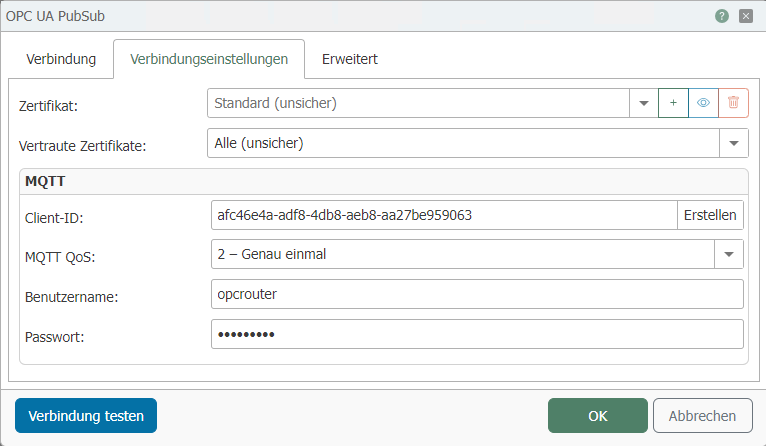
| Property | Description |
|---|---|
| Certificates | Add a certificate here for encrypted communication. |
| Trusted Certificates | Here you can select which server certificates should be accepted. |
MQTT
| Property | Description |
|---|---|
| Client ID | Enter the client ID here. To do so, click the “Generate” button. |
| MQTT QoS | Set the QoS. |
| Username | Enter the username here. |
| Password | Enter the password here. |
Advanced
-2794be14dbe645acb6679698f36caacd.png)
| Property | Description |
|---|---|
| Network Interface | Specifies which network interface should be used. |