MongoDB Plug-in
MongoDB Requirements
Starting with OPC Router 5.7, an updated MongoDB driver is used that requires at least MongoDB 4.2 (Wire version 8). For older MongoDB versions, the connection test will report a corresponding error.
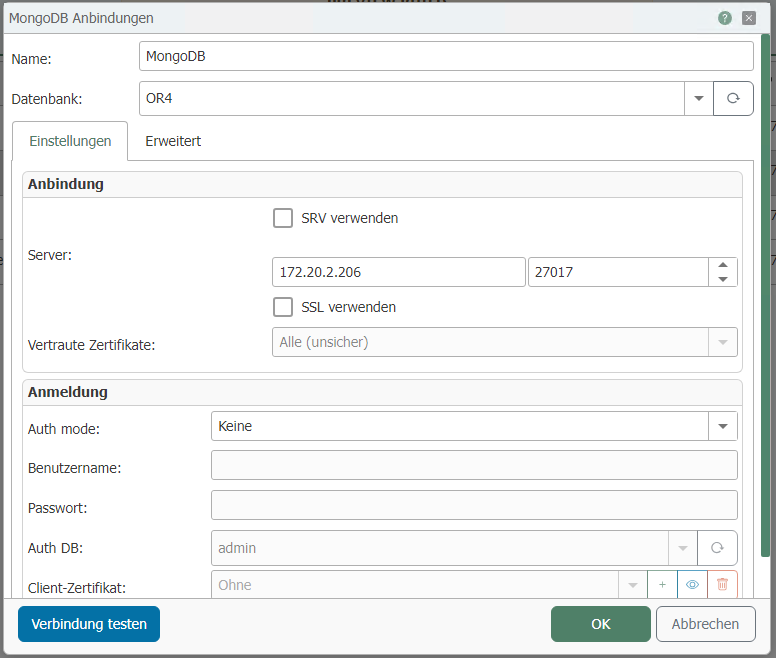
You can set the following properties in the configuration of the MongoDB plug-in:
| Property | Description |
|---|---|
| Name | Give the MongoDB connection a unique name. |
| Use SRV | Enable to use SRV to connect to the database. |
| Host | Specify the IP or DNS name of the Mongo database server. |
| Use SSL | Enable to encrypt the network connection. |
| Auth mode | Select the desired authentication method. Depending on the authentication method, the following input fields will be enabled. |
| Username | Specify a username. |
| Password | Specify a password. |
| AuthDB | Select a user database for the MongoDB instance. |
| Client Certificate | Select or create a certificate for authentication. |
| Database | Select the MongoDB database. |
Tab: Advanced
| Property | Description |
|---|---|
| Timeout(s) | Specify the timeout in seconds. |
| Use replica set | If you want to use a replica set, select this checkbox. |
| Replica Set Name: | Name of the replica set. |
| Read Preference | Setting specifying which server data should primarily be read from. |