Datachange
Note: The Datachange trigger cannot reliably detect every data change. For critical connections for data transfer, please use the Message or Bit trigger together with a handshake.
The Data Change trigger initiates data transfer when the value of a data point changes. You can also set a relative or absolute tolerance and specify a minimum and maximum time interval – forced transfer even if there is no change, or limitation of transfers in the event of many data changes.
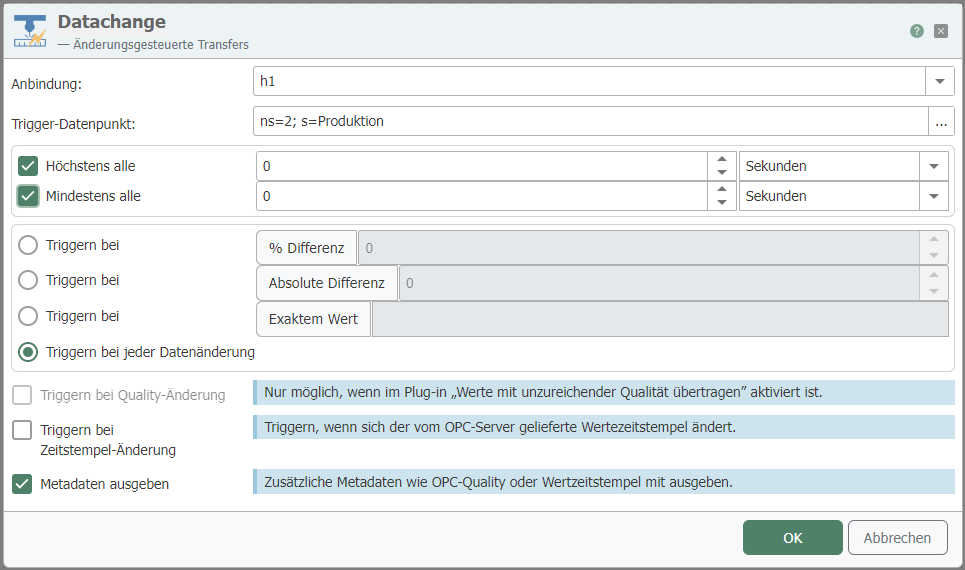
| Property | Description |
|---|---|
| Connection | Heidenhain connection via which the relevant data point is reached. |
| Trigger data point | Trigger data point whose value above/below triggers the transfer. Use the "..." button to open the tag selection (see below) for interactive selection of an item. |
Use the "Advanced" button to define additional properties.
| Property | Description |
|---|---|
| At most every | If the value of the data point changes frequently, the transfer rate can be limited here via an interval. The entry therefore means: "The maximum transfer rate is, for example, once per second, even if the value changes more frequently." Always enter a whole number, no decimal places. The units to be selected are therefore milliseconds, seconds, minutes, hours, or days. |
| At least every | Time interval in which data is transferred in any case, even if the value of the data point has not changed. Always specify as a whole number, no decimal places. Therefore, milliseconds, seconds, minutes, hours, or days must be selected as units. |
| Trigger at ... % difference | The transfer is only triggered if the value of the data point changes by this entry (relative). |
| Trigger at ... Absolute difference | The transfer is only triggered if the value of the data point changes by this entry (absolute). |
| Trigger on every data change | Default. Overrides tolerance settings. |
| Trigger on quality change | Select the checkbox if you want to trigger on quality change. |
| Trigger on timestamp change | Select the checkbox if you want to trigger when the timestamp changes. |
| Output metadata | Select the checkbox if you want to output the timestamp or quality metadata. |
Tip: To set conditions for absolute and relative differences, configure two data change triggers: one for relative differences and one for absolute differences. You can link them using AND or OR.