Data Change Trigger
The Data Change trigger initiates data transfer when the value of a data point changes. You can also set a relative or absolute tolerance and specify a minimum and maximum time interval – forced transfer even if there is no change, or limitation of transfers in the event of many data changes.
The Data-Change-Trigger reacts to value changes reported by the connection. If the data point changes multiple times within a read cycle, the OPC Router only sees the latest value—the intermediate values are lost without notification. When every data record must be accounted for, use the bit trigger or the message trigger in conjunction with a handshake; see “Securing OPC Transfers” for details on how to set this up.
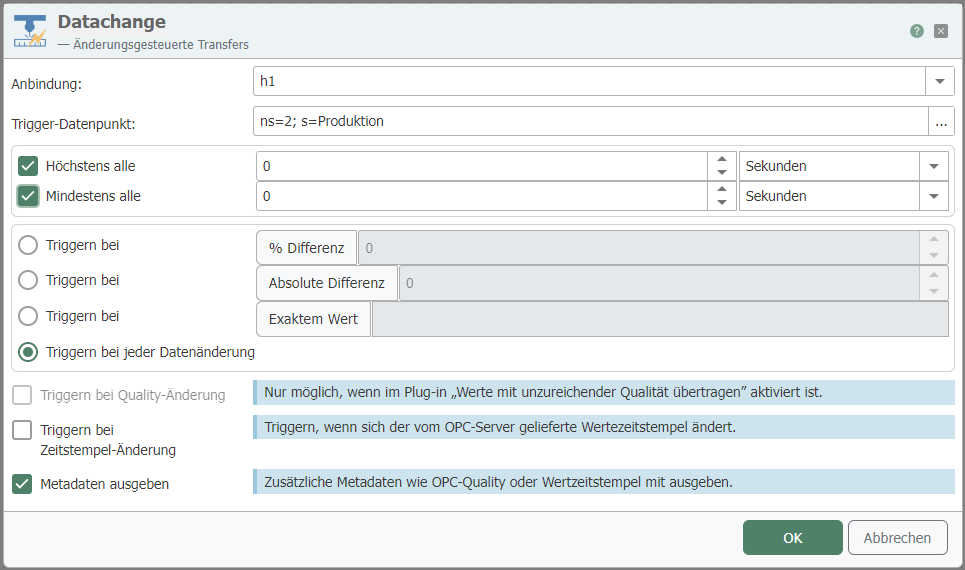
| Property | Description |
|---|---|
| Connection | Heidenhain connection via which the relevant data point is reached. |
| Trigger data point | Trigger data point whose value above/below triggers the transfer. Use the "..." button to open the tag selection (see below) for interactive selection of an item. |
Use the “Advanced” button to configure the additional properties.
| Property | Description |
|---|---|
| At most every | If the value of the data point changes frequently, the transfer rate can be limited here via an interval. The entry therefore means: "The maximum transfer rate is, for example, once per second, even if the value changes more frequently." Always enter a whole number, no decimal places. The units to be selected are therefore milliseconds, seconds, minutes, hours, or days. |
| At least every | Time interval in which data is transferred in any case, even if the value of the data point has not changed. Always specify as a whole number, no decimal places. Therefore, milliseconds, seconds, minutes, hours, or days must be selected as units. |
| Trigger at ... % difference | The transfer is only triggered if the value of the data point changes by this entry (relative). |
| Trigger at ... Absolute difference | The transfer is only triggered if the value of the data point changes by this entry (absolute). |
| Trigger on every data change | Default. Overrides tolerance settings. |
| Trigger on quality change | Select the checkbox if you want to trigger on quality change. |
| Trigger on timestamp change | Select the checkbox if you want to trigger when the timestamp changes. |
| Output metadata | Select the checkbox if you want to output the timestamp or quality metadata. |
Tip: To set conditions for absolute and relative differences, configure two data change triggers: one for relative differences and one for absolute differences. You can link them using AND or OR.