ERP Web Services Transfer Object
Web services are available as data targets (input parameters) and as data sources (output parameters). Create an ERP transfer object within the connection as described.
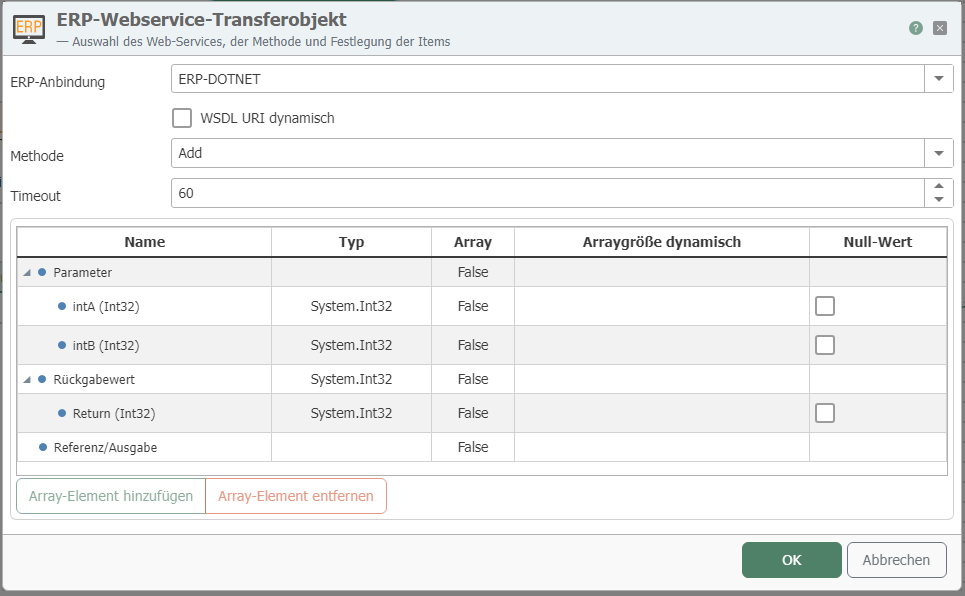
After double-clicking on the transfer object, set the following properties:
| Property | Description |
|---|---|
| ERP connection | The web services are available here as configured instances of the ERP plug-in. |
| Method | Select the method to be addressed. |
| Dynamic WSDL URL | Activate to dynamically transfer the URL at runtime. However, the method and parameters must be identical. |
| Timeout | Time (in ms) that the connection may take to establish before a connection error is returned. |
All input and output parameters of the web service are available to you.
Parameters of type "array"
For parameters of type "array," you have two options:
-
Enable the Dynamic array size property to read all entries in the array.
-
Limit the returned entries by creating a number of nodes. This number corresponds to the number of array entries returned. Please note: The web service, not OPC Router, decides which entries are returned. 1. Leave the Array size dynamic property deactivated. 2. Select the array (in the figure, "input"). 3. Click on "Add Node." These nodes appear within the array, here as input[0], input[1] ... 4. Add as many nodes as you need.
You can remove a node by selecting it and using the corresponding "Remove node" button.
Nested classes with array parameters do not support dynamic parameters. If you still want to use nested classes, you must first define how many elements the array has, as all nodes must be created manually.
Data type "Integer"
According to the XSD standard, the "Integer" type represents an infinitely large number that can only be stored as a string. If an integer must be transferred, the web service must use the data type "int," which is read correctly.