Create Instances from a File
If you want to create many instances from a template, you can import the values for the template variables in bulk. To do this, you can
- import a prepared Excel or CSV file
- or fill out a corresponding table directly in OPC Router
The names of the template variables in the file and the template must match exactly. The columns in the CSV file can be separated by semicolons or commas.
Structure of the Import File
The CSV file has the following structure:
| InstanceName | Variable1 | Variable2 | ... |
|---|---|---|---|
| ConnectionName1 | Value | Value | Value |
| ConnectionName2 | Value | Value | Value |
| <unterordner>\ConnectionName3 | Value | Value | Value |
| ... | Value | Value | Value |
Specifying a subfolder is optional. You can distribute the connections across multiple folders and subfolders in this way.
Time Values in Template Variables
The following time offsets apply to time values:
- 1ms for milliseconds
- 1s for seconds
- 1m for minutes
- 1h for hours
- 1d for days
There must be no space between the number and the unit.
Create Multiple Instances from a File
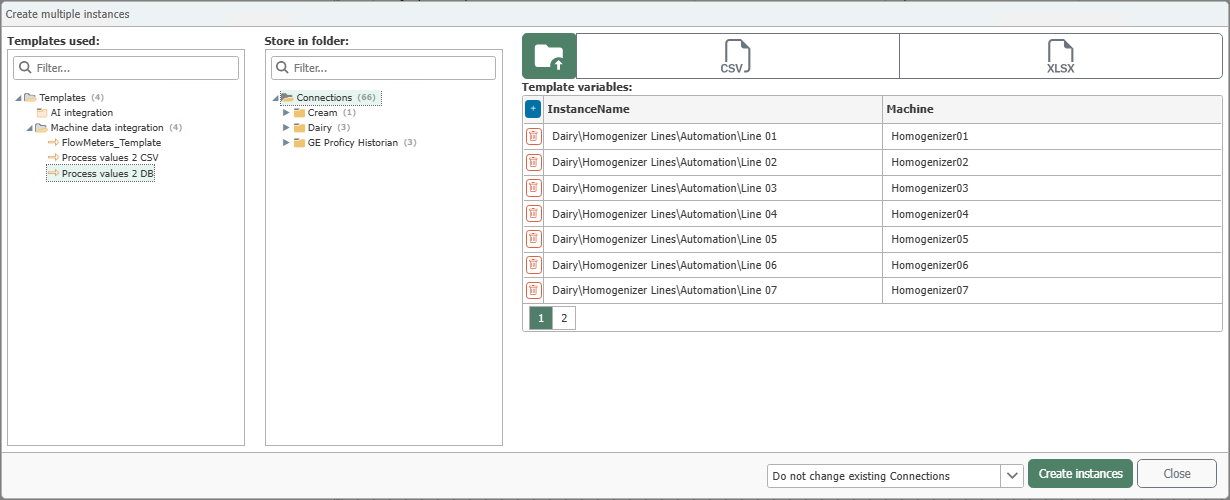
- In the “Templates” or “Connections” snap-in, select the “Create Instance” drop-down button, then select “Create Multiple Instances.”
- Select the template you want to use.
- Select the destination folder.
- Enter the values directly or open your CSV or Excel file using the “Import” button (
 ).
). - Specify whether to keep or overwrite existing connections.
- Click the “Create Instances” button.
- Put the new instances into production.
note
Note: If you change the template later, all instances will be updated.