Apache Kafka Trigger
Responds to changes in projected topics. Returns the payload and key. In the properties mask, you can specify the connection parameters for your Apache Kafka query:
 (2)-6b92b6ccfbd07f755aa8ed0f6f941b99.png)
The following properties can be configured:
| Broker | Select a configured broker connection from the drop-down menu. |
|---|---|
| Topic | Specify the topic to be read from. |
| Wait for transfer | Select whether and in what form to wait for the transfer. |
| Trigger on service start | Enable this option if you want to trigger when OPC Router starts |
Interaction with the broker
The section on sequence diagrams explains how to interpret this diagram.
The Apache Kafka trigger is a regular member consumer of a Kafka consumer group; automatic read position acknowledgment is disabled, so the OPC Router acknowledges the offset itself. Important for understanding the “Wait for Transfer” option: No thread waits for the flow—the trigger starts the transfer and returns immediately. This option merely delays the moment at which the offset is confirmed (committed) and the consumer resumes. After each message is read, the consumer pauses; if the option is set to “on,” it remains paused until the transfer result is available, ensuring that the messages of a topic are processed strictly one after another.
The switch is three-state. “Default” applies the connection settings, while “Active” and “Inactive” override them for this specific trigger. The two diagrams show the result of the evaluation, not the position of the switch.
Wait for Transfer: Off
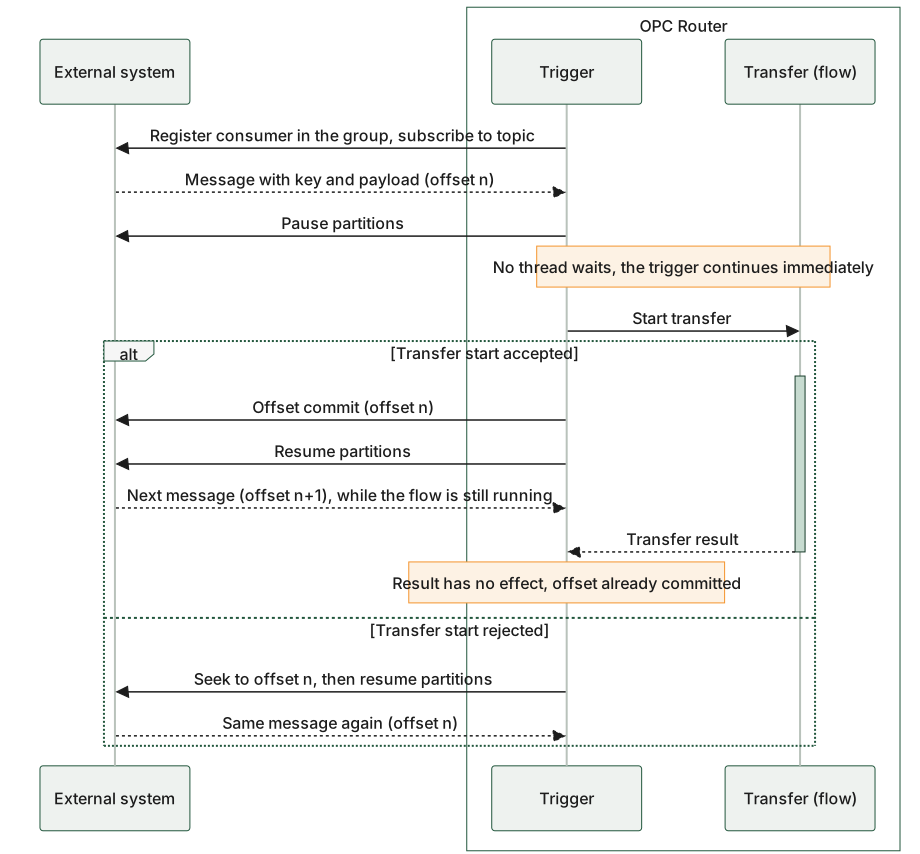
With this option disabled, the trigger confirms the offset immediately after the transfer starts successfully and resumes the consumer right away. No thread waits for the flow: the trigger starts the transfer and continues processing immediately. The next message can therefore already be processed while the previous flow is still running; the transfer result that arrives later is no longer evaluated and has no effect. Only a rejected transfer start leads to a seek back to the previous offset; the message is then delivered again.
Wait for Transfer: On
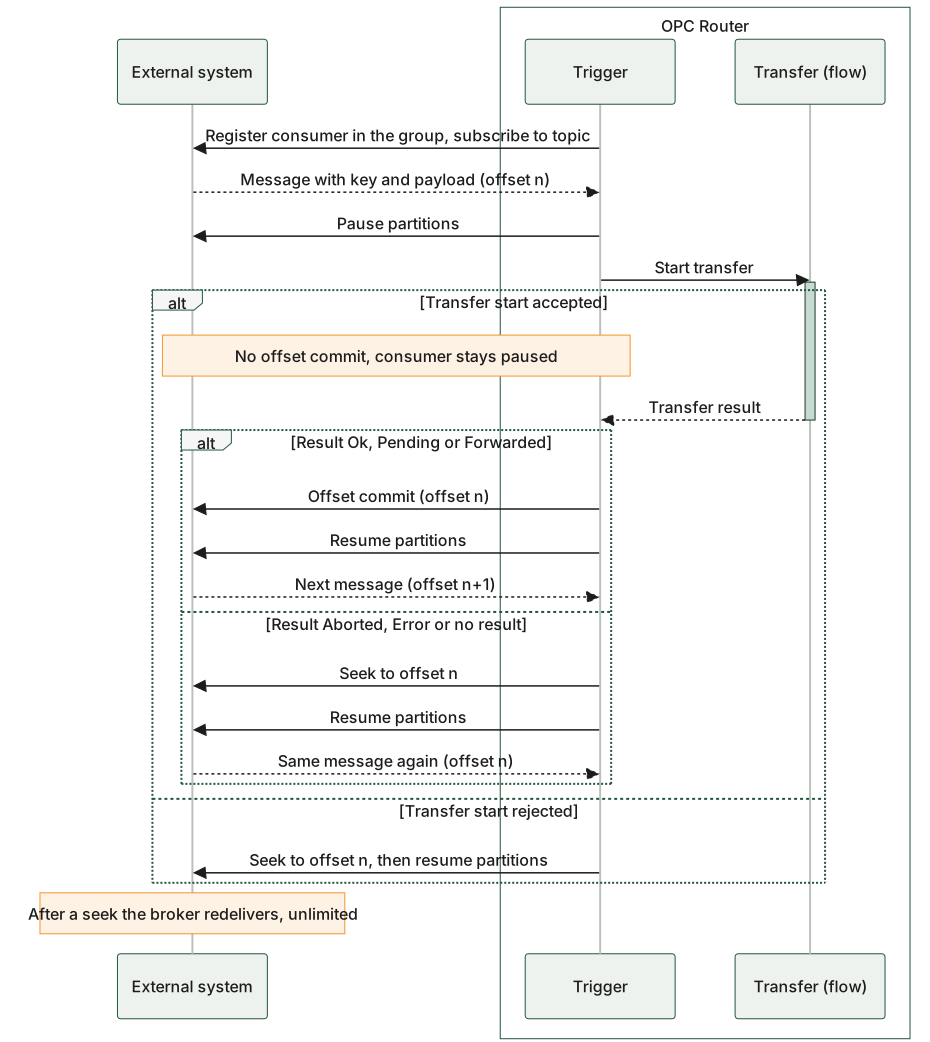
When this option is enabled, the commit and resume operations are initially skipped; the consumer remains paused until the flow reports its result. A successful result leads to an offset commit and continuation; an abortion or error results in a seek back to the previous offset—the same message is then re-delivered by the broker an unlimited number of times as long as the flow fails. This redelivery is Kafka protocol behavior and not a repetition by the OPC router. A rejected transfer start is rolled back via a seek, as shown in the first diagram.
The only difference lies in the timing of the consumer’s offset commit and resume relative to the transfer: in the first diagram, immediately after the start; in the second, only after the transfer result is known.