Provision of production data via MCP
This example demonstrates how production data from databases can be made available to AI systems via the OPC Router using MCP. An AI system with access to this MCP tool could, for example, answer the following questions:
- Which machine is the most productive?
- Which machines are due for maintenance soon?
- At what times are the machines least productive?
This example uses a specific data structure. However, the basic concepts from this example can be applied to a wide range of use cases.
Initial situation
Production data for individual machines is recorded in a database table. This data is to be made available via the OPC Router using MCP to enable AI systems to query and process this data.
Data structure
The table with the machine data is structured as follows:
| id | machine_id | ts | quantity | scrap | oee |
|---|---|---|---|---|---|
| 1 | PRESS-01 | 2026-02-01 06:00:00 | 500 | 10 | 0.82 |
| 2 | PRESS-01 | 2026-02-01 07:00:00 | 520 | 12 | 0.80 |
| 3 | PRESS-01 | 2026-02-01 08:00:00 | 515 | 11 | 0.81 |
Setup in the OPC Router
MCP tool configuration
A REST trigger is required to configure an MCP tool in the OPC Router. When defining an MCP tool, you must assign a name and description. These help AI systems determine when it makes sense to use this MCP tool.
To be able to configure an MCP tool in the REST trigger, MCP must be activated in the REST plug-in.
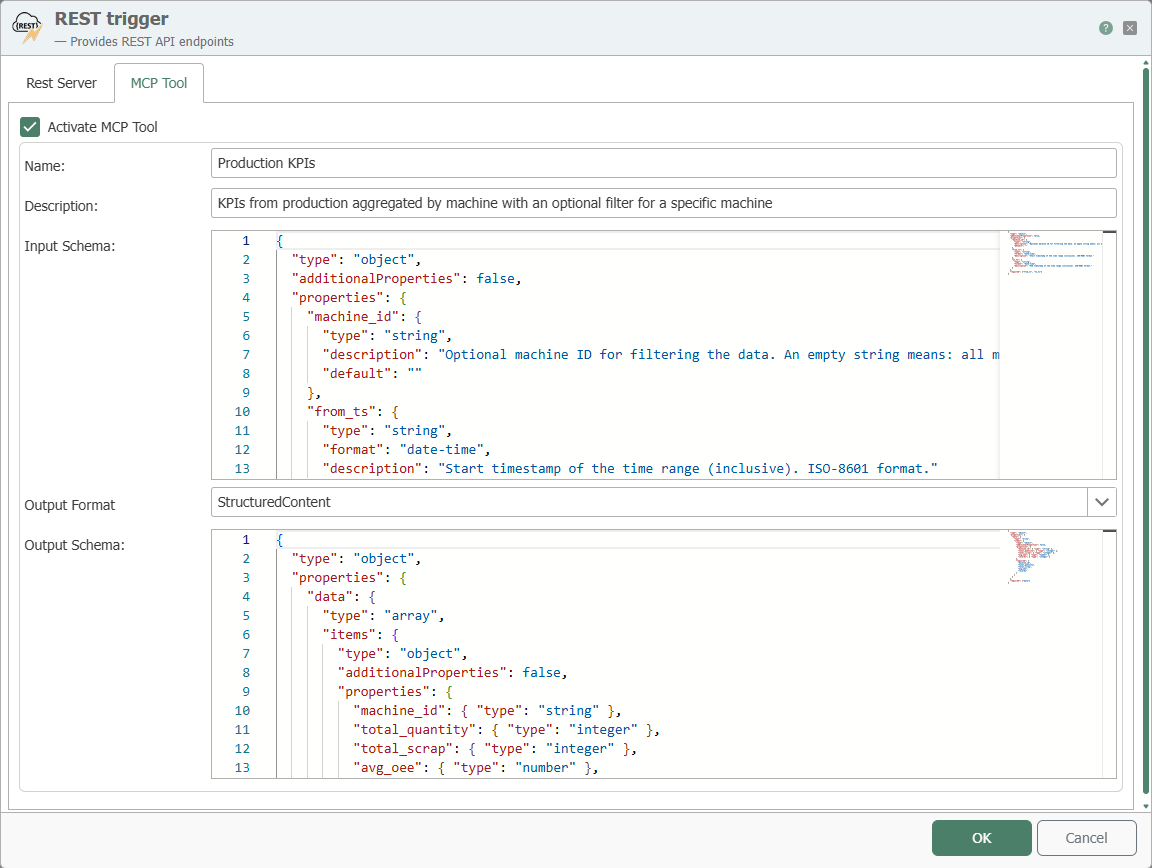
When creating the input and output schemas, you must specify which parameters can be specified in the request and which of them are optional. The structure in which the MCP tool should return the data must also be specified.
Input Schema
In this example, the request needs to include a time range for the data. The time range is specified using two timestamps. Optionally, the request can filter for a specific machine using its ID. This results in the following input schema.
{
  "type": "object",
  "additionalProperties": false,
  "properties": {
    "machine_id": {
      "type": "string",
      "description": "Optional machine ID for filtering the data. An empty string means: all machines.",
      "default": ""
    },
    "from_ts": {
      "type": "string",
      "format": "date-time",
      "description": "Start timestamp of the time range (inclusive). ISO-8601 format."
    },
    "to_ts": {
      "type": "string",
      "format": "date-time",
      "description": "End timestamp of the time range (inclusive). ISO-8601 format."
    }
  },
  "required": ["from_ts", "to_ts"]
}
Output Schema
The aggregated data for the machines should be returned as an array. Each element of the array contains data for one machine.
{
  "type": "object",
  "properties": {
    "data": {
      "type": "array",
      "items": {
        "type": "object",
        "additionalProperties": false,
        "properties": {
          "machine_id": { "type": "string" },
          "total_quantity": { "type": "integer" },
          "total_scrap": { "type": "integer" },
          "avg_oee": { "type": "number" },
          "records": { "type": "integer" }
        },
        "required": [
          "machine_id",
          "total_quantity",
          "total_scrap",
          "avg_oee",
          "records"
        ]
      }
    }
  },
  "required": ["data"]
}
These schemas show AI systems how queries for this MCP tool must be structured and how the results are structured.
Preparing the data for the MCP tool
The data from the table is aggregated for the specified period using a stored procedure. This stored procedure is executed in the OPC Router using the stored procedure Transfer Object. The output values of the stored procedure Transfer Object are then transferred to the data structure defined as the output schema using two JSON Transfer Objects. Finally, the created JSON document is transferred to the REST trigger as a response body.
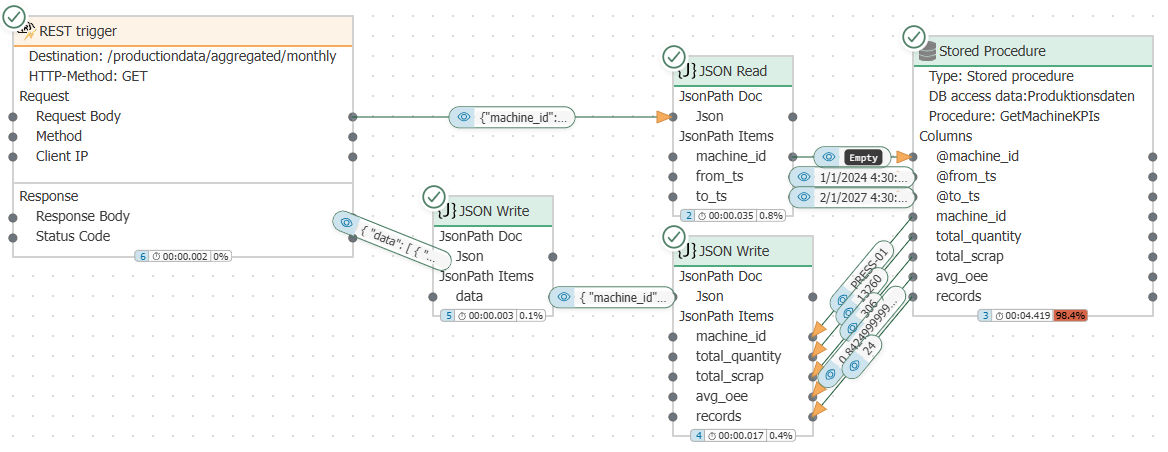
A detailed description of the configuration for data preparation has been deliberately omitted, as situations can vary greatly in practice. In addition, the provision of data in JSON format is not specific to MCP. There may already be existing REST endpoints in the OPC Router for which MCP would only need to be configured to make them usable for AI systems.