Snowflake Delete Transfer Object
The transfer object Snowflake Delete deletes one or more records from a table or database view in the Snowflake AI Data Cloud during data transfer. The transfer object thus acts as a transfer destination.
Dialog Overview
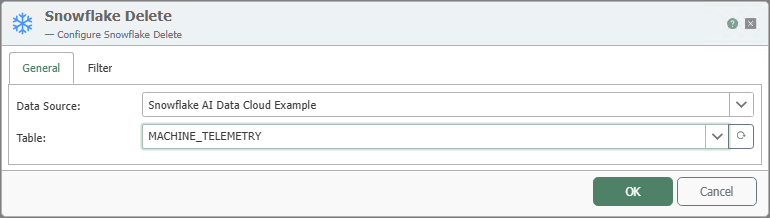
General Properties
| Property | Description |
|---|---|
| Data Source | All Snowflake connections created in the Plug-ins section are available for selection here. If the desired connection is not yet available, you can make it available in the Plug-ins section as a “Snowflake AI Data Cloud” plug-in. |
| Table | Table or database view on which the delete operation is performed. |
Filters
The delete operation requires a filter to clearly define which records are to be removed. The structure and use of the Filter tab are described in detail at Filters and Filter Groups .
Delete operations are particularly critical from a business perspective. Use Snowflake Delete only with a unique filter, and verify the impact on downstream processes and history. The affected records will be permanently deleted.
Notes
The transfer object can also be selected for database views.
Example
The OPC Router removes outdated telemetry data records from MACHINE_TELEMETRY, for example, when a test station is reset. The filter restricts the deletion to the MACHINE_ID. The transfer object shown above is configured for this example.
| Setting | Value |
|---|---|
| Table | MACHINE_TELEMETRY |
| Filter | MACHINE_ID = <Eingang> |
The OPC Router generates the following SQL statement based on this:
DELETE FROM MACHINE_TELEMETRY WHERE MACHINE_ID = ?