Snowflake Update transfer object
The Snowflake Update transfer object updates one or more existing data records in a table or database view of the Snowflake AI Data Cloud during data transfer. The transfer object thus acts as a transfer destination.
Dialog Overview
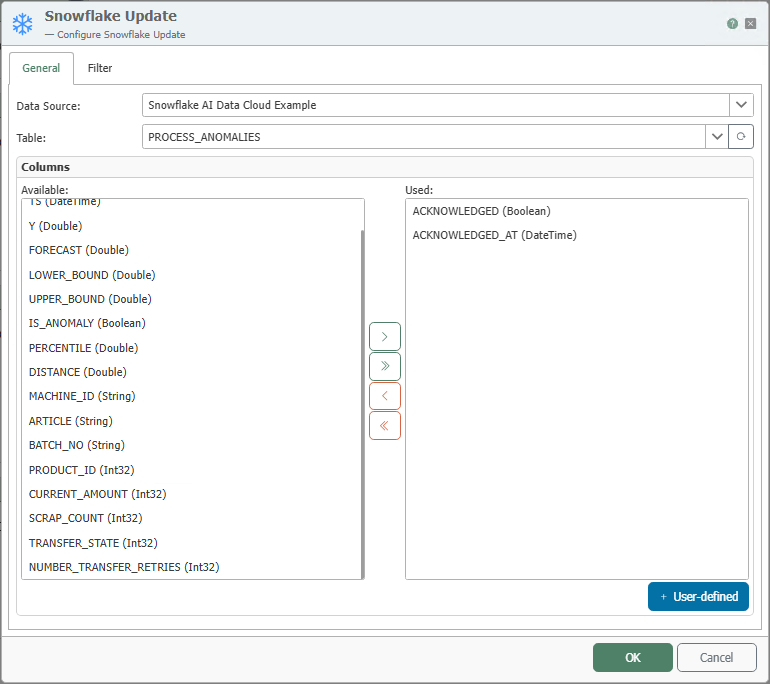
General Properties
| Property | Description |
|---|---|
| Data Source | All Snowflake connections created in the Plug-ins section are available for selection here. If the desired connection does not yet exist, you can make it available in the Plug-ins section as the “Snowflake AI Data Cloud” plug-in. |
| Table | Table or database view on which the update is performed. |
| Available Columns | Columns in the table that have not yet been used. |
| Used Columns | Columns whose values will be updated during the update. |
Move columns by double-clicking the column name or using the <, >, <<, and >> buttons.
Filter
The update requires a filter to clearly define which records are updated. The structure and operation of the Filter tab are described in detail under Filters and Filter Groups.
Use the update only with filters that are appropriate for the business context. A filter that is too broad or missing may unintentionally modify many records.
Return Value
The transfer object provides the number of rows that were actually updated as a data source.
Notes
The transfer object can also be selected for database views.
Example
The Snowflake AI Data Cloud handles the actual anomaly detection using its AI functions (e.g., the IS_ANOMALY column). The OPC Router only reports back that a process has been completed on the shop floor: As soon as an operator acknowledges a detected anomaly on the machine, they updates the ACKNOWLEDGED (acknowledgment flag) and ACKNOWLEDGED_AT (acknowledgment time). The transfer object shown above is configured for this example.
| Setting | Value |
|---|---|
| Table | PROCESS_ANOMALIES |
| Columns Used | ACKNOWLEDGED and ACKNOWLEDGED_AT – the new values are bound as targets. Any number of columns can be updated simultaneously. |
| Filter | ID = <eingang> – the primary key limits the change to exactly one row |
You do not write any SQL—the OPC Router generates the appropriate statement from the configuration, essentially:
UPDATE PROCESS_ANOMALIES SET ACKNOWLEDGED = ?, ACKNOWLEDGED_AT = ? WHERE ID = ?
You can use the returned number of updated rows to verify that exactly one record was changed (here, 1).