FTP Plug-in
You can configure the following properties in the FTP plug-in settings:
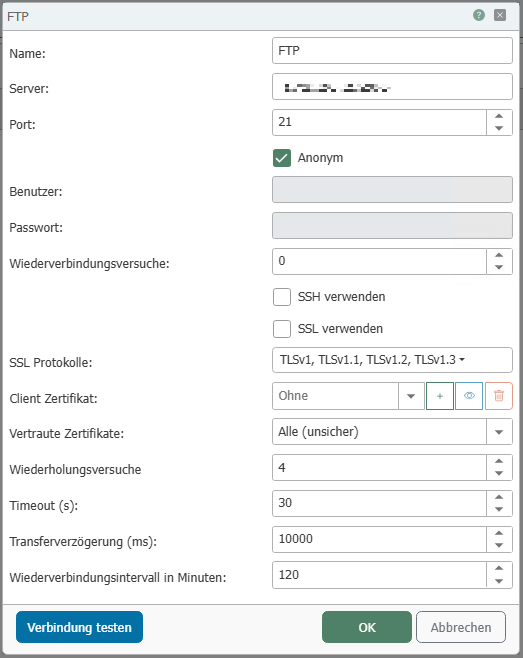
| Property | Description |
|---|---|
| Name | Any name under which this FTP file server appears in Flow configuration. Choose a name that is unique to you during Flow configuration. |
| Server | Hostname or IP address of the server |
| Port | Port on which the server’s FTP service is accessible |
| Anonymous | This option can be used if no authentication is required |
| User | The username for the FTP server |
| Password | Password for the FTP server. |
| Reconnection Attempts | Number of reconnection attempts before an error is reported. |
| Use SSH | If this option is enabled, SSH is used. |
| Use SSL | If this option is enabled, SSL is used. |
| SSL Protocols | SSL protocols that may be used for a connection. (Some servers will refuse the connection if algorithms that are too weak are selected). |
| Client Certificate | Certificate used by the OPC Router to log in to the FTP server. |
| Trusted Certificates |
|
| Retry attempts | If connection problems occur, the transfer is repeated the specified number of times before an error is reported. |
| Timeout | Connection timeout for the FTP server |
| Transfer delay | Delay between locating the file and starting the download. |
| Reconnection Interval | Time in minutes that a connection remains active before it is reestablished. |
You can use the “Test Connection” button to check whether a connection can be successfully established with the current configuration. |
| Transfer Delay | Delay between locating the file and the start of the download. | | Reconnection Interval | Time, in minutes, that a connection remains active before it is reestablished. |
You can use the “Test Connection” button to check whether a connection can be successfully established with the current configuration.