Network File Access Trigger
The Network File Access Trigger initiates a transfer as soon as a file is added to or modified in a directory.
The following properties can be configured:
"Folder Options" section
| Property | Description |
|---|---|
| Path | Directory to be monitored |
| Include subdirectories | If this option is enabled, subdirectories are also monitored. |
| Fallback Scan Interval | Interval in seconds at which the folder is checked for changes. |
"File Settings" section
| Property | Description |
|---|---|
| File name pattern | File name pattern for the trigger. |
| Read binary data or text | Read binary data can be used to read binary files (e.g., *.doc, *.jpg, *.xlsx). Read |
| Encoding | If Read text is selected, the encoding can be selected. The default is UTF8. |
“Move Settings” section
| Property | Description |
|---|---|
| Delete after successful transfer | If this option is enabled, the file will be deleted from the network drive after successful transfer. |
| Destination path | Directory to which the file will be moved after successful transfer. |
| Delete after unsuccessful transfer | If this option is enabled, the file will be deleted from the network drive after an unsuccessful transfer. |
| Destination path (error) | Directory to which the file will be moved after an unsuccessful transfer. |
| Prefix UTC timestamp to file name | If the source file is to be moved, this option can be used to prefix the current timestamp (UTC) to the file name. For example, the file test.txt becomes 20191204_095646_test.txt. |
"Repeats" section
| Property | Description |
|---|---|
| Repeat in | Time in seconds to wait between repetitions. |
| Repeat counter | Limit on the number of repetitions if a file cannot be accessed. |
Interaction with Storage
The section on sequence diagrams explains how to interpret this diagram.
The Network File Access trigger and the Cloud File Access trigger operate according to the same pattern; they differ only in the connected storage (SMB or FTP share for one, S3 bucket or Azure Blob container for the other). Both access the storage in three separate phases: The trigger cyclically lists the files, the transfer reads the file contents, and the trigger then deletes the file based on the result. Note that the listing is the only trigger mechanism—despite the name “Fallback Scan Interval,” there is no event path through which the storage notifies the OPC Router on its own. Also note that the file contents are not read when the trigger is activated, but only during the transfer: A read error therefore appears as a transfer error and not as a trigger error.
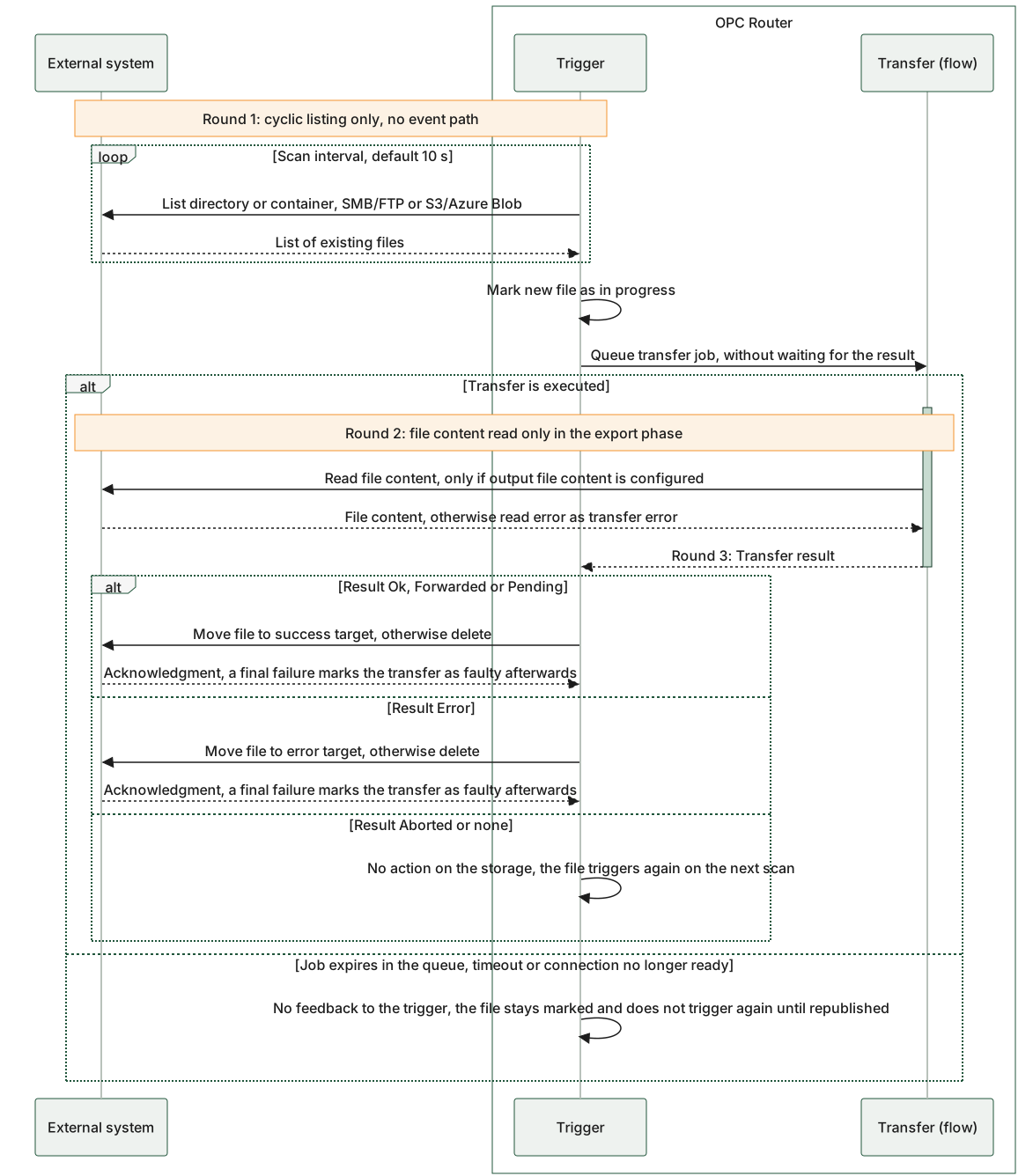
The diagram shows both triggers in a skeleton: Round 1 is the cyclic enumeration by the observer thread, and this enumeration is the only triggering mechanism—there is no event path through which the storage notifies the OPC Router on its own. Round 2 is the reading of the file contents during the transfer, in the export phase; Round 3 is the result-dependent action on the storage device after the transfer ends. The three result branches show that “Leave as Is” is not a configurable option: “Move” and “Delete” are the same setting, and only in the case of “Aborted” or “No Result” does the file remain untouched and trigger again. The outer else branch shows the special case in which the queued job expires: The trigger then receives no result, the file remains in the processing queue, and is not triggered again.
Three rounds against memory: The trigger lists files cyclically, the transfer reads the file contents, and only after the transfer result is received does the trigger move or delete the file.