IDoc Trigger
The IDoc trigger is used when the OPC Router is to receive IDocs from the SAP® system. The SAP® system initiates the data transfer via the IDoc trigger. The configuration on the SAP® side is explained here only in broad terms; please refer to the SAP® documentation for details.
Dialog Overview
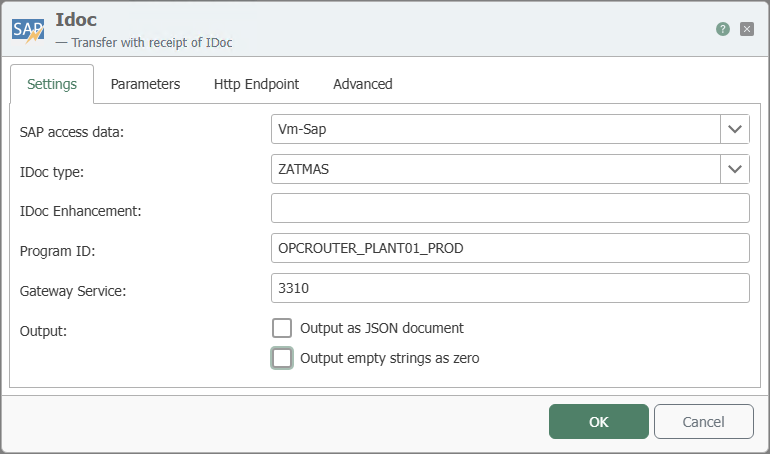
The screenshot shows the selection of the SAP® connection and the IDoc type, as well as the configuration of the program ID, gateway service, and parameters.
Settings
| Property | Description |
|---|---|
| SAP Connection | All SAP® connections created in the Plug-ins section are available for selection here. If the desired connection is not yet available, you can make it available in the Plug-ins section as a SAP® connection . |
| IDoc type | IDoc type that triggers the action when sent. Ideally, this should be the same as the type specified in the IDoc transfer object. |
| IDoc Extension | Class extension for the IDocs. |
| Program ID | Program ID used by the SAP® system to call the destination; identical to the program ID of transaction SM59. |
| Gateway Service | Gateway service of the SAP® system. |
| Output | “Output as JSON document”: provides the received IDoc as a JSON document. “Output empty strings as null”: outputs empty strings as null. |
Parameters
| Property | Description |
|---|---|
| Available Parameters | Select the required parameters by checking the corresponding boxes. You can also select entire categories. |
| Copy JSON Format | Copies a JSON document to the clipboard whose structure corresponds to the function call. |
The program ID is evaluated character-for-character (case-sensitive) and must match exactly the entry in the SAP® transaction SM59. Capitalization is common and recommended, but not mandatory. The combination of host (SAP connection), gateway, and program ID must be unique. Starting with version 3.1.1.5, the program ID itself can be used multiple times—but only with different gateways/hosts.
If an IDoc is updated or modified in the SAP® system, the trigger must also be adapted to the new IDoc.
HTTP Endpoint
Using the “Http Endpoint” tab, the OPC Router can also receive IDocs via an HTTP or HTTPS endpoint.
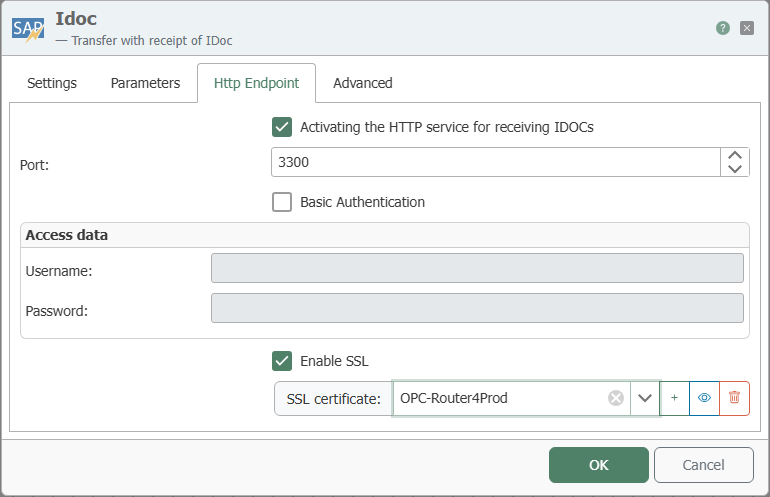
| Property | Description |
|---|---|
| Enable HTTP Service for Receiving IDocs | Enables the HTTP endpoint through which IDocs are received. |
| Port | Port on which the HTTP endpoint is accessible. |
| Basic Authentication | If enabled, access requires logging in with a username and password. |
| Username / Password | Login credentials for Basic Authentication. |
| Enable SSL | Makes the endpoint available via HTTPS and encrypts the transmission. |
| SSL Certificate | Certificate used for the HTTPS connection. |
Advanced
Use the “Advanced” tab to control the status updates for received IDocs sent to the SAP® system.
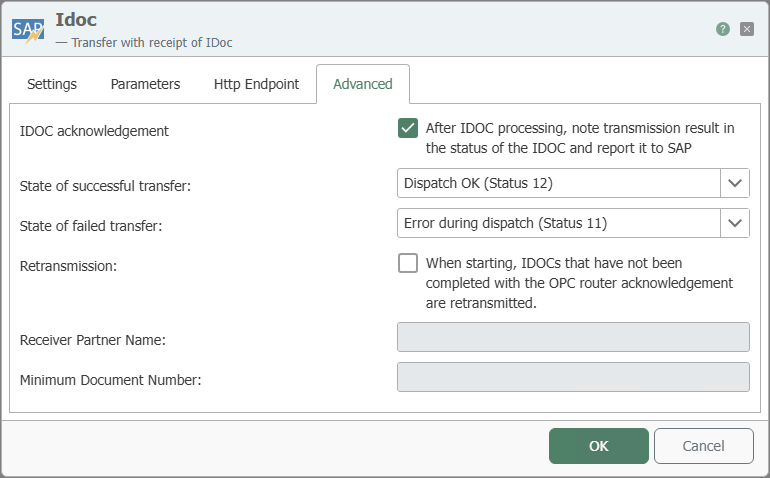
| Property | Description |
|---|---|
| IDoc Acknowledgment | If enabled, the OPC Router records the transfer result in the IDoc’s status after processing and reports it back to the SAP® system. |
| Status on Successful Transfer | IDoc status set upon successful processing, for example, Dispatch OK (Status 12). |
| Status on Failed Transfer | IDoc status set when processing fails, for example, Error during dispatch (Status 11). |
| Resend | If enabled, IDocs that have not yet been completed with an acknowledgment from the OPC router are retransmitted at startup. |
| Recipient Partner Name | Partner name to which the status update applies. |
| Minimum Document Number | Lowest IDoc document number starting from which the status update or resend is taken into account. |
Interaction with SAP
The section on sequence diagrams explains how to read this diagram.
The IDoc trigger receives IDocs from the SAP® system and uses them to start a transfer. The triggering call is acknowledged immediately, even before the flow runs: The OPC Router places the IDoc in a queue and retrieves it at polling intervals. Therefore, no result is returned via the triggering call. If you enable IDoc acknowledgment on the “Advanced” tab, the OPC Router reports the transfer result after the transfer is complete, and the roles are reversed: To acknowledge the IDoc, the OPC Router itself establishes an RFC connection to the SAP® system and writes the IDoc’s status record there.
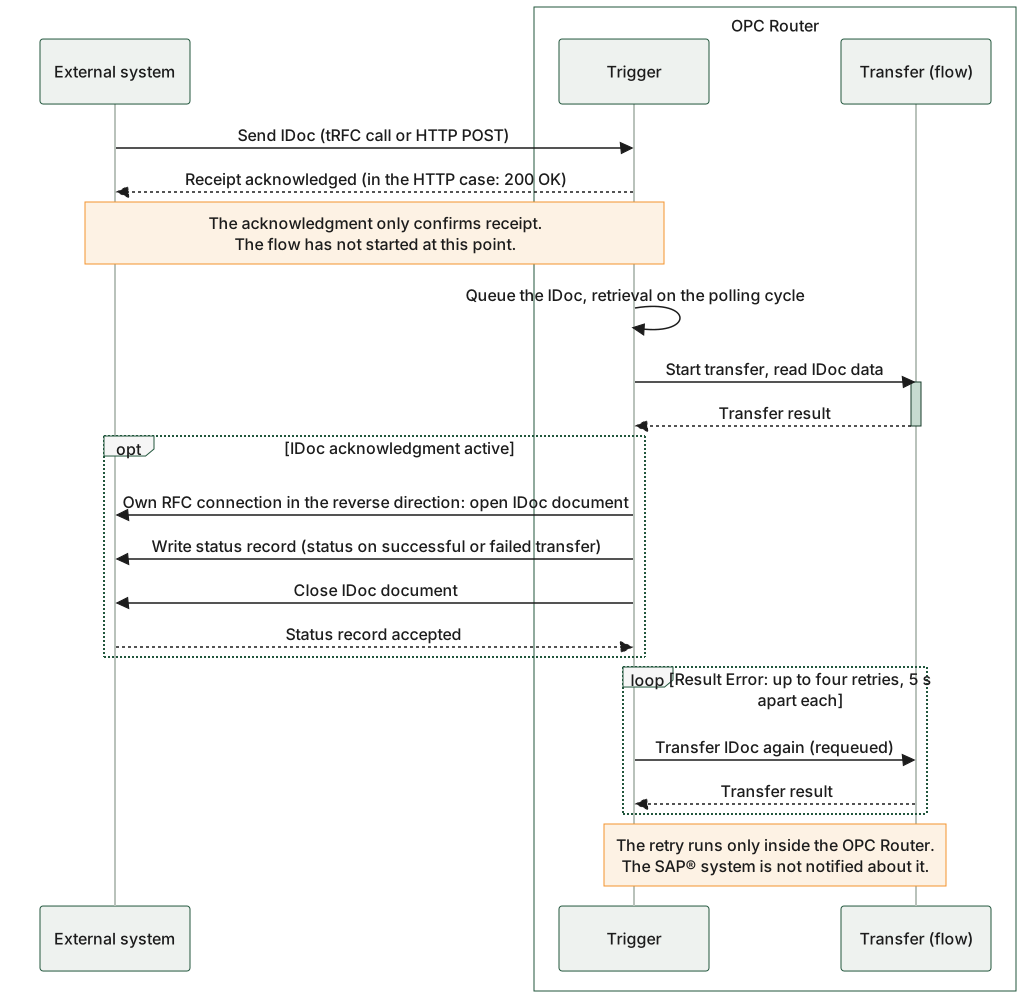
The diagram shows both directions separately: The IDoc is sent from the SAP® system to the OPC Router and is acknowledged immediately; the status record is then sent back to the SAP® system via a separate connection of the OPC Router. The opt-block is the Advanced tab with the IDoc Acknowledgment setting, and the loop-block is the router’s internal retry after a failed transfer.
Process flow for the IDoc trigger: The receipt is acknowledged immediately; if IDoc acknowledgment is enabled, the OPC Router then reports the transfer result back via a separate connection in the opposite direction.
Example
Settings for the IDoc Trigger:
| Property | Configuration |
|---|---|
| SAP Connection | <sap-anbindung>, through which the relevant function is accessed. |
| IDoc Type | PRODUCTIONORDER |
| Program ID | INRAYTRIGGER |
| Gateway Service | Gateway service of the SAP® system, for example 3302 |
Logical System in SAP® Transaction BD54:
| Property | Configuration |
|---|---|
| LogSystem | OPCRIDOC01 |
| Description | OPC Router with IDoc Listener |
Corresponding SAP® Settings, SM59:
| Property | Configuration |
|---|---|
| Destination | OPCROUTER |
| Connection Type | T TCP/IP |
| Activation Type | Registered Server Program |
| Program ID | INRAYTRIGGER |
| Gateway Host | (no entry!) |
| Gateway Service | (no entry!) |
Port in SAP® Transaction WE21:
| Property | Configuration |
|---|---|
| (Type) | Transactional RFC |
| Port | for example, IDOCPORT |
| Version | (select the appropriate IDoc version) |
| RFC Destination | OPCROUTER |
Partner Agreement in WE20:
| Property | Configuration |
|---|---|
| (Partner Type) | LS (Logical System) |
| Partner Number | OPCRIDOC01 |
Output Parameters in WE20:
| Property | Configuration |
|---|---|
| Receiver Port | IDOCPORT |
| Output Mode | Transfer IDoc Immediately |
| IDoc Type/Base Type | PRODUCTIONORDER |
| Syntax Check | (Enabled) |
For manual testing, you can send an IDoc via WE19 by specifying the partner number and port. Be sure to select “Start Outbound IDoc Processing Immediately.” Errors can be viewed in WE07. The function to be called in SAP® is IDOC_INBOUND_ASYNCHRONOS (as of 4.0) or INBOUND_IDOC_PROCESS (3.x).