Configure Secure Redundancy
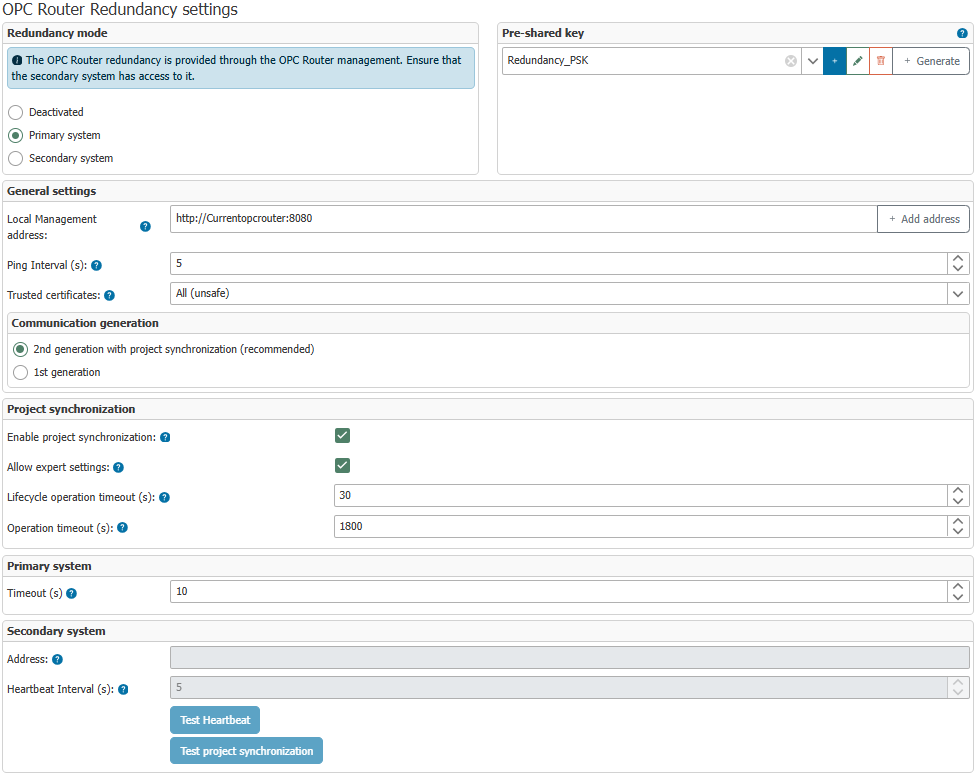 Since version 5.1, the OPC Router’s redundancy feature has used a pre-shared key to secure communication. In the 2nd generation, there is now also the option to synchronize projects directly via the corresponding synchronization dialog in the OPC Router.
Project synchronization transfers project content between two OPC Routers. It does not replace client failover and does not automatically ensure that external clients are redirected to the active OPC Router.
Redundancy Configuration
Recommended Use of the Second Generation
The 2nd Generation is the recommended redundancy option for new installations and migrations. You should always use this option even if projects are to be synchronized between the two systems manually—via project export and project import—rather than using the built-in project synchronization. This ensures that future redundancy features are immediately available to you.
The 2nd Generation is not tied to project synchronization via the dialog. It can also be used without project synchronization enabled and remains the recommended technical basis for redundancy operation.
Using Project Synchronization
In order for the primary and secondary services to synchronize a project, you must configure both systems to specify how the respective OPC Router Management instance can be reached from the other system. The actual synchronization is then initiated via the redundancy status in the header menu:
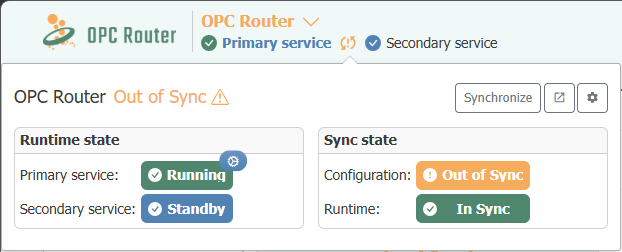
Here, in addition to the general redundancy status, you can also see whether and when a project synchronization last took place. If necessary, the synchronization can be triggered again.
Project synchronization does not automatically check whether the configuration is functionally complete or executable. It merely initiates the exchange of the required project data between the two systems.
Version Matching of Redundancy Partners
Project synchronization requires that both redundancy partners use the same product version, up to and including the build number (Major.Minor.Build, for example, 5.7.00). This applies to both synchronization targets: configuration and runtime.
If the versions differ, synchronization will not start at all: In the dialog, the affected synchronization target is reported as invalid in the Information section, and the Perform Synchronization button remains disabled. In this case, no partial data will be transferred either. Instead, update both systems to the same version.
Up to OPC Router 5.6, for the Configuration synchronization target, it was sufficient for Major.Minor to match; only the runtime additionally required the same build number. Starting with version 5.7, Major.Minor.Build must match for both targets. Therefore, when planning updates for a redundancy pair, always plan them together for both the primary and secondary services.
Redundancy Mode
The dialog is divided into the sections Redundancy Mode, Pre-Shared Key, General Settings, Communication Generation, Project Synchronization, Primary System, and Secondary System. Which fields can be actively edited depends on the selected redundancy mode.
Redundancy Mode
This section determines whether the instance is deactivated or operates as the primary or secondary system.
| Property | Description |
|---|---|
| Disabled | Redundancy is inactive. |
| Primary System | This instance operates as the active system. It provides web-based management for project synchronization and heartbeat communication and monitors the secondary service. |
| Secondary System | This instance remains on standby as long as the primary system is reachable. If the primary system fails, it assumes the active role. |
Pre-Shared Key
The pre-shared key is used for authentication between the participating OPC router instances. It is required in both generations and is stored as a combination of a key and a value in the internal secrets store—with the same rules for modification, deletion, export, and versioning as any other secret.
| Property | Description |
|---|---|
| Pre-Shared Key | The pre-shared key is stored as a key-value pair in the secrets store. This pair must be consistent on both the primary and secondary systems for authentication between the redundancy partners to work. |
| Add / Edit / Delete | Use these buttons to add, edit, and delete key-value pairs in the Secrets Store. |
| Generate | Automatically generates a pre-shared key value. This can then be inserted as the key value in such a pair in both the primary and secondary OPC Routers. |
General Settings
These settings affect the general availability and security of redundancy communication.
| Property | Description |
|---|---|
| Local Management Address | Address of the local OPC Router management in URL format. The respective instance must be reachable by the redundancy partner via this address. |
| Ping Interval (s) | Interval in seconds at which the remote station is checked. This value affects the response time with which status changes are detected. |
| Trusted Certificates | If HTTPS is used for management access, this setting specifies which certificates are trusted. “All (unsafe)” accepts any certificate, Router trusts the certificates stored in the OPC Router’s certificate management, and Windows uses the Windows certificate store. For setup instructions regarding Router and Windows, see the section Certificate Issues (HTTPS). |
Communication Generation
Here you select which redundancy generation to use.
| Property | Description |
|---|---|
| 2nd Generation with Project Synchronization (recommended) | Recommended current version. It supports project synchronization between both OPC Router instances and forms the technical basis for additional features in future versions. |
| 1st Generation | Earlier generation variant without project synchronization. |
Both generations use a pre-shared key to secure communication. The most important differences are summarized in the following overview:
| Feature | 2nd Generation | 1st Generation |
|---|---|---|
| Project synchronization | ✅ | – |
| Project synchronization in the dialog | ✅ | – |
| Synchronization icon in status | ✅ | – |
| Basis for additional redundancy functions | ✅ | – |
Notes on the comparison table:
- ✅ = available
- – = not available
Unsecured legacy redundancy is no longer supported as of OPC Router 5.4. When updating from older OPC Router versions with unsecured redundancy, you must therefore reconfigure project synchronization.
Configuring Project Synchronization
This section controls project synchronization between the primary and secondary systems. It can be actively used in the 2nd generation. In the 1st generation, it remains disabled; project synchronization must be performed manually there as needed via Project Export and Project Import.
| Property | Description |
|---|---|
| Enable Project Synchronization | Enables project synchronization in the 2nd generation. In the first generation, this option is not available and remains disabled. |
| Allow Expert Settings | Part of project synchronization and available only in the second generation. Expert settings allow you to bypass validations so that locks caused by invalid data can be ignored. |
| Lifecycle Operations Timeout | Time limit for lifecycle operations (initialize, complete) of project synchronization. These operations should ideally take only a few seconds. In the first generation, this setting is disabled. |
| Operation Timeout | General time limit for a synchronization operation (export, transfer, import). In the first generation, this setting is disabled. |
Settings (Primary System Only)
The primary service is active and monitors whether the secondary service continues to send heartbeats. If no heartbeats are received, the secondary service is considered disconnected. This section applies to both generations.
| Property | Description |
|---|---|
| Timeout | Time in seconds after which the secondary service (from the primary service’s perspective) is considered disconnected if no valid heartbeats are received. |
Settings (Secondary System Only)
The secondary service remains in standby as long as the primary service is reachable. You can use Test Heartbeat to check the connection to the corresponding service. In the 2nd generation, Test Project Synchronization is also available to verify the communication paths for project synchronization. In the 1st generation, this feature is not available, nor is project synchronization.
For the connection test to work, the redundancy configuration must be active.
| Property | Description |
|---|---|
| Address | Address of the primary system in URL format. The port must be the Web Management port; for example, https://primaryInstance:5000. |
| Heartbeat Interval | Interval in seconds during which the secondary service contacts the primary system. The value should be less than the primary system’s timeout so that the connection there is not continuously marked as disconnected. |
| Test Heartbeat | Checks whether the configured primary system is reachable. |
| Test Project Synchronization | Available only in the 2nd generation. Checks whether the communication paths for project synchronization are functioning in principle. This does not involve a technical validation of the project. |
The port for the primary service’s web management must be allowed through the firewall so that the secondary service can connect.
Changes in the redundancy status are logged and additionally highlighted in color in the status display. A log entry is created when redundancy becomes active (primary OPC Router has failed) or becomes inactive again (primary OPC Router is reachable again). In the status display, the active state is shown in green and the standby state in blue.
Environment Variables
Several settings related to redundancy behavior can be configured via Environment Variables for Redundancy.
Settings configured via environment variables always override settings made through the UI.