Dynamic Instances API
Go to “Extras > Settings > Dynamic Instances” to open the Dynamic Instances API settings.
The Dynamic Instances API allows you to create and remove flows at runtime. The business use of dynamic instances is described on the Create Dynamic Instances page.
Purpose of the Settings
The dynamic instances feature is part of the Enterprise+ environment. For more information on license assignment and other Enterprise+ features, see License Levels.
For more information on dynamic instances and their proper use, see here: Dynamic Instances
Here, you configure the database connection that the OPC Router uses to manage the tables for dynamic instances in the api schema. You can only create dynamic instances from a template after this connection has been configured and the database has been set up.
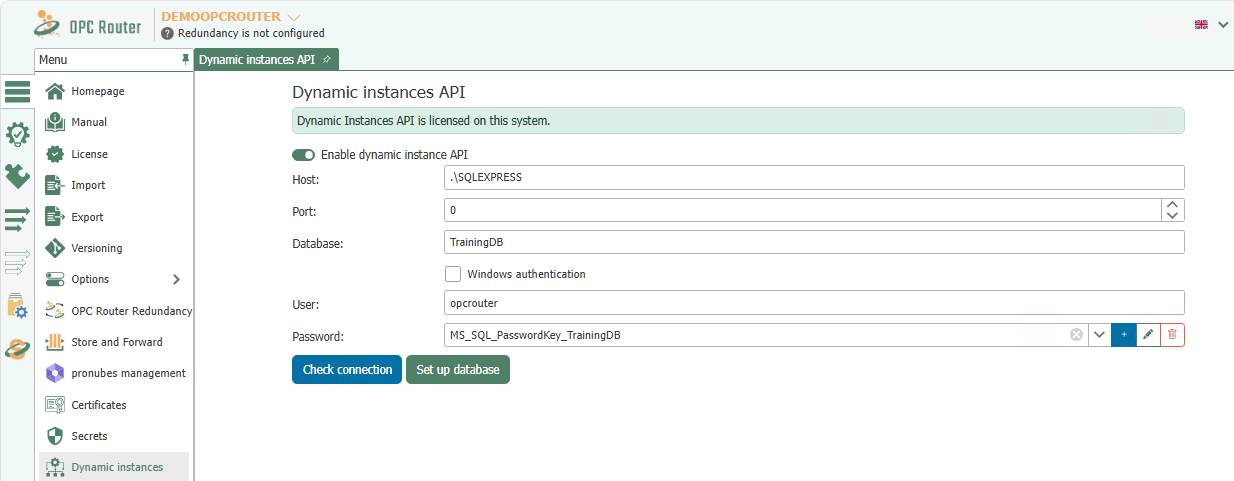
First, enable the Dynamic Instances API, and then enter the connection details for the database you want to use for dynamic instances.
Settings
| Property | Description |
|---|---|
| Enable the Dynamic Instances API | Enables the dynamic instances feature in OPC Router. |
| Host | Specify the DNS name or IP address of the database host. |
| Port | Specify the port of the database server. |
| Database | Specify the name of the database in which the tables for dynamic instances are to be created. |
| Windows Authentication | Enable this option if you want to log in using the Windows context of the OPC Router Service. |
| User | Specify the database user if you are not using Windows authentication. |
| Password | Enter the database user's password. The field references a secret via the placeholder “Select a Secret…”; it does not accept plaintext. |
First, verify the connection using Check connection. When you click Set up database, the OPC Router automatically sets up the required basic structure for dynamic instances in the selected database.
Further Information
For further steps on using a template with dynamic instances, see the Create Dynamic Instances page.