MQTT Trigger
Responds to changes in the specified topics. Returns the payload. In the properties dialog, you can configure the connection parameters for your MQTT query:
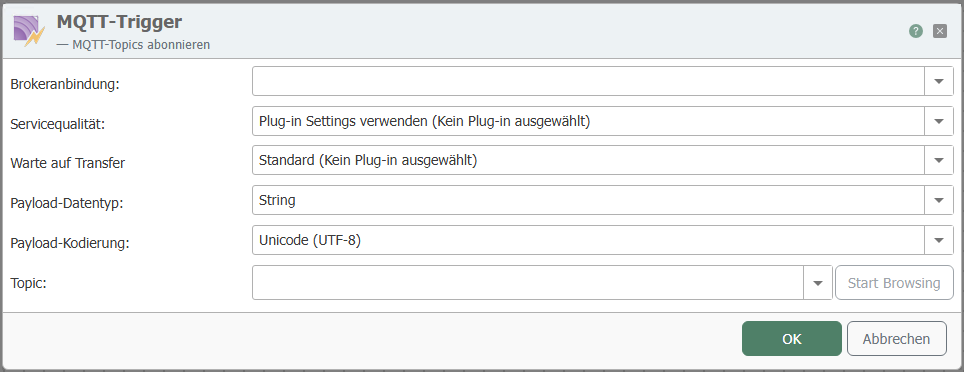
If topics are connected multiple times via triggers in different connections, this may result in duplicate triggers for the individual connections.
This also applies to the use of wildcards.
The individual properties are:
| Property | Description |
|---|---|
| Broker Connection | Select a configured broker connection from the drop-down menu. |
| Service Quality | Select how frequently the query should be executed. |
| Wait for Transfer | Select whether and how to wait for the transfer. |
| Payload Data Type | Select the data type: Byte Array or String. |
| Payload Encoding | Select the encoding for the MQTT query. |
| Topic | Enter the topic. |
Shared Subscriptions (MQTT v5)
Shared Subscriptions are a feature of MQTT Version 5 and require support from both the broker and the client.
With Shared Subscriptions, multiple clients can join a shared consumer group and distribute incoming messages evenly among themselves. This enables horizontal scaling on the receiver side.
Topic Format
$shared/[groupName]/[topic]
Example:
$shared/inrayTest/SharedSubscriptionTest
Behavior
- Messages are distributed according to the round-robin principle or, depending on the broker, via “fair dispatch.” The goal is to distribute the load as evenly as possible among the clients within a group.
- Each published data record is delivered exactly once to a subscriber of the shared group (taking into account the respective QoS level).
- Clients with different
groupNamevalues receive messages independently of one another—each group operates in isolation.
Prerequisites
- Support for MQTT Version 5 by both the broker and the client.
- All participating clients must connect to the identical shared subscription topic (including the same
groupName) to be part of the same consumer group.
QoS Behavior
| Aspect | Description |
|---|---|
| QoS Support | QoS continues to be applied as usual (0, 1, or 2). |
| Impact on Distribution | The shared subscription affects only distribution, not the delivery guarantee. |
| Retry Attempts | If QoS > 0, depending on the broker implementation, delivery attempts may be repeated if a client does not acknowledge. |
Limitations and Special Features
| Aspect | Description |
|---|---|
| Message Order | The order is not guaranteed, as different clients process messages. |
| Stateful Processing | If states or order are relevant, they must be managed externally. |
| Broker Dependency | The exact behavior (e.g., distribution strategy) may vary depending on the MQTT broker. |
Example
Publisher sends to:
SharedSubscriptionTest
Subscribers use:
$shared/inrayTest/SharedSubscriptionTest
With three active clients in the inrayTest group, incoming messages are distributed, e.g.:
| Message | Delivered to |
|---|---|
| Message 1 | Client A |
| Message 2 | Client B |
| Message 3 | Client C |
| Message 4 | Client C |